> Portal Navigation:
>
> - Append `.md` to any URL under `https://dev.wix.com/docs/` to get its markdown version.
> - Pages are either content pages (article or reference text) or menu pages (a list of links to child pages).
> - To get a menu page, truncate any URL to a parent path and append `.md` (e.g. `https://dev.wix.com/docs/sdk.md`, `https://dev.wix.com/docs/sdk/core-modules.md`).
> - Top-level index of all portals: https://dev.wix.com/docs/llms.txt
> - Full concatenated docs: https://dev.wix.com/docs/llms-full.txt
## Resource: Introduction
## Article: Introduction
## Article Link: https://dev.wix.com/docs/api-reference/business-solutions/cms/external-databases/external-database-service-plugin/introduction.md
## Article Content:
# About the External Database Service Plugin
__Important:__
When developing websites or building apps with Blocks, use [Velo service plugins](https://dev.wix.com/docs/velo/events-service-plugins/about-events-service-plugins-and-the-sdk.md).
> **Note for app developers:** Wix Data APIs require the site's [code editor](https://dev.wix.com/docs/develop-websites/articles/get-started/development-environments.md) to be enabled. If you are building a Wix app, add a [data collections extension](https://dev.wix.com/docs/build-apps/develop-your-app/extensions/backend-extensions/data-collections/about-data-collections-extensions.md) to automatically enable the code editor and create data collections when your app is installed on a site.
As an external database provider, you can integrate with Wix to allow Wix sites to access and manage data stored anywhere, as if it were hosted natively on Wix.
By implementing this service plugin, you can design your app to:
- Make external business data accessible to Wix sites.
- Make an external database available to Wix users to store their business data.
The integration is done via an app in the Wix App Market and by implementing the External Database [service plugin](https://dev.wix.com/docs/build-apps/develop-your-app/extensions/backend-extensions/service-plugins/about-service-plugin-extensions.md). After the app is installed on a site, Wix triggers a call to your service whenever the site needs to access and interact with the external database.
## Managing data with Wix
Wix offers a variety of data management solutions to accommodate common user needs at different scales. This includes support for internal databases hosted directly on Wix, as well as [external databases](https://dev.wix.com/docs/api-reference/business-solutions/cms/external-databases/external-database-connection/introduction.md) hosted outside the Wix ecosystem.
You can store and manage data directly on Wix using the [Wix Data API](https://dev.wix.com/docs/rest/business-solutions/cms/introduction.md). Wix also supports managing data hosted on external databases. The [External Database Connections API](https://dev.wix.com/docs/api-reference/business-solutions/cms/external-databases/external-database-connection/introduction.md) allows Wix Data to communicate with an external database as if it were hosted directly on Wix. Wix offers several out-of-the-box [external database integrations](https://dev.wix.com/docs/develop-websites/articles/databases/external-databases/overview/integrating-external-databases-with-your-wix-site.md#supported-databases) for common platforms such as Google Cloud Platform (GCP), Amazon Web Services (AWS), or Microsoft Azure. These integrations translate Wix Data requests into the external database's protocol, and translate the response back into a format that Wix APIs can read.
To allow Wix Data to communicate with any other data source, implement the External Database service plugin.
## Use Cases
Your service can accommodate many scenarios that require Wix Data to communicate with external databases. These might include:
- A business that wants to make its data available for Wix users.
- A Wix user whose data is stored in an external database and wants to [query and display that data on their site](https://dev.wix.com/docs/api-reference/business-solutions/cms/external-databases/external-database-service-plugin/sample-flows.md).
- A Wix app developer who wants to implement ready-for-use external database integrations for specific database services.
- A growing business that wants to store its Wix collections on an external cloud service to scale as needed.
## Before you begin:
It's important to note the following before starting to code:
- This service plugin isn't yet supported by the [CLI](https://dev.wix.com/docs/build-apps/develop-your-app/frameworks/wix-cli/about-the-wix-cli-for-apps.md) framework.
::::tabs
:::REST_TAB
## Get started
The External Database service plugin defines methods you can implement to integrate an external database with Wix. Wix Data calls these methods to access and manage the items and collections in the external database. The method descriptions specify the type of request Wix Data sends to each method, and what type of response each method is expected to return.
When the methods are implemented, you can either:
- [Create and configure a Wix app](#create-a-wix-app) to make your service available for integration with one or more sites.
- Use the [External Database Connections API](https://dev.wix.com/docs/api-reference/business-solutions/cms/external-databases/external-database-connection/introduction.md) with `connectionType` set to `WIX_SERVICE_PLUGIN` to integrate your service with a single site.
### Provide basic functionality
While you aren't required to implement all the methods in this service plugin, make sure to implement at least the following methods to provide basic functionality:
- [Get Capabilities](https://dev.wix.com/docs/api-reference/business-solutions/cms/external-databases/external-database-service-plugin/get-capabilities.md): This method lets Wix Data determine which capabilities are supported by the external database.
- [List Collections](https://dev.wix.com/docs/api-reference/business-solutions/cms/external-databases/external-database-service-plugin/list-collections.md): This method enables Wix Data to view the collections stored in the external database.
- [Query Data Items](https://dev.wix.com/docs/api-reference/business-solutions/cms/external-databases/external-database-service-plugin/query-data-items.md): This method enables Wix Data to query items in an external collection.
### Create a Wix app
> **Note**: Instead of creating an app, you can connect your service directly to a single site using the [External Database Connections API](https://dev.wix.com/docs/api-reference/business-solutions/cms/external-databases/external-database-connection/introduction.md).
To make your service available for integration with multiple sites, create and configure a [Wix app](https://dev.wix.com/docs/build-apps/get-started/overview/about-wix-apps.md):
1. Create an app in your [Wix Studio workspace](https://dev.wix.com/apps).
2. Go to [**Extensions**](https://dev.wix.com/docs/build-apps/develop-your-app/extensions/about-extensions.md) in your app's dashboard.
3. Click **Create Extension**.
4. Find and select **External Database Provider** and click **Create**.
5. If it has not been set before, set up an app namespace. This is a unique identifier for your app that, once set, can't be changed. It is added as a prefix to the user's external collection names.
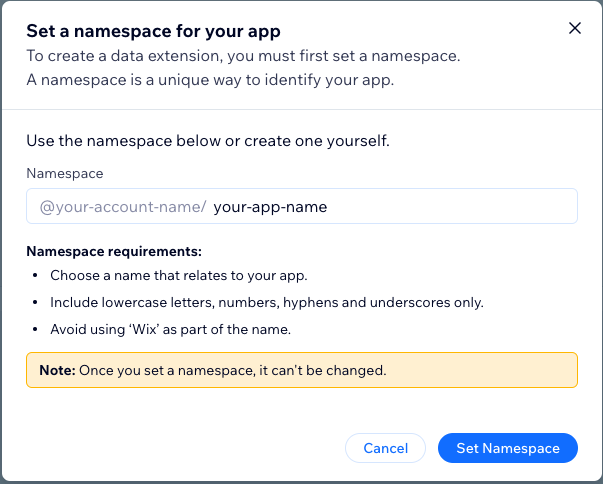
6. Use the built-in JSON editor to provide your extension’s configuration details. Make sure to include all the required fields as they appear in the table below. Once you're done, click **Save**.
| Name | Type | Description |
| ------------------- | ------ | ------------------------------------------------------------------------------------------------------------------------------ |
| `namespace` | String | **Required**. A prefix for all the collections your application retrieves. It must be identical to your app namespace. |
| `uriConfig` | Object | The URI configuration object. |
| `uriConfig.baseUri` | String | **Required**. Base URI where your service is deployed. Wix Data uses this URI to call your service's methods. |
| `componentName` | String | A unique name for this component. This is an internal name that appears in the [app dashboard](https://dev.wix.com/apps) only. |
For example:
```json
{
"namespace": "@your-account-name/your-app-name",
"uriConfig": {
"baseUri": "https://my-external-db-collections-service.com"
},
"componentName": "myExternalCollections"
}
```
:::
:::SDK_TAB
## Get started
Follow these steps to begin implementing your service plugin.
### Implementation approach
You can implement this service plugin using a self-hosted deployment. Learn how to [implement a self-hosted service plugin with the SDK and the Wix Dev Center](https://dev.wix.com/docs/build-apps/develop-your-app/frameworks/self-hosting/supported-extensions/backend-extensions/add-self-hosted-service-plugin-extensions-with-the-sdk.md).
### Configure your service plugin
To configure and customize your plugin, you need to provide important information in the service plugin configuration file. You can [configure your plugin in your app's dashboard](https://dev.wix.com/docs/build-apps/develop-your-app/frameworks/self-hosting/supported-extensions/backend-extensions/add-self-hosted-service-plugin-extensions-with-the-sdk.md#step-1--add-a-service-plugin-extension-to-your-app). For details, see [External Database Extension Configuration](https://dev.wix.com/docs/api-reference/business-solutions/cms/external-databases/external-database-service-plugin/extension-config.md).
### Define handler functions
Use [`externalDatabase.provideHandlers()`](https://dev.wix.com/docs/build-apps/develop-your-app/frameworks/self-hosting/supported-extensions/backend-extensions/add-self-hosted-service-plugin-extensions-with-the-sdk.md#step-4--define-handler-functions) to define the following handler functions that implement your custom business logic. Make sure you define all required functions.
| Function | Required |
|-----------------------------|----------------|
| [`aggregateDataItems()`](https://dev.wix.com/docs/api-reference/business-solutions/cms/external-databases/external-database-service-plugin/aggregate-data-items.md) | No |
| [`countDataItems()`](https://dev.wix.com/docs/api-reference/business-solutions/cms/external-databases/external-database-service-plugin/count-data-items.md) | No |
| [`createCollection()`](https://dev.wix.com/docs/api-reference/business-solutions/cms/external-databases/external-database-service-plugin/create-collection.md) | No |
| [`deleteCollection()`](https://dev.wix.com/docs/api-reference/business-solutions/cms/external-databases/external-database-service-plugin/delete-collection.md) | No |
| [`getCapabilities()`](https://dev.wix.com/docs/api-reference/business-solutions/cms/external-databases/external-database-service-plugin/get-capabilities.md) | Yes |
| [`insertDataItemReferences()`](https://dev.wix.com/docs/api-reference/business-solutions/cms/external-databases/external-database-service-plugin/insert-data-item-references.md) | No |
| [`insertDataItems()`](https://dev.wix.com/docs/api-reference/business-solutions/cms/external-databases/external-database-service-plugin/insert-data-items.md) | No |
| [`listCollections()`](https://dev.wix.com/docs/api-reference/business-solutions/cms/external-databases/external-database-service-plugin/list-collections.md) | Yes |
| [`queryDataItems()`](https://dev.wix.com/docs/api-reference/business-solutions/cms/external-databases/external-database-service-plugin/query-data-items.md) | Yes |
| [`queryDistinctValues()`](https://dev.wix.com/docs/api-reference/business-solutions/cms/external-databases/external-database-service-plugin/query-distinct-values.md) | No |
| [`queryReferencedDataItems()`](https://dev.wix.com/docs/api-reference/business-solutions/cms/external-databases/external-database-service-plugin/query-referenced-data-items.md) | No |
| [`removeDataItemReferences()`](https://dev.wix.com/docs/api-reference/business-solutions/cms/external-databases/external-database-service-plugin/remove-data-item-references.md) | No |
| [`removeDataItems()`](https://dev.wix.com/docs/api-reference/business-solutions/cms/external-databases/external-database-service-plugin/remove-data-items.md) | No |
| [`truncateDataItems()`](https://dev.wix.com/docs/api-reference/business-solutions/cms/external-databases/external-database-service-plugin/truncate-data-items.md) | No |
| [`updateCollection()`](https://dev.wix.com/docs/api-reference/business-solutions/cms/external-databases/external-database-service-plugin/update-collection.md) | No |
| [`updateDataItems()`](https://dev.wix.com/docs/api-reference/business-solutions/cms/external-databases/external-database-service-plugin/update-data-items.md) | No |
## Code examples
Below is an example for implementing the External Database service plugin in your code.
### Self-hosted: Basic code structure
This is the basic code structure for implementing a self-hosted External Database service plugin:
```js
import { createClient } from '@wix/sdk';
import { externalDatabase } from '@wix/data/service-plugins'
const wixClient = createClient({
auth: {
appId: ,
publicKey:
},
modules: { externalDatabase }
});
wixClient.externalDatabase.provideHandlers({
getCapabilities: async (payload) => {
const { request, metadata } = payload;
// Add your logic here
},
listCollections: async (payload) => {
const { request, metadata } = payload;
// Add your logic here
},
queryDataItems: async (payload) => {
const { request, metadata } = payload;
// Add your logic here
}
});
// Implement a router to process all requests
express.post('/plugins-and-webhooks/*', (req, res) => {
wixClient.process(req);
});
```
:::
::::
## Terminology
+ **Collection:** A schema that determines the structure of data items to be stored. The schema defines the fields each item contains and the data type of each field.
+ **Item:** A single data entry in a collection.
+ **External Database:** A database hosted by an external service outside of Wix.
+ **External Database Service Provider:** A 3rd-party service that implements an interface to allow Wix Data to interact with an external database.
## See also
+ [About Service Plugin Extensions](https://dev.wix.com/docs/build-apps/develop-your-app/extensions/backend-extensions/service-plugins/about-service-plugin-extensions.md)
+ [Add a Self-hosted Service Plugin With the SDK](https://dev.wix.com/docs/build-apps/develop-your-app/frameworks/self-hosting/supported-extensions/backend-extensions/add-self-hosted-service-plugin-extensions-with-the-sdk.md)
+ [Add Self-hosted Service Plugin Extensions with REST](https://dev.wix.com/docs/build-apps/develop-your-app/frameworks/self-hosting/supported-extensions/backend-extensions/add-self-hosted-service-plugin-extensions-with-rest.md)