> Portal Navigation:
>
> - Append `.md` to any URL under `https://dev.wix.com/docs/` to get its markdown version.
> - Pages are either content pages (article or reference text) or menu pages (a list of links to child pages).
> - To get a menu page, truncate any URL to a parent path and append `.md` (e.g. `https://dev.wix.com/docs/sdk.md`, `https://dev.wix.com/docs/sdk/core-modules.md`).
> - Top-level index of all portals: https://dev.wix.com/docs/llms.txt
> - Full concatenated docs: https://dev.wix.com/docs/llms-full.txt
## Resource: About the Code Tab
## Article: About the Code Tab
## Article Link: https://dev.wix.com/docs/build-apps/develop-your-app/app-workspace/about-the-code-tab.md
## Article Content:
# About the Code Tab
__Alpha:__
The [AI app builder](https://dev.wix.com/docs/build-apps/develop-your-app/build-with-ai/about-the-ai-app-builder.md) is currently in alpha. This feature is subject to change and may have bugs, issues, and limitations. We're actively improving it based on your feedback.
The **Code** tab is a VS Code Web-based development environment in the [app workspace](https://dev.wix.com/docs/build-apps/develop-your-app/app-workspace/about-the-app-workspace.md) where you can edit your app's code directly in the browser.
> **Note:** The Code tab isn't supported in Safari.
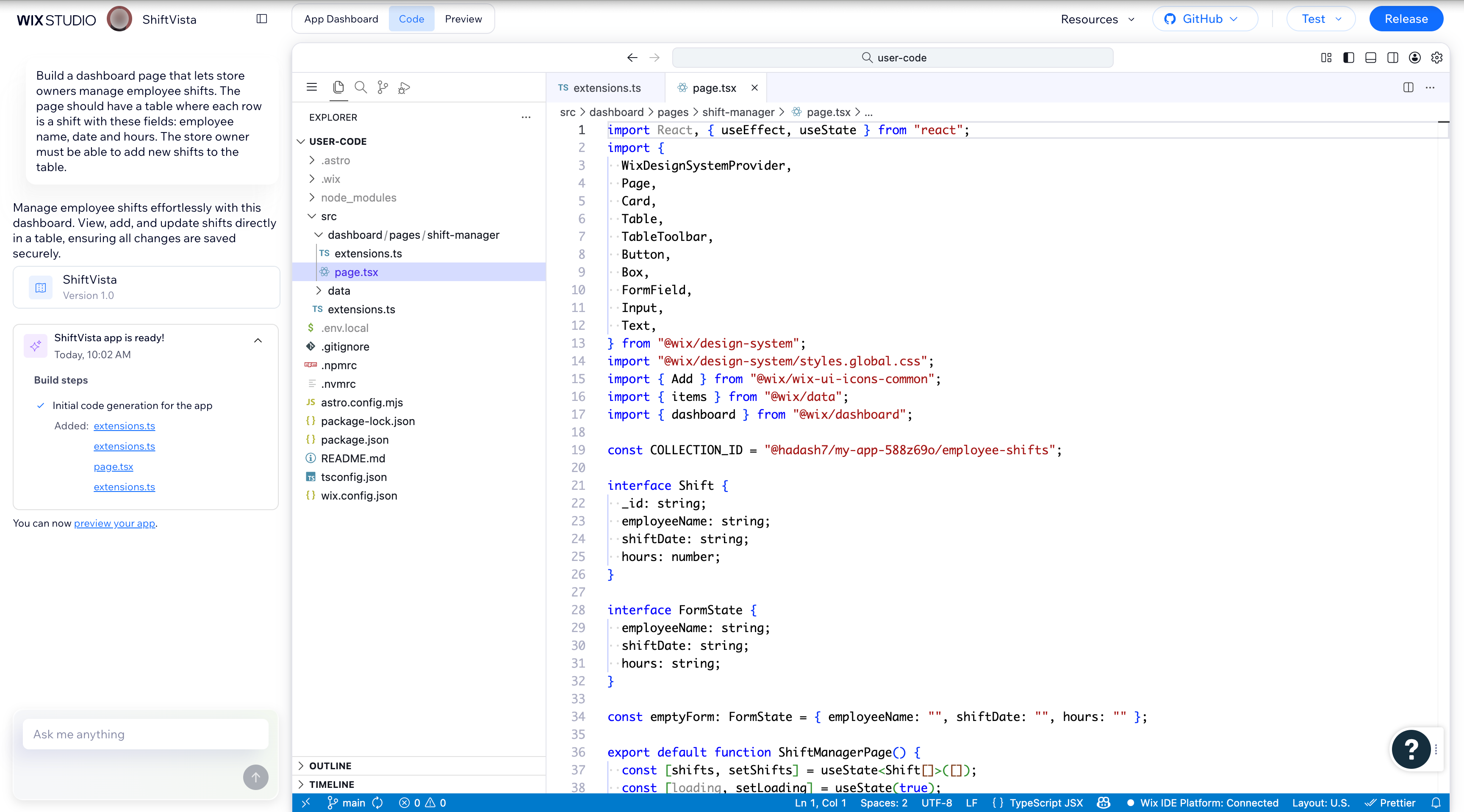
## File structure
The Code tab shows Wix-hosted extensions built and managed with the [Wix CLI](https://dev.wix.com/docs/wix-cli.md). These projects use [Astro](https://docs.astro.build/en/getting-started/), a web development framework optimized for performance, with React for UI components.
The **src** folder holds your app's [extensions](https://dev.wix.com/docs/build-apps/develop-your-app/extensions/about-extensions.md) built with the Wix CLI. Each extension type has its own subfolder, such as **dashboard** or **site**. To manage all of your app's extensions, go to the **Extensions** page in the [App Dashboard](https://dev.wix.com/docs/build-apps/develop-your-app/app-workspace/about-the-app-workspace.md).
__Caution:__
Only edit files that are in the **src** folder. Editing other files may cause unexpected behavior or damage to your project.
## IDE features
The Code tab includes standard VS Code Web features like syntax highlighting, code navigation, and multi-file editing.
Changes are saved automatically every few seconds.
## AI chat
The AI chat sits on the left side of the Code tab. You can request code changes, ask questions, and get explanations. The AI agent reads your project files and makes edits directly in the editor.
To generate dashboard pages, the AI agent uses [Auto Patterns](https://dev.wix.com/docs/api-preview/building-apps-with-ai/auto-patterns/about-auto-patterns.md), a configuration-driven library that lets you build pages using JSON instead of writing React components manually.
## Wix Logs
**Wix Logs** is a panel in the bottom area of the Code tab, alongside **Problems**, **Output**, **Debug Console**, and **Terminal**. It centralizes [Wix CLI](https://dev.wix.com/docs/wix-cli.md) process logs into a single, timestamp-sorted stream so you can monitor and debug what the Wix CLI is doing during development.

### Filters and toolbar
Use the toolbar controls to focus on the logs you need:
- **Short**: Toggles the timestamp format between short (`HH:MM:SS.mmm`) and full ISO.
- **Producers**: Filters logs by the part of the CLI that generated them.
- **Levels**: Filters logs by severity, which includes`error`, `warn`, `info`, or `debug`.
- **Search**: Searches logs.
- **Pause** (‖): Pauses the log stream.
- **Clear** (≡): Clears the current log output.
- **Refresh** (↺): Reloads the log stream.
## GitHub integration
You can connect your app project to a GitHub repository directly from the Code tab. This gives you version control, collaboration, and the flexibility to work in any external IDE. Learn more about [GitHub integration](building-apps-with-ai/git-hub-integration/about-git-hub-integration).
## See also
- [About the App Workspace](https://dev.wix.com/docs/build-apps/develop-your-app/app-workspace/about-the-app-workspace.md)
- [About Building Apps with AI](building-apps-with-ai/about-building-apps-with-ai)
- [About Extensions](https://dev.wix.com/docs/build-apps/develop-your-app/extensions/about-extensions.md)
- [About Auto Patterns](https://dev.wix.com/docs/api-preview/building-apps-with-ai/auto-patterns/about-auto-patterns.md)
- [Why Astro?](https://dev.wix.com/docs/wix-cli/guides/about-the-wix-cli.md#why-astro)