> Portal Navigation:
>
> - Append `.md` to any URL under `https://dev.wix.com/docs/` to get its markdown version.
> - Pages are either content pages (article or reference text) or menu pages (a list of links to child pages).
> - To get a menu page, truncate any URL to a parent path and append `.md` (e.g. `https://dev.wix.com/docs/sdk.md`, `https://dev.wix.com/docs/sdk/core-modules.md`).
> - Top-level index of all portals: https://dev.wix.com/docs/llms.txt
> - Full concatenated docs: https://dev.wix.com/docs/llms-full.txt
## Resource: Wix Restaurants: Table Reservations: Table Reservations Page
## Article: Wix Table Reservations: Table Reservations Page
## Article Link: https://dev.wix.com/docs/build-apps/develop-your-app/extensions/dashboard-extensions/dashboard-plugins/supported-wix-app-dashboard-pages/wix-restaurants/wix-restaurants-table-reservations-table-reservations-page.md
## Article Content:
# Wix Restaurants: Table Reservations Page
The Table Reservations page has 3 plugin slots: 1 dashboard, and 2 dashboard menu. [Slots](https://dev.wix.com/docs/build-apps/develop-your-app/extensions/dashboard-extensions/dashboard-plugins/supported-wix-app-dashboard-pages/about-dashboard-page-slots.md) are the placeholders in the UI for plugins. The slot ID is the value for the required `extends` field when configuring the plugin in the [app dashboard](https://manage.wix.com/account/custom-apps).
## Location in dashboard
Table Reservations
## Dashboard plugin slot
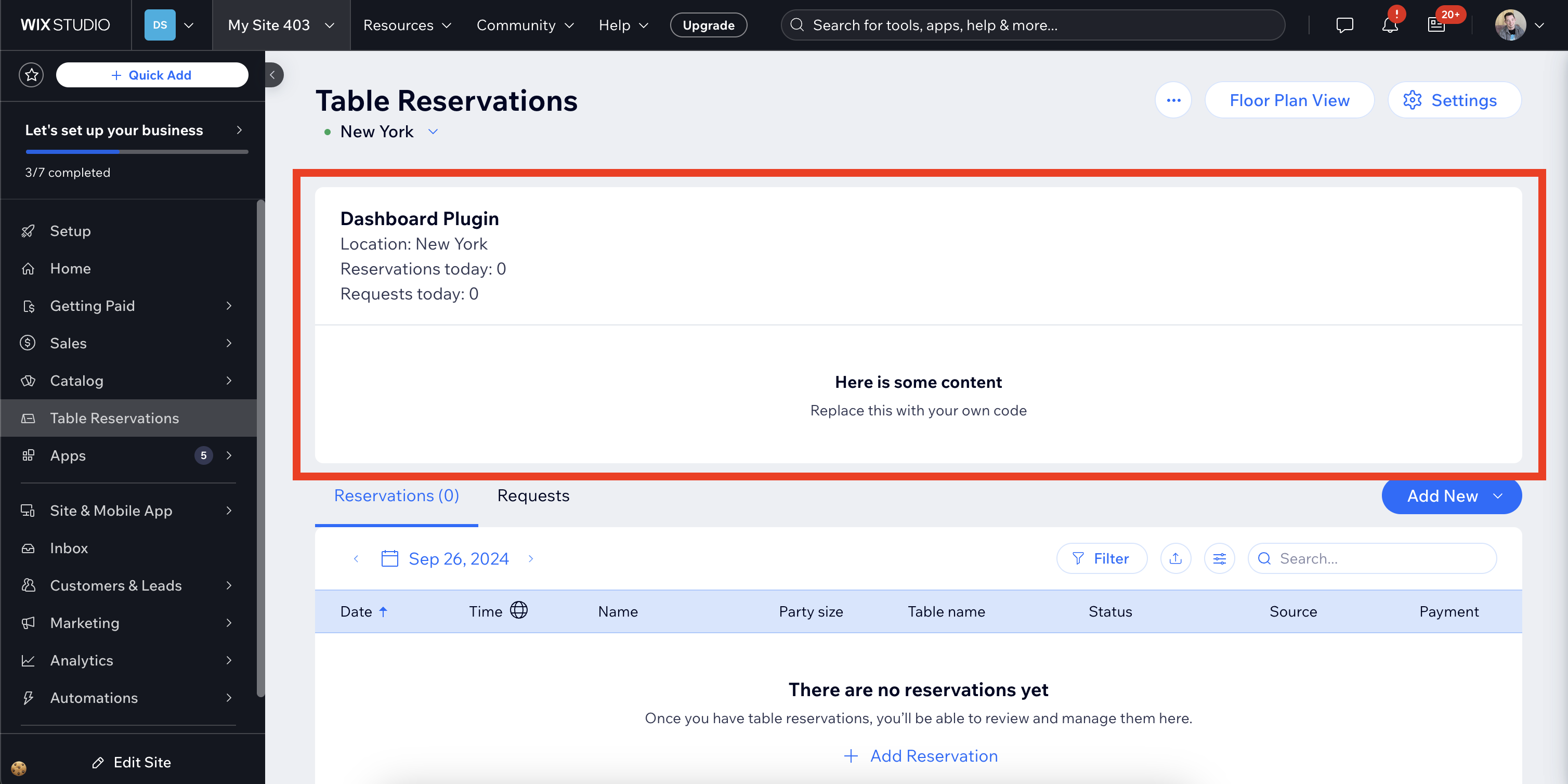
The Table Reservations page features 1 dashboard plugin slot.
### Slot 1: Table Reservations page
The Table Reservations page dashboard plugin slot is positioned on the top of the page.
#### Sample use case
Add a plugin that allows the site owner to display some statistics for the currently selected reservation location.
#### Configuration
Use the following slot ID for the `extends` property in your dashboard plugin's configuration in your app's dashboard:
**slot ID**: `7f71aacd-0cbf-4b73-9ea5-482e073ea237`
For example:
```json
{
"hostingPlatform": "BUSINESS_MANAGER",
"extends": "7f71aacd-0cbf-4b73-9ea5-482e073ea237",
"description": "Dashboard Plugin on the Table Reservations page.",
"title": "Table Reservations Page Dashboard Plugin",
"height": 400,
"iframeUrl": "https://www.example.com",
"componentName": "Table Reservations Page Widget Plugin"
}
```
**Important:**
The hosting platform must be "BUSINESS_MANAGER".
#### Interaction between the dashboard page and your plugin
Apps built by Wix pass parameters via dashboard slots for you to utilize in your plugin's functionality. Learn how to [interact with and retrieve parameters from the dashboard page](https://dev.wix.com/docs/build-apps/develop-your-app/extensions/dashboard-extensions/dashboard-plugins/about-dashboard-plugin-extensions.md).
This slot passes the following parameters:
| Name | Type | Description |
| ----------------- | ------------------- | -------------------------------------------------------------------------------------------------------------------------------------------------------------------- |
| `currentReservationLocation` | Object | Object containing information about the reservation location whose reservations are currently being displayed. |
| `reservations` | Array | Array of objects containing information about each reservation on the currently selected date. These are also displayed in the table below the widget. |
| `requests` | Array | Array of objects containing information about the requested reservations on the currently selected date. These are also displayed in the table below the widget. |
#### Multiple plugins in the same slot
This plugin slot can host multiple plugins.
The plugins are displayed horizontally and ordered by date created, with the most recently created plugin displayed at the right.
## Dashboard menu plugin slots
The Table Reservations page features 2 dashboard menu plugin slots.
### Slot 2: Table Reservations page's more actions menu
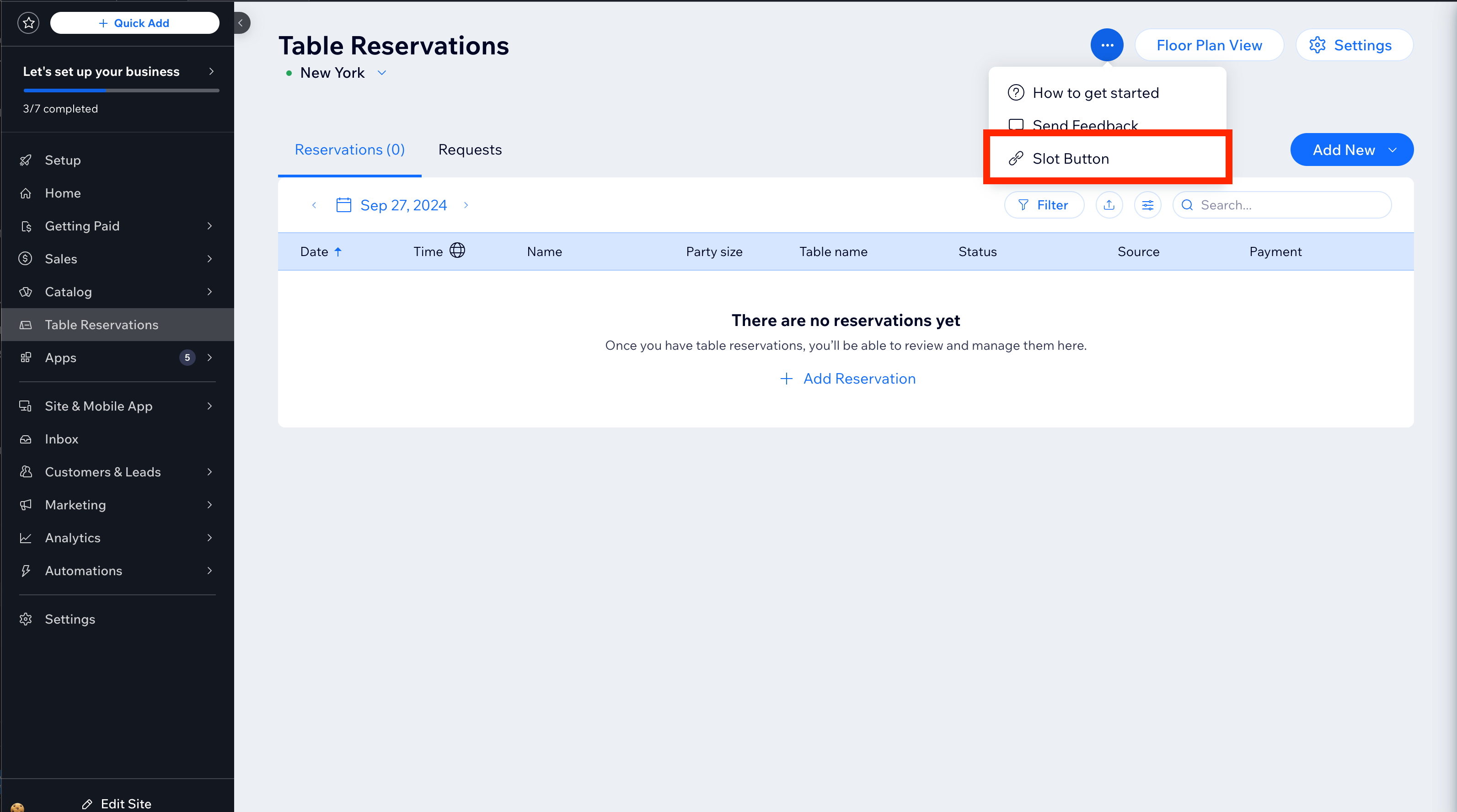
This dashboard menu plugin slot is located in the more actions menu at the top right of the page.
**Sample use case**
Add a menu item that opens a modal with additional information about the selected reservation location.
#### Configuration
Use the following slot ID for the `extends` property in your dashboard menu plugin's configuration in your app's dashboard:
**slot ID**: `61646cc4-8deb-4e4b-bd30-938d3a29eeee`
For example:
```json
{
"hostingPlatform": "BUSINESS_MANAGER",
"extends": "61646cc4-8deb-4e4b-bd30-938d3a29eeee",
"description": "More Actions Dashboard Menu Plugin on the Table Reservations Page.",
"title": "Table Reservations Page More Actions Menu Plugin",
"action": {
"openModal": {
"componentId": "36bceb0e-5ac3-4b12-a40d-df0bf5e8dc89",
"componentParams": {}
}
},
"componentName": "My Table Reservations Page More Actions Dashboard Menu Plugin"
}
```
**Important:**
The hosting platform must be "BUSINESS_MANAGER".
#### Interaction between the dashboard page and your plugin
Apps built by Wix pass parameters via dashboard slots for you to utilize in your plugin's functionality. Learn how to [interact with and retrieve parameters from the dashboard page](https://dev.wix.com/docs/build-apps/develop-your-app/extensions/dashboard-extensions/dashboard-plugins/about-dashboard-plugin-extensions.md).
This slot passes the following parameters:
| Name | Type | Description |
| ------------- | ------------------- | ---------------------------------------------------------------------------------------------- |
| `reservationLocationId` | String | ID of the currently selected reservation location. |
#### Multiple plugins in the same slot
This plugin slot can host multiple plugins.
The plugins are displayed vertically and ordered by date created, with the most recently created plugin displayed at the bottom.
### Slot 3: Reservation items' more actions menu
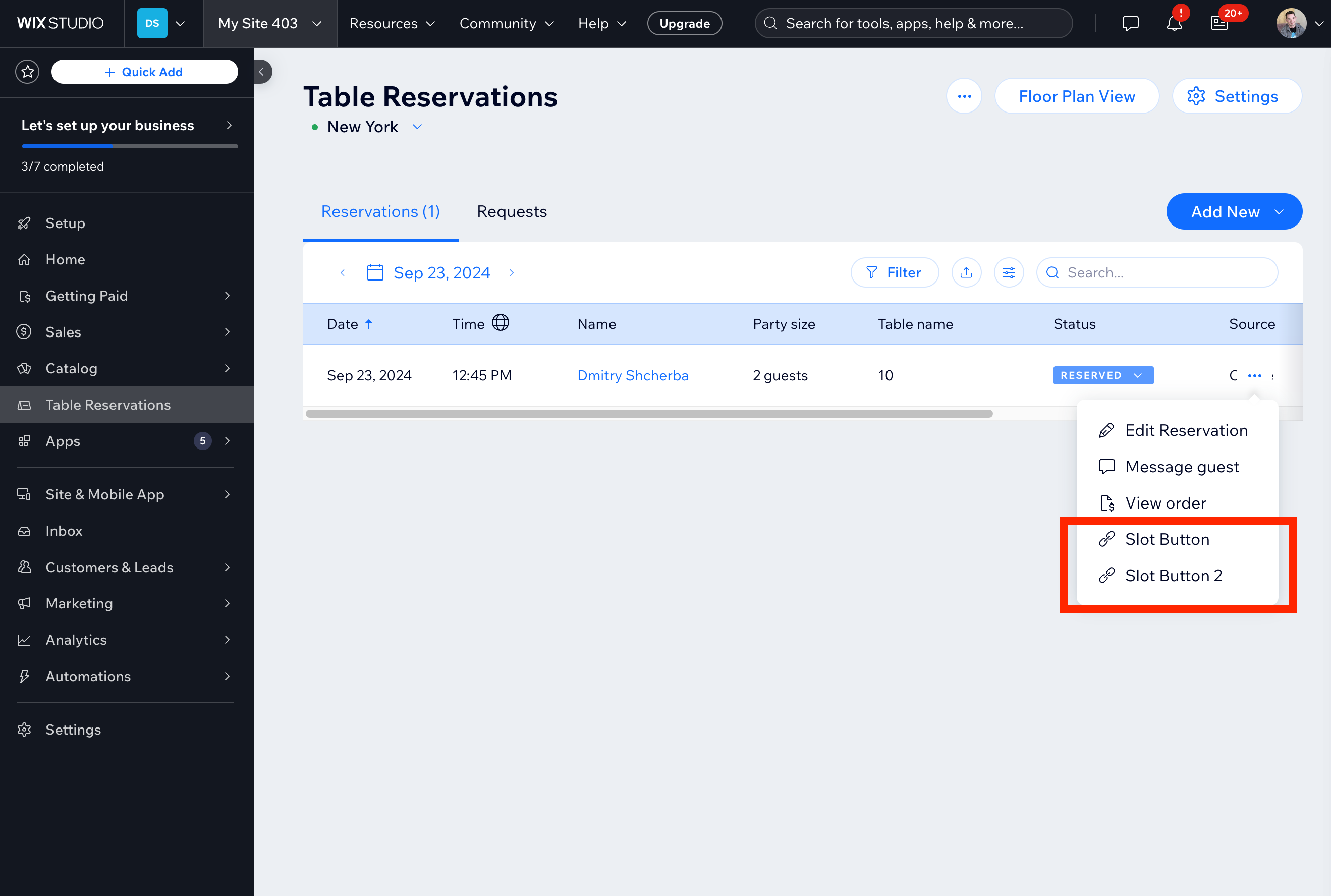
This dashboard menu plugin slot is located in the more actions menu of each reservation in the **Reservations** and **Requests** tables.
**Sample use case**
Add an item to the more actions menu of each reservation that links to a dashboard page with additional information about that reservation.
#### Configuration
Use the following slot ID for the `extends` property in your dashboard menu plugin's configuration in your app's dashboard:
**slot ID**: `f51f609d-950f-448a-a5e7-f01d31a7978d`
For example:
```json
{
"hostingPlatform": "BUSINESS_MANAGER",
"extends": "f51f609d-950f-448a-a5e7-f01d31a7978d",
"description": "Reservation Item More Actions dashboard menu plugin.",
"title": "Reservation Item More Actions Dashboard Plugin",
"iconKey": "Payment",
"action": {
"openModal": {
"componentId": "36bceb0e-5ac3-4b12-a40d-df0bf5e8dc89",
"componentParams": {}
}
},
"componentName": "More Actions Plugin"
}
```
**Important:**
- The hosting platform must be "BUSINESS_MANAGER".
- Each slot must include an [icon](https://www.wix-pages.com/wix-design-system-employees/?path=/story/foundations-icons--icons) to comply with Wix's style requirements. Provide the icon's name as the value for `"iconKey"`.
#### Interaction between the dashboard page and your plugin
Apps built by Wix pass parameters via dashboard slots for you to utilize in your plugin's functionality. Learn how to [interact with and retrieve parameters from the dashboard page](https://dev.wix.com/docs/build-apps/develop-your-app/extensions/dashboard-extensions/dashboard-plugins/about-dashboard-plugin-extensions.md).
This slot passes the following parameters:
| Name | Type | Description |
| ------------- | ------------------- | ---------------------------------------------------------------------------------------------- |
| `selectedId` | String | ID of the reservation for which the more actions menu was opened. |
#### Multiple plugins in the same slot
This plugin slot can host multiple plugins.
The plugins are displayed vertically and ordered by date created, with the most recently created plugin displayed at the bottom.
## Wix APIs
You can implement logic in your plugin using the Wix Table Reservations API:
- [SDK](https://dev.wix.com/docs/sdk/backend-modules/table-reservations/introduction.md)
- [REST](https://dev.wix.com/docs/rest/business-solutions/restaurants/wix-restaurants-new/reservations/introduction.md)
## Slot IDs
| Slot | ID | Parameters |
| ------------------------- | -------------------------------------- | ------------------------------------------------------------------------------------------------ |
| Table reservations page | `7f71aacd-0cbf-4b73-9ea5-482e073ea237` | `currentReservationLocation`, `reservations`, `requests` |
| Table reservations page More Actions menu | `61646cc4-8deb-4e4b-bd30-938d3a29eeee` | `reservationLocationId` |
| Reservation item More Actions menu | `f51f609d-950f-448a-a5e7-f01d31a7978d` | `selectedId` |
## See also
- [About Dashboard Page Slots](https://dev.wix.com/docs/build-apps/develop-your-app/extensions/dashboard-extensions/dashboard-plugins/supported-wix-app-dashboard-pages/about-dashboard-page-slots.md)
- [About Dashboard Plugin Extensions](https://dev.wix.com/docs/build-apps/develop-your-app/extensions/dashboard-extensions/dashboard-plugins/about-dashboard-plugin-extensions.md)
- [Add Self-hosted Dashboard Plugin Extensions](https://dev.wix.com/docs/build-apps/develop-your-app/frameworks/self-hosting/supported-extensions/about-self-hosted-app-extensions.md)
- [About Dashboard Menu Plugin Extensions](https://dev.wix.com/docs/build-apps/develop-your-app/extensions/dashboard-extensions/dashboard-plugins/dashboard-menu-plugins/dashboard-menu-plugin-extensions.md)- [Add Dashboard Menu Plugin Extensions](https://dev.wix.com/docs/build-apps/develop-your-app/extensions/dashboard-extensions/dashboard-plugins/dashboard-menu-plugins/add-dashboard-menu-plugin-extensions.md)