> Portal Navigation: > > - Append `.md` to any URL under `https://dev.wix.com/docs/` to get its markdown version. > - Pages are either content pages (article or reference text) or menu pages (a list of links to child pages). > - To get a menu page, truncate any URL to a parent path and append `.md` (e.g. `https://dev.wix.com/docs/sdk.md`, `https://dev.wix.com/docs/sdk/core-modules.md`). > - Top-level index of all portals: https://dev.wix.com/docs/llms.txt > - Full concatenated docs: https://dev.wix.com/docs/llms-full.txt ## Resource: Wix eCommerce: Checkout Page ## Article: Wix eCommerce: Checkout Page ## Article Link: https://dev.wix.com/docs/build-apps/develop-your-app/extensions/site-extensions/site-plugins/supported-wix-app-pages/wix-e-commerce/wix-e-commerce-checkout-page.md ## Article Content: # Wix eCommerce (Checkout & Orders): Checkout Page The following slots and APIs are available when building a [site plugin](https://dev.wix.com/docs/build-apps/develop-your-app/extensions/site-extensions/site-plugins/about-site-plugin-extensions.md) for the Checkout Page.
Important: Some plugins may not support automatic addition upon installation, even with `autoAddToSite` enabled. In that case, you must: - [Create a dashboard page to manage your site plugin](https://dev.wix.com/docs/build-apps/develop-your-app/extensions/site-extensions/site-plugins/build-a-dashboard-page-to-manage-your-site-plugin.md) that calls [`addSitePlugin()`](https://dev.wix.com/docs/sdk/host-modules/dashboard/add-site-plugin.md) to let users add the plugin to the checkout slot. - Release at least 1 version of your app so the site plugin extension is registered with Wix for `addSitePlugin()` to work properly.
## Slots The following image shows slots in the checkout page, into which users can add plugins. ![checkout-slots](https://wixmp-833713b177cebf373f611808.wixmp.com/images/c886759054f07416b475304c52fbc31d.png) The slots are represented by the following `placement` object: ```json [ { "appDefinitionId": "", "widgetId": "", "slotId": "" } ] ``` Provide the following values for each property: | Key | Value | | ------------------ | ------- | | `appDefinitionId` | "1380b703-ce81-ff05-f115-39571d94dfcd" | | `widgetId` | "14fd5970-8072-c276-1246-058b79e70c1a" | | `slotId` | ID of the slot you want [as displayed in the image above](#slots).
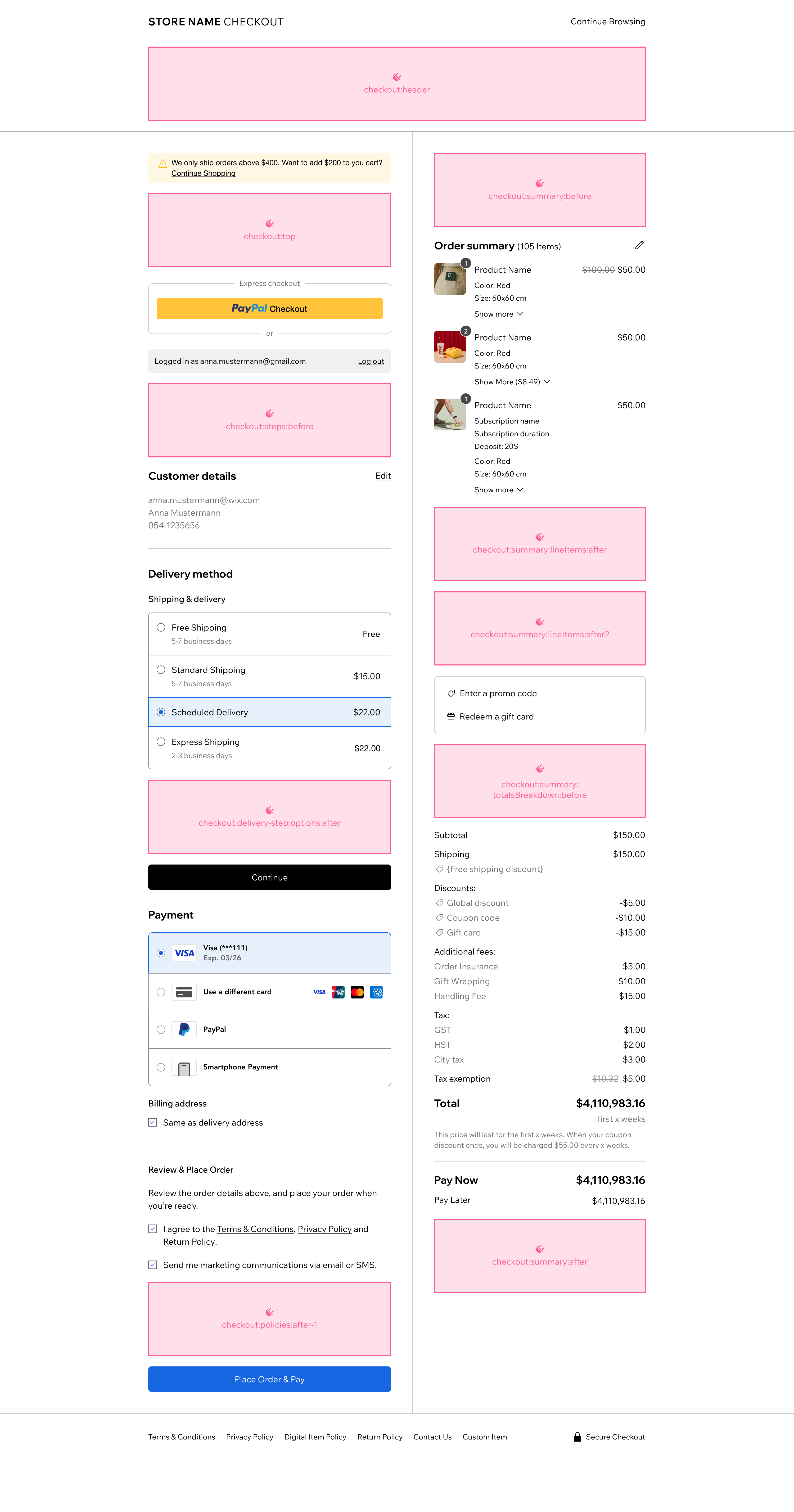
Supported values:
  • `"checkout:header"`
  • `"checkout:top"`
  • `"checkout:steps:before"`
  • `"checkout:delivery-step:options:after"`
  • `"checkout:policies:after-1"`
  • `"checkout:summary:before"`
  • `"checkout:summary:lineItems:after"`
  • `"checkout:summary:lineItems:after2"`
  • `"checkout:summary:totalsBreakdown:before"`
  • `"checkout:summary:after"`
| For example, for your widget to appear before the totals breakdown in a checkout page use the following object in your configuration: ```json { "appDefinitionId": "1380b703-ce81-ff05-f115-39571d94dfcd", "widgetId": "14fd5970-8072-c276-1246-058b79e70c1a", "slotId": "checkout:summary:totalsBreakdown:before" } ``` ## Checkout plugin API Use the Checkout plugin API to integrate with the plugin's host. The API provides data about the current checkout process and lets you define a callback function that's invoked whenever changes are made in the checkout. > **Note:** The `checkout:delivery-step:options:after` slot uses a [different API](#delivery-step-options-slot-api). ### Properties | Name | Type | Description | | --------------------- | ------ | ----------- | | `checkoutId` | String | The ID of the current checkout process. | | `stepId` | String | The ID of the step currently rendered in the checkout page, which can be one of the following:
  • `'contact-details'`
  • `'delivery-method'`
  • `'payment-and-billing'`
  • `'place-order'`
  • | | `checkoutUpdatedDate` | String | Date and time the checkout was updated. | ### Functions | Name | Type | Description | | -------- | ---- | ----------- | | `onRefreshCheckout()` | `(refreshCheckoutCallback: () => void) => void` | An event handler that accepts a callback function that's invoked by a widget. The widget should call the function whenever the checkout needs to be refreshed. | ### Code example CLI custom element When building a checkout plugin with the [CLI](https://dev.wix.com/docs/wix-cli/guides/extensions/site-extensions/site-plugins/add-a-site-plugin-extension.md), the checkout API properties are passed as custom element attributes in kebab-case (for example, `checkoutId` becomes `checkout-id`). ```typescript class MyCheckoutPlugin extends HTMLElement { private refreshCheckoutCallback: (() => void) | null = null; static get observedAttributes() { return ['checkout-id', 'step-id', 'checkout-updated-date']; } connectedCallback() { this.render(); } attributeChangedCallback() { this.render(); } onRefreshCheckout(callback: () => void) { this.refreshCheckoutCallback = callback; } render() { const checkoutId = this.getAttribute('checkout-id'); const stepId = this.getAttribute('step-id'); const checkoutUpdatedDate = this.getAttribute('checkout-updated-date'); this.innerHTML = `

    Checkout ID: ${checkoutId}

    Current step: ${stepId}

    Last updated date: ${checkoutUpdatedDate}

    `; } } export default MyCheckoutPlugin; ``` ### Code example: Velo ```javascript import { checkout } from 'wix-ecom-backend'; // Global variable to use to refresh checkout let refreshCheckoutCallback; $w.onReady(async function () { // Get properties passed by the Checkout page const {checkoutId} = $widget.props; // Property usage const checkout = fetchCheckout(checkoutId); // Add selected items to the checkout on button click $w('#addItems').onClick(async () => { const itemsToAdd = $w('#itemsToChoose').value; await checkout.addToCheckout(checkoutId, {lineItems: itemsToAdd}); // Call refreshCheckoutCallback to refresh the checkout refreshCheckoutCallback(); }) }); // Export function to get the refresh checkout callback /** * @function * @description An event handler that accepts a callback function that's invoked by a widget. The widget should call the function whenever the checkout needs to be refreshed. * @param {string} callback - Callback to be trigger whenever the checkout needs to be refreshed * @returns {void} */ export function onRefreshCheckout(callback){ refreshCheckoutCallback = callback; } ``` ### Dashboard page example Checkout plugins require a [dashboard page](https://dev.wix.com/docs/build-apps/develop-your-app/extensions/site-extensions/site-plugins/build-a-dashboard-page-to-manage-your-site-plugin.md) so users can add the plugin to their checkout page. Use [`addSitePlugin()`](https://dev.wix.com/docs/sdk/host-modules/dashboard/add-site-plugin.md) to trigger the addition flow. The `pluginId` is the ID of your site plugin extension, which you can find in your [app's dashboard](https://manage.wix.com/account/custom-apps) under **Extensions**.
    Important: Some plugins may not support automatic addition upon installation, even with `autoAddToSite` enabled. In that case, you must: - [Create a dashboard page to manage your site plugin](https://dev.wix.com/docs/build-apps/develop-your-app/extensions/site-extensions/site-plugins/build-a-dashboard-page-to-manage-your-site-plugin.md) that calls [`addSitePlugin()`](https://dev.wix.com/docs/sdk/host-modules/dashboard/add-site-plugin.md) to let users add the plugin to the checkout slot. - Release at least 1 version of your app so the site plugin extension is registered with Wix for `addSitePlugin()` to work properly.
    ```typescript import React, { type FC, useState } from 'react'; import { dashboard } from '@wix/dashboard'; import { Button, Card, Page, Text, Box, WixDesignSystemProvider, } from '@wix/design-system'; import '@wix/design-system/styles.global.css'; const PLUGIN_ID = ''; const PLUGIN_PLACEMENT = { appDefinitionId: '1380b703-ce81-ff05-f115-39571d94dfcd', widgetId: '14fd5970-8072-c276-1246-058b79e70c1a', slotId: 'checkout:summary:after', }; const PluginManagerPage: FC = () => { const [isAdding, setIsAdding] = useState(false); const handleAddPlugin = async () => { setIsAdding(true); try { await dashboard.addSitePlugin(PLUGIN_ID, { placement: PLUGIN_PLACEMENT, }); dashboard.showToast({ message: 'Plugin added to checkout page!', type: 'success', }); } catch (error) { console.error('Failed to add plugin:', error); dashboard.showToast({ message: 'Could not add plugin. It may already be added.', type: 'warning', }); } finally { setIsAdding(false); } }; return ( Add your plugin to the checkout page. ); }; export default PluginManagerPage; ``` ## Delivery step options slot API The `checkout:delivery-step:options:after` slot uses a different API than the other checkout slots. ### Properties | Name | Type | Description | | --------------------- | ------ | ----------- | | `checkoutId` | String | The ID of the current checkout process. | | `checkoutUpdatedDate` | String | Date and time the checkout was updated. | | `selectedDeliveryOptionCarrierId` | String | The ID of the carrier for the selected delivery option. | | `selectedDeliveryOptionId` | String | The ID of the selected delivery option. | | `deliveryStepState` | String | The current state of the delivery step. Possible values: `'open'` or `'summary'`. | ### Functions | Name | Type | Description | | -------- | ---- | ----------- | | `onRefreshCheckout()` | `(callback: () => Promise) => void` | An event handler that accepts a callback function that's invoked by a widget. The widget should call the function whenever the checkout needs to be refreshed. | | `disableContinueButton()` | `(callback: (isDisabled: boolean) => void) => void` | An event handler that accepts a callback function to control the checkout's continue button. Call the callback with `true` to disable the button, or `false` to enable it. | ## Permissions and webhooks The following [permissions](https://dev.wix.com/docs/build-apps/develop-your-app/access/authorization/about-permissions.md) are relevant for most checkout plugins: - **Wix Developers > Manage Your App**: Added automatically. - **Stores > Read Stores**: Required for accessing product and store data. The following [webhooks](https://dev.wix.com/docs/build-apps/develop-your-app/access/authorization/about-permissions.md) are relevant to most checkout plugins: - [App Installed](https://dev.wix.com/docs/rest/app-management/app-instance/app-instance-installed.md) - [App Removed](https://dev.wix.com/docs/rest/app-management/app-instance/app-instance-removed.md) ## Design guidelines The Checkout page is the final step in the customer's purchase process. Its design is closed and can't be changed by users or third parties. All Wix eCommerce sites share the same checkout experience. To ensure your plugin fits seamlessly into the checkout: - Follow the [design specs and guidelines for the Wix Checkout page](https://zeroheight.com/462ab97c4), especially the [guidelines for building plugins](https://zeroheight.com/462ab97c4/p/590051-checkout-page-slots). - Use the [Checkout UI kit and guidelines (Figma)](https://www.figma.com/file/YTGZdwAV314Gg6EdWE5gvD/Wix-Checkout---UI-Kit-and-Guidelines-(WIP-%F0%9F%9B%A0)?node-id=0%3A1&t=1FD43rEv9yTYyCa2-1) for reference styles and components. ## Testing checkout plugins To test a checkout plugin: 1. [Create a Premium development site](https://dev.wix.com/docs/build-apps/launch-your-app/app-distribution/test-your-app/test-your-app-on-a-premium-site.md). Select Wix Stores as the business solution. 1. Install your app on the development site. 1. If your plugin requires dashboard-based installation, go to your dashboard page and add the plugin to the checkout page. 1. Initiate a checkout flow on the live site to verify your plugin appears and functions correctly. ## Related Wix backend APIs Checkout plugins usually need to integrate with Wix eCommerce's Checkout APIs, as well as other backend APIs. In your site plugin or in your app's server code, you may want to perform actions or implement logic that's dependent on the state of the current checkout or related data. The following Wix APIs may be useful: * eCommerce APIs ([JavaScript SDK](https://dev.wix.com/docs/api-reference/business-solutions/e-commerce/introduction?apiView=SDK.md), [REST](https://dev.wix.com/docs/api-reference/business-solutions/e-commerce/introduction.md), [Velo](https://dev.wix.com/docs/velo/apis/wix-ecom-backend/introduction.md)) * Stores APIs ([JavaScript SDK](https://dev.wix.com/docs/api-reference/business-solutions/stores/introduction.md), [REST](https://dev.wix.com/docs/api-reference/business-solutions/stores/introduction.md), [Velo](https://dev.wix.com/docs/velo/apis/wix-stores-v2/products/introduction.md))