> Portal Navigation:
>
> - Append `.md` to any URL under `https://dev.wix.com/docs/` to get its markdown version.
> - Pages are either content pages (article or reference text) or menu pages (a list of links to child pages).
> - To get a menu page, truncate any URL to a parent path and append `.md` (e.g. `https://dev.wix.com/docs/sdk.md`, `https://dev.wix.com/docs/sdk/core-modules.md`).
> - Top-level index of all portals: https://dev.wix.com/docs/llms.txt
> - Full concatenated docs: https://dev.wix.com/docs/llms-full.txt
## Resource: Blocks Widget Events
## Article: Widget API Events
## Article Link: https://dev.wix.com/docs/build-apps/develop-your-app/frameworks/wix-blocks/widget-api/blocks-widget-events.md
## Article Content:
# Blocks Widget Events
**Editor compatibility**
Wix Blocks apps aren't supported in the Wix Harmony editor. Existing Blocks apps remain available for purchase on the Wix App Market for Wix Editor and Wix Studio sites. To learn more, see [About Wix Harmony and Blocks](https://dev.wix.com/docs/build-apps/develop-your-app/frameworks/wix-blocks/about-wix-harmony-and-blocks.md).
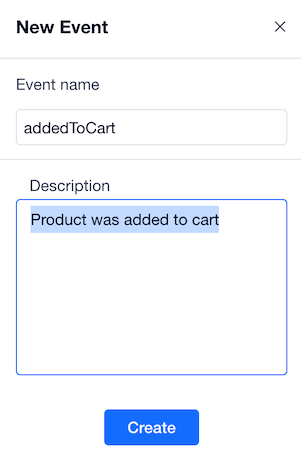
Add an event when you want to provide information about actions that happen in the widget to the site owner. For example, when a customer adds a product to the cart.
**To add a new event:**
1. Click the **Widget API**  icon.
2. Click **Add New Public Event** or hover over **Events** and click the  icon.
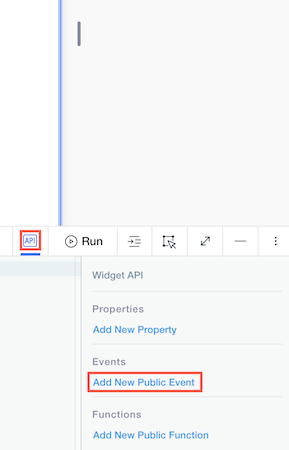
3\. Name your event and provide a description.
4\. Fire the event from your widget code.
Use this syntax:
```ts
$widget.fireEvent('eventName', {eventObject})
```
Define the condition for firing the event and, optionally, send event data. For example:
```javascript
$w(`#button1`).onClick(() => {
$widget.fireEvent('addedToCart', {productId: product.id, customerId: customer.id})
});
```
5\. You can [catch your event](https://dev.wix.com/docs/build-apps/develop-your-app/frameworks/wix-blocks/widget-api/use-the-widget-api-when-editing-a-site.md) from two places
* From any site where your widget is installed.
* From any widget of your app to which you added this widget as an inner widget.
Don't forget to document
Make sure to document your widget API by describing any property, event or function you add to it. These descriptions are available to Wix users who install your widget.