> To build or manage a Wix site with an AI agent, follow https://www.wix.com/headless/skill.md
> It builds a new Wix site or puts your own site online, from a prompt, and keeps changing it afterwards. The pages are code in any web technology, and Wix runs the backend.
> It works through the Wix plugin (the Wix MCP and the Wix skills), the Wix CLI or no Wix login, and puts the site live on Wix hosting or on another host.
> Business features include a store, bookings, events and tickets, a restaurant, a blog, forms, members and many more.
> Read the Wix skills online at https://www.wix.com/skills
>
> Portal Navigation:
>
> - Append `.md` to any URL under `https://dev.wix.com/docs/` to get its markdown version.
> - Pages are either content pages (article or reference text) or menu pages (a list of links to child pages).
> - To get a menu page, truncate any URL to a parent path and append `.md` (e.g. `https://dev.wix.com/docs/sdk.md`, `https://dev.wix.com/docs/sdk/core-modules.md`).
> - If a reference page seems to be missing its schema (parameters, return types, or type definitions), append `?schema=true` to its `.md` URL (e.g. `https://dev.wix.com/docs/contexts/contexts/stores/category-info/use-category-info-context.md?schema=true`).
> - Top-level index of all portals: https://dev.wix.com/docs/llms.txt
> - Full concatenated docs: https://dev.wix.com/docs/llms-full.txt
## Resource: Book a Hike
## Article: Book a Hike
## Article Link: https://dev.wix.com/docs/coding-examples/business-solutions/wix-bookings/book-a-hike.md
## Article Content:
# Book a Hike
Allows visitors to book a hike with the Wix Bookings API.
IntermediateLast updated: 22 Apr 2025
## About
---
In this example, we demonstrate how to create a customized booking experience using the Wix Bookings API. Visitors can select a hike, enter their contact details, and proceed to checkout easily.
## Before you begin
---
To use this example:
* You must have at least one Bookings service set up.
* Your site must have a payment provider connected.
## APIs
---
## How we built it
---
We added the following to our site:
#### Page Elements
##### Home Page
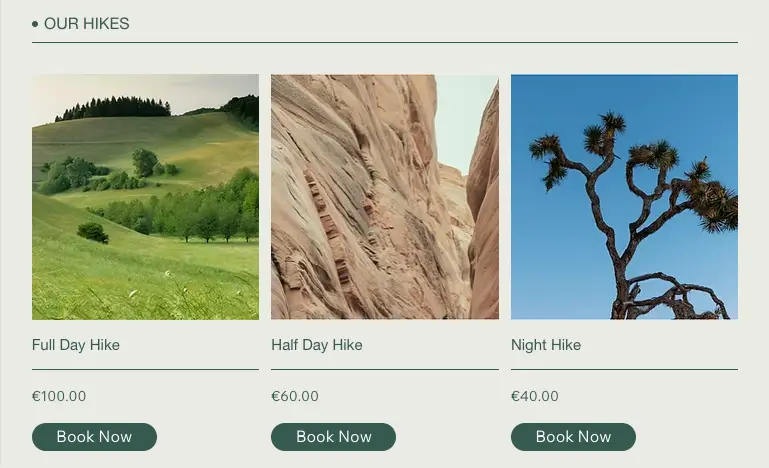
* A repeater for displaying hike options available for booking.
* Buttons for navigating to the booking form.
##### Services page (dynamic)
* Text elements for displaying hike details, such as name, cost, and description.
* A date picker element for visitors to select a date for booking the hike.
* Text input elements for visitors to enter their contact details, such as name, email, phone number, and number of participants..
* A button for initiating the checkout process when creating the booking.
#### Frontend Code
##### Home Page
On the home page, the repeater is populated with hike options to book by connecting it to the Wix Bookings Services app collection. The “Book Now” buttons direct the visitor to a dynamic page with the relevant hike’s details.
##### Services page (dynamic)
The code in this file initializes the page’s elements and retrieves availability data for the selected hike from the backend.
In this file, we:
* Load the relevant details of the selected hike.
* Set event handlers to collect the contact details from the form’s user input elements.
* Retrieve the dates and times available for the hike from the backend, and then populate the date picker element with those options.
* Handle errors for cases where the booking process fails and display error messages.
#### Backend Code
##### wixBookings.web.js
The code in this file manages the booking process using the Wix Bookings API. We defined the following methods:
* `queryAvailability()`: This method queries and returns the available booking slots for the specified hike.
* `createBooking()`: This method accepts booking details collected from the booking form and creates a booking. It then returns the result to confirm that the booking was successful.
##### wixEcom.web.js
The code in this file handles the checkout process using the Wix Ecom API. We defined the following methods:
* `createCheckout()`: This method begins the checkout process, allowing visitors to complete their payment for the booking.
* `getCheckoutUrl()`: This method retrieves the checkout URL for the booking transaction, which directs visitors to pay for their booking.
## Code Snippets
---
wixBookings.web.js
```javascript
import { Permissions, webMethod } from "@wix/web-methods";
import { availabilityCalendar, bookings } from "@wix/bookings";
export const queryAvailability = webMethod(Permissions.Anyone, async (serviceId, options) => {
const query = {
"filter": {
"serviceId": serviceId,
"startDate": new Date(),
"endDate": new Date(new Date().setDate(new Date().getDate() + 30)),
"bookable": true
}
}
console.log('query:', query);
try {
return (await availabilityCalendar.queryAvailability(query, options)).availabilityEntries;
} catch (error) {
console.error(error);
}
}
);
export const createBooking = webMethod(Permissions.Anyone, async (booking, options) => {
try {
const result = await bookings.createBooking(booking, options);
return result;
} catch (error) {
console.error(error);
}
});
```
wixEcom.web.js
```javascript
import { checkout } from "@wix/ecom";
import { Permissions, webMethod } from "@wix/web-methods";
export const createCheckout = webMethod(Permissions.Anyone, async (options) => {
try {
const newCheckout = await checkout.createCheckout(options);
console.log('Success! Checkout created, checkout:', newCheckout);
return newCheckout;
} catch (error) {
console.error(error);
// Handle the error
}
});
export const getCheckoutUrl = webMethod(Permissions.Anyone, async(id) => {
try {
return await checkout.getCheckoutUrl(id);
} catch (error) {
console.error(error);
}
});
```
Services (Item)
```javascript
import { queryAvailability, createBooking } from "backend/wixBookings.web";
import { createCheckout, getCheckoutUrl } from "backend/wixEcom.web";
import wixLocation from "wix-location";
const WIX_BOOKINGS_APP_DEF_ID = "13d21c63-b5ec-5912-8397-c3a5ddb27a97";
let entries, slotForBookings, currentService;
let contactDetails = {
firstName: "",
lastName: "",
email: "",
phone: "",
};
$w.onReady(function () {
currentService = $w("#dynamicDataset").getCurrentItem();
const serviceId = currentService._id;
const selectedTimezone = Intl.DateTimeFormat().resolvedOptions().timeZone;
const options = {
timezone: selectedTimezone,
};
bookingsServiceInit(serviceId, options);
$w("#firstNameInput").onChange(() => {
contactDetails.firstName = $w("#firstNameInput").value;
});
$w("#lastNameInput").onChange(() => {
contactDetails.lastName = $w("#lastNameInput").value;
});
$w("#emailInput").onChange(() => {
contactDetails.email = $w("#emailInput").value;
});
$w("#phoneInput").onChange(() => {
contactDetails.phone = $w("#phoneInput").value;
});
$w("#continueButton").onClick(async () => {
$w("#continueButton").disable();
$w("#errorText").hide();
$w("#pendingText").show();
$w("#continueButton").label = "Please wait";
createBookingsAndCheckout();
});
});
async function bookingsServiceInit(serviceId, options) {
entries = await queryAvailability(serviceId, options);
setServiceDetails(currentService);
setDatePicker(entries);
setEvents();
}
async function setServiceDetails(currentService) {
let serviceDurationInHours = await getDurationInHours();
$w("#serviceName").text = currentService.serviceName;
$w("#serviceCost").text = currentService.priceSummary;
$w("#serviceLocation").text = currentService.tagLine;
$w("#serviceDescription").text = currentService.description;
$w("#time").text = `${serviceDurationInHours.toString()} hr`
}
function getDurationInHours() {
const startDate = new Date(entries[0].slot.startDate);
const endDate = new Date(entries[0].slot.endDate);
const diffInMilliseconds = endDate - startDate;
const diffInHours = diffInMilliseconds / (1000 * 60 * 60);
return diffInHours;
}
function setEvents() {
$w("#datePicker").onChange(() => {
let selectedDate = $w("#datePicker").value;
slotForBookings = entries.filter((entry) =>
new Date(entry.slot.startDate)
.toLocaleDateString()
.includes(new Date(selectedDate).toLocaleDateString())
)[0];
$w("#numberOfParticipantsInput").max = slotForBookings.openSpots;
});
}
function setDatePicker(availability) {
const availableDates = [];
availability.forEach((availableTime) => {
availableDates.push({
startDate: new Date(
new Date(availableTime.slot.startDate).toLocaleDateString()
),
endDate: new Date(
new Date(availableTime.slot.startDate).toLocaleDateString()
),
});
});
$w("#datePicker").enabledDateRanges = availableDates;
$w("#datePicker").enable();
}
async function createBookingsAndCheckout() {
const bookingObject = {
totalParticipants: Number($w("#numberOfParticipantsInput").value),
bookingSource: {
actor: "CUSTOMER",
platform: "WEB",
},
contactDetails: {
firstName: contactDetails.firstName,
lastName: contactDetails.lastName,
email: contactDetails.email,
phone: contactDetails.phone,
},
bookedEntity: {
slot: {
sessionId: slotForBookings.slot.sessionId,
},
},
};
let createdBooking = await createBooking(bookingObject, {});
try {
const options = {
lineItems: [{
quantity: 1,
catalogReference: {
appId: WIX_BOOKINGS_APP_DEF_ID,
catalogItemId: createdBooking.booking._id,
},
}, ],
checkoutInfo: {
billingInfo: {
contactDetails: {
firstName: contactDetails.firstName,
lastName: contactDetails.lastName,
phone: contactDetails.phone,
},
},
buyerInfo: {
email: contactDetails.email,
},
},
channelType: "WEB",
};
let createCheckoutEcom = await createCheckout(options);
let urlObject = await getCheckoutUrl(createCheckoutEcom._id);
// !!!!!!! Checkout redirect has been disabled on this example. !!!!!!!!
// wixLocation.to(urlObject.checkoutUrl);
// !!!!!!! Checkout disable tool tip. This can be removed on a live website !!!!!!!!
$w("#tooltipMsgContainer").show()
$w("#pendingText").text = "Booking created. Proceeding to checkout."
setTimeout(() => {
$w("#tooltipMsgContainer, #pendingText, #errorText").hide();
$w("#continueButton").enable();
$w("#continueButton").enable();
$w("#continueButton").label = "Continue Booking"
$w("TextInput").value = " "
}, 10000)
} catch (err) {
console.log(err);
$w("#continueButton").label = "Complete Booking";
$w("#continueButton").enable();
$w("#errorText").show();
}
}
```
Home
```javascript
$w.onReady(function () {
});
```
## Get Help
---
### Join the community
Join the [Wix Studio][discord-community] community on Discord, where experienced developers and fellow creators come together to share tips, troubleshoot issues, and collaborate.
### Hire a developer
Building a coded solution on your own can be challenging. Let an experienced Wix developer build it for you, so you can keep working on your site or business.
Visit the [Wix Marketplace][wix-marketplace] to find a trusted developer.
[discord-community]: https://discord.com/invite/GhdmDN926z
[wix-marketplace]: https://www.wix.com/marketplace/brief-auto-match/web-developer?entry=velo&origin=examples-page "Wix Marketplace"
 Intermediate
Last updated: 22 Apr 2025