> To build or manage a Wix site with an AI agent, follow https://www.wix.com/headless/skill.md
> It builds a new Wix site or puts your own site online, from a prompt, and keeps changing it afterwards. The pages are code in any web technology, and Wix runs the backend.
> It works through the Wix plugin (the Wix MCP and the Wix skills), the Wix CLI or no Wix login, and puts the site live on Wix hosting or on another host.
> Business features include a store, bookings, events and tickets, a restaurant, a blog, forms, members and many more.
> Read the Wix skills online at https://www.wix.com/skills
>
> Portal Navigation:
>
> - Append `.md` to any URL under `https://dev.wix.com/docs/` to get its markdown version.
> - Pages are either content pages (article or reference text) or menu pages (a list of links to child pages).
> - To get a menu page, truncate any URL to a parent path and append `.md` (e.g. `https://dev.wix.com/docs/sdk.md`, `https://dev.wix.com/docs/sdk/core-modules.md`).
> - If a reference page seems to be missing its schema (parameters, return types, or type definitions), append `?schema=true` to its `.md` URL (e.g. `https://dev.wix.com/docs/contexts/contexts/stores/category-info/use-category-info-context.md?schema=true`).
> - Top-level index of all portals: https://dev.wix.com/docs/llms.txt
> - Full concatenated docs: https://dev.wix.com/docs/llms-full.txt
## Resource: Create a Quiz
## Article: Create a Quiz
## Article Link: https://dev.wix.com/docs/coding-examples/extend-functionality/data/create-a-quiz.md
## Article Content:
# Create a Quiz
Generate a random quiz from a given set of questions.
IntermediateLast updated: 14 Apr 2025
## About
---
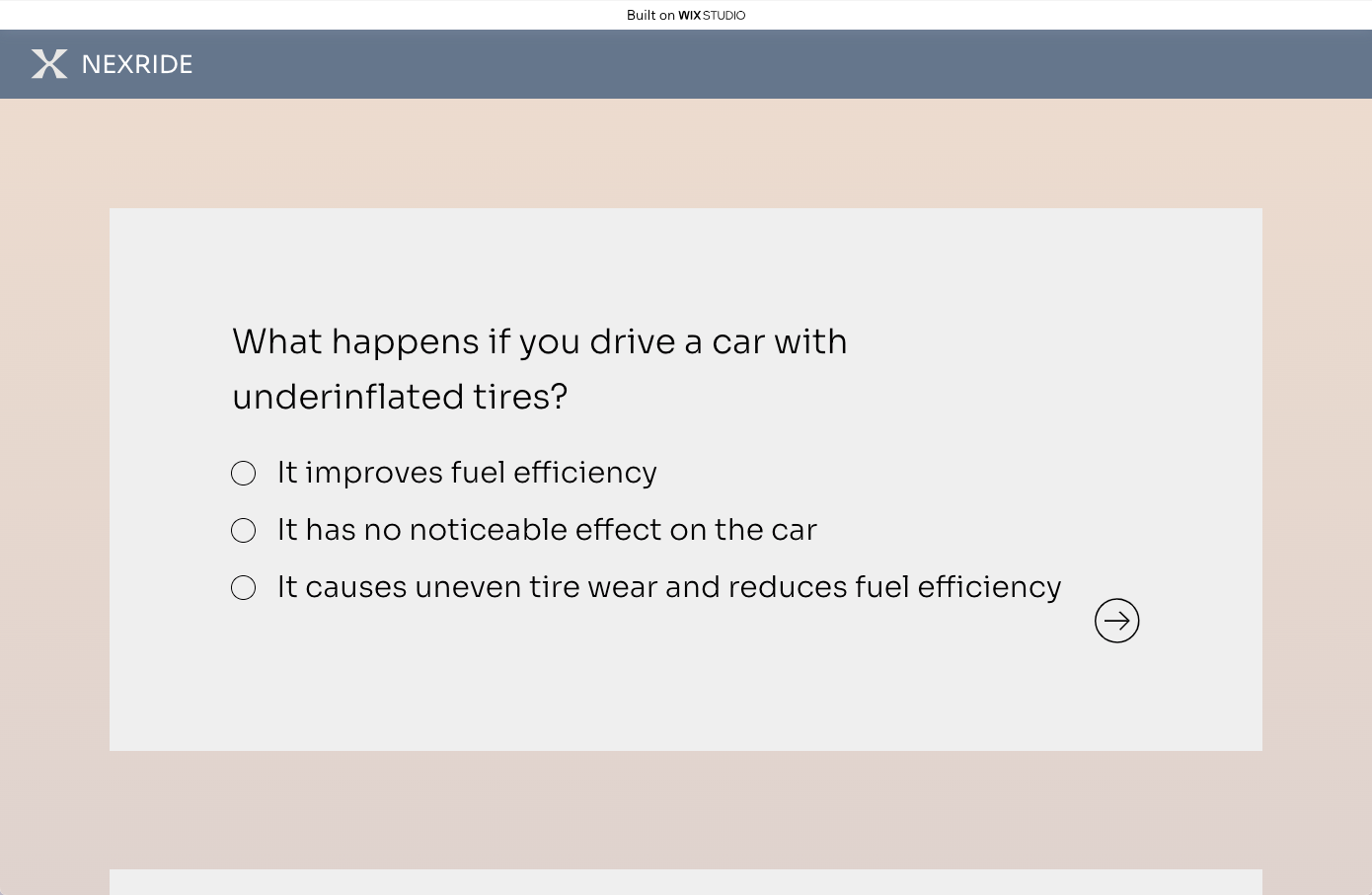
In this example, we create a quiz that randomly selects 5 questions from a collection. Once a visitor answers and submits the quiz, we validate the answers and display the correct answer for each question along with the total score.
## APIs
---
## How we built it
---
We added the following to our site:
#### Page Elements
##### Home Page
* A repeater for displaying quiz questions and answers.
* Buttons to open the quiz and submit quiz answers.
* Text to display the total score.
#### Collections
Questions: A collection containing the quiz questions, the type of input for each question, the possible options for multiple choice questions, and the correct answer to each question.
#### Frontend Code
##### Home
The code in this file initializes the page’s initial state, retrieves quiz data from the backend, and displays the quiz questions and answers.
In this file, we:
* Initialize the page elements and set the page’s initial display state.
* Create multiple page displays and update them based on which button is clicked.
* Retrieve quiz data by calling a backend function upon the start of the quiz.
* Render quiz questions, input options, and correct answers using a repeater.
* Validate visitor-submitted answers when the submit button is clicked.
* Calculate and display the total quiz score.
#### Backend Code
##### questions.web.js
The code in this file retrieves the quiz questions at random from the questions collection.
We defined the following methods:
* `getRandomQuestions()`: Calls the other method to retrieve the quiz items and creates an array of quiz items at random.
* `getAllQuestions()`: Retrieves all the quiz items.
## Code Snippets
---
questions.web.js
```javascript
import { Permissions, webMethod } from "@wix/web-methods";
import { items } from '@wix/data';
export const getRandomQuestions = webMethod(
Permissions.Anyone,
async (numOfQuestions) => {
const allQuestions = await getAllQuestions();
const numberOfItems = allQuestions.length;
let randomQuestions = [];
while (randomQuestions.length < numOfQuestions) {
const randomNumber = Math.floor(Math.random() * (numberOfItems));
let question = allQuestions[randomNumber];
if (randomQuestions.indexOf(question) < 0) {
randomQuestions.push(question);
}
}
return randomQuestions;
}
);
const getAllQuestions = webMethod(
Permissions.Anyone,
async () => {
try {
const request = await items.query('questions').find();
if (request.items.length > 0) {
return request.items;
} else {
throw 'no items found';
}
} catch (error) {
console.error('an error was found in getAllQuestions function', error);
}
}
);
```
Home
```javascript
import { getRandomQuestions } from "backend/questions.web.js";
const numOfQuizQuestions = 5;
const questionValue = 100 / numOfQuizQuestions;
const greenBgColor = "#D2FFEB";
const redBgColor = "#FFE2E2";
const greyBgColor = "#EFEFEF";
const quizItems = [];
$w.onReady(function () {
$w("#quizSection, #submitSection, #scoreSection").collapse();
$w("#startQuizBtn").onClick(async () => {
$w("#questionBox").style.backgroundColor = greyBgColor;
$w("#startQuizBtn").label = "Loading quiz";
$w("#startQuizBtn").disable();
await initQuestionsData();
$w("#welcomeSection, #invalidMessageText").collapse();
$w("#quizSection, #submitSection").expand();
});
$w("#submitBtn").onClick(async () => {
$w("#invalidMessageText").collapse();
let isUserAnswersValid = await checkValidity();
if (isUserAnswersValid) {
await submitAnswers();
$w("#scoreSection").expand();
$w("#submitSection").collapse();
$w("#scoreSection").scrollTo();
} else {
$w("#invalidMessageText").expand();
$w("#invalidMessageText").text =
"An error occured. Please check that you have answered all the questions.";
}
});
$w("#tryAgainBtn").onClick(() => {
$w("#scoreSection, #quizSection, #submitSection").collapse();
$w("#welcomeSection").expand();
$w("#startQuizBtn").enable();
$w("#startQuizBtn").label = "Start Now";
});
});
async function initQuestionsData() {
const questions = await getRandomQuestions(numOfQuizQuestions);
$w("#quizRepeater").data = questions;
$w("#quizRepeater").forEachItem(($item) => { quizItems.push($item("#questionBox")) }) //store items for scrollTo onClick
$w("#quizRepeater").onItemReady(($item, itemData, index) => {
$item("#questionText").text = itemData.title;
$item("#correctAnswerText").hide();
index !== numOfQuizQuestions - 1 ? $item("#nextButton").onClick(() => scrollToNextItem(index)) : $item("#nextButton").delete();
if (itemData.type === "radioGroup") {
$item("#radioGroup").selectedIndex = null;
$item("#radioGroup").resetValidityIndication();
setRadioGroupOptions($item, itemData);
$item("#radioGroup").expand();
$item("#input").collapse();
} else {
$item("#input").value = null;
$item("#input").resetValidityIndication();
$item("#input").expand();
$item("#radioGroup").collapse();
}
});
}
function scrollToNextItem(currentIndex) {
if (quizItems[currentIndex + 1]) {
quizItems[currentIndex + 1].scrollTo();
} else {
return
}
}
function setRadioGroupOptions($item, itemData) {
let opts = itemData.answersList.map((answer) => {
return { label: answer, value: answer };
});
$item("#radioGroup").options = opts;
}
async function checkValidity() {
let allInputsValidity = [];
$w("#quizRepeater").forEachItem(($item, itemData, index) => {
if (itemData.type === "input") {
allInputsValidity.push($item("#input").valid);
$item("#input").updateValidityIndication();
} else {
allInputsValidity.push($item("#radioGroup").valid);
$item("#radioGroup").updateValidityIndication();
}
});
for (let i = 0; i < allInputsValidity.length; i++) {
const valid = allInputsValidity[i];
if (!valid) {
return false;
}
}
return true;
}
async function submitAnswers() {
let score = 0;
$w("#quizRepeater").forEachItem(async ($item, itemData, index) => {
let userAnswer;
if (itemData.type === "input") {
userAnswer = $item("#input").value;
} else {
userAnswer = $item("#radioGroup").value;
}
if (userAnswer.toLowerCase() === itemData.correctAnswer.toLowerCase()) {
score = Math.ceil(score + questionValue);
$item("#correctAnswerText").show();
$item(
"#correctAnswerText"
).text = `Great job, you got it right! The answer is ${itemData.correctAnswer}`;
$item("#questionBox").style.backgroundColor = greenBgColor;
} else {
$item("#correctAnswerText").show();
$item("#questionBox").style.backgroundColor = redBgColor;
$item(
"#correctAnswerText"
).text = `Sorry, thats incorrect. The correct answer is ${itemData.correctAnswer}`;
}
$w("#txtFinalScore").text = `Your total score is ${String(score)}`;
});
}
```
## Get Help
---
### Join the community
Join the [Wix Studio][discord-community] community on Discord, where experienced developers and fellow creators come together to share tips, troubleshoot issues, and collaborate.
### Hire a developer
Building a coded solution on your own can be challenging. Let an experienced Wix developer build it for you, so you can keep working on your site or business.
Visit the [Wix Marketplace][wix-marketplace] to find a trusted developer.
[discord-community]: https://discord.com/invite/GhdmDN926z
[wix-marketplace]: https://www.wix.com/marketplace/brief-auto-match/web-developer?entry=velo&origin=examples-page "Wix Marketplace"
 Intermediate
Last updated: 14 Apr 2025