> To build or manage a Wix site with an AI agent, follow https://www.wix.com/headless/skill.md
> It builds a new Wix site or puts your own site online, from a prompt, and keeps changing it afterwards. The pages are code in any web technology, and Wix runs the backend.
> It works through the Wix plugin (the Wix MCP and the Wix skills), the Wix CLI or no Wix login, and puts the site live on Wix hosting or on another host.
> Business features include a store, bookings, events and tickets, a restaurant, a blog, forms, members and many more.
> Read the Wix skills online at https://www.wix.com/skills
>
> Portal Navigation:
>
> - Append `.md` to any URL under `https://dev.wix.com/docs/` to get its markdown version.
> - Pages are either content pages (article or reference text) or menu pages (a list of links to child pages).
> - To get a menu page, truncate any URL to a parent path and append `.md` (e.g. `https://dev.wix.com/docs/sdk.md`, `https://dev.wix.com/docs/sdk/core-modules.md`).
> - If a reference page seems to be missing its schema (parameters, return types, or type definitions), append `?schema=true` to its `.md` URL (e.g. `https://dev.wix.com/docs/contexts/contexts/stores/category-info/use-category-info-context.md?schema=true`).
> - Top-level index of all portals: https://dev.wix.com/docs/llms.txt
> - Full concatenated docs: https://dev.wix.com/docs/llms-full.txt
## Resource: Hello Data
## Article: Hello Data
## Article Link: https://dev.wix.com/docs/coding-examples/getting-started/hello-world/hello-data.md
## Article Content:
# Hello Data
Manage a data collection through a site.
IntroductionLast updated: 14 Apr 2025
## About
---
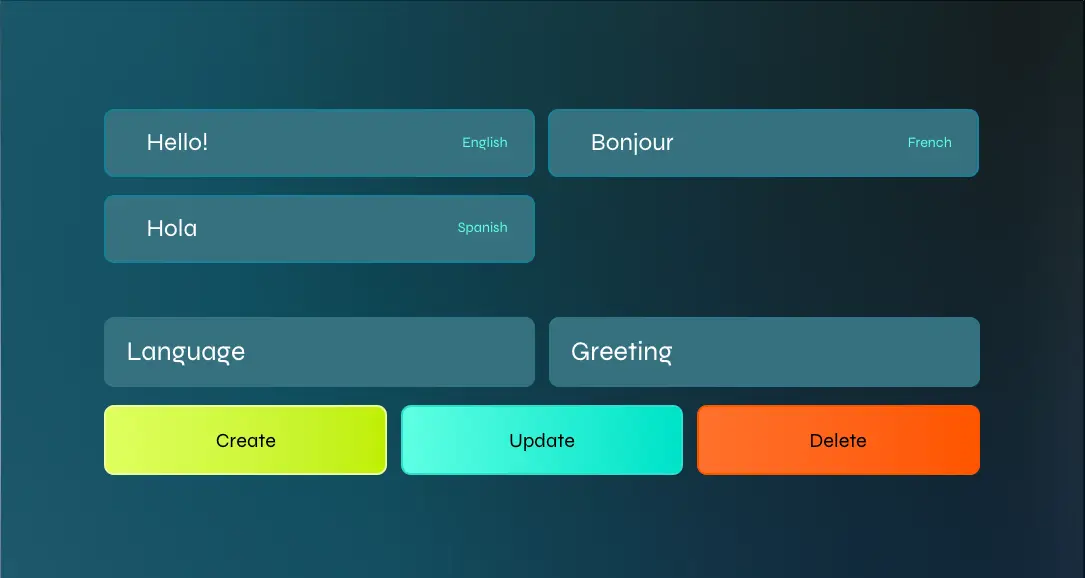
In this example, we use the Wix Data API to perform CRUD (Create, Read, Update, Delete) operations through simple button clicks. Site visitors can enter a language and greeting in the text input fields and select a greeting from a repeater, allowing them to add, edit, and delete items from the Greetings collection.
## Before you begin
---
This example demonstrates how to create, read, update, and delete data from collections using frontend interactions and backend functions..
To help protect your site's data from misuse, it's important to understand how collection permissions are managed in Wix. You can read more about collection permissions [here](https://support.wix.com/en/article/cms-collection-permissions-overview).
For this example, the collection permissions have been set to Private to test in Preview mode. If you plan to use this example on a live site, make sure to review and update the collection's permissions accordingly.
Additionally, consider using [Live Site Item Visibility](https://support.wix.com/en/article/cms-controlling-live-site-item-visibility-from-your-collection) to control which data is visible to visitors on your site.
## APIs
---
## How we built it
---
We added the following to our site:
#### Page Elements
##### Home
* A repeater for selecting data items from a collection to update and delete, as well as for displaying items from the collection.
* Text input fields for creating and updating data items in a collection.
* Buttons to perform CRUD operations.
#### Frontend Code
##### Home
The code in this file initializes the page’s elements, listens for button clicks, and performs CRUD operations called from the backend based on the button that is clicked.
In this file, we:
* Query the contents of the Greetings collection and display them in the repeater.
* Define event handlers for the following actions:
* When the Create, Update, or Delete button is clicked.
* When a new greeting is created and added to the repeater.
* When a greeting in the repeater is selected.
* Add a new greeting item to the collection by calling the `createGreeting()` function with the provided input values when the Create button is clicked.
* Retrieve the greeting item ID when a greeting is selected, and then populate the text input fields with the greeting item data.
* Update the selected greeting by calling `updateGreeting()` with the updated user input values when the Update button is clicked.
* Delete the selected greeting by calling `deleteGreeting()` when the Delete button is clicked.
* Clear the user input fields after a button is clicked.
#### Backend Code
##### dataOperations.web.js
In this file we define the functions that are called from the frontend, and work directly with the collection to create, read, update and delete data. These functions include:
* `readGreetings()` - returns all the greetings in the collection to the frontend.
* `createGreeting()` - inserts a new item into the collection.
* `updateGreeting()` - update's the selected item in the collection.
* `deleteGreeting()`- removes an item from the collection.
## Code Snippets
---
dataOperations.web.js
```javascript
import { items } from '@wix/data';
import { webMethod, Permissions } from "@wix/web-methods";
export const readGreetings = webMethod(Permissions.Anyone, async () => {
try {
const results = await items.query('Greetings').ascending('language').find();
return results.items;
} catch (error) {
console.log("Error reading greetings:", error)
}
});
export const updateGreeting = webMethod(Permissions.Admin, async (itemId, language, greeting) => {
const toUpdate = {
_id: itemId,
language,
greeting
};
const updateItem = await items.update('Greetings', toUpdate);
return updateItem
});
export const deleteGreeting = webMethod(Permissions.Admin, async (itemId) => {
return items.remove('Greetings', itemId);
});
export const createGreeting = webMethod(Permissions.Anyone, async (language, greeting) => {
const toInsert = {
language,
greeting
};
try {
const insertItem = await items.insert("Greetings", toInsert)
return insertItem
} catch (error) {
console.log("Error inserting greeting", error)
}
});
```
Home
```javascript
import {updateGreeting, deleteGreeting, createGreeting, readGreetings } from "backend/dataOperations.web";
let currentItemId;
$w.onReady(function () {
displayGreetings();
})
$w("#helloRepeater").onItemReady(($item, itemData) => {
$item("#languageText").text = itemData.language;
$item("#helloText").text = itemData.greeting;
$item("#itemContainer").onClick(() => {
selectItem($item, itemData);
})
});
$w("#createButton").onClick(async () => {
if ($w("#languageInput").value && $w("#greetingInput").value) {
$w("#createButton").disable();
await createGreeting(
$w("#languageInput").value,
$w("#greetingInput").value
);
clearInputs();
await displayGreetings();
$w("#createButton").enable();
}
});
$w("#deleteButton").onClick(async () => {
if (currentItemId) {
$w("#deleteButton").disable();
await deleteGreeting(currentItemId);
clearInputs();
await displayGreetings();
$w("#deleteButton").enable();
}
});
$w("#updateButton").onClick(async () => {
$w("#updateButton").disable();
await updateGreeting(
currentItemId,
$w("#languageInput").value,
$w("#greetingInput").value
);
clearInputs();
$w('#helloRepeater').data = [];
await displayGreetings();
$w("#updateButton").enable();
});
function selectItem($item, itemData) {
clearSelectedIndicator();
currentItemId = itemData._id;
$w("#languageInput").value = itemData.language;
$w("#greetingInput").value = itemData.greeting;
$item("#selectedIndicator").show();
}
function clearSelectedIndicator() {
$w("#helloRepeater").forItems([currentItemId], ($item) => {
$item("#selectedIndicator").hide();
});
}
function clearInputs() {
$w("#languageInput").value = null;
$w("#greetingInput").value = null;
}
async function displayGreetings() {
const greetings = await readGreetings();
$w("#helloRepeater").data = greetings;
return greetings;
}
```
## Get Help
---
### Join the community
Join the [Wix Studio][discord-community] community on Discord, where experienced developers and fellow creators come together to share tips, troubleshoot issues, and collaborate.
### Hire a developer
Building a coded solution on your own can be challenging. Let an experienced Wix developer build it for you, so you can keep working on your site or business.
Visit the [Wix Marketplace][wix-marketplace] to find a trusted developer.
[discord-community]: https://discord.com/invite/GhdmDN926z
[wix-marketplace]: https://www.wix.com/marketplace/brief-auto-match/web-developer?entry=velo&origin=examples-page "Wix Marketplace"
 Introduction
Last updated: 14 Apr 2025