`. Google views URLs with numbered page query parameters as links to independent pages.
For example, let's say you have a numbered menu with several buttons:
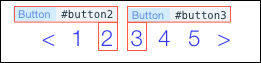
Google indexes the following as 2 separate pages:
* `#button2` URL: `https://www.example.com?page=2`
* `#button3` URL: `https://www.example.com?page=3`
>**Note:**
> For the link to the first page, don't set the query param to **?page=1** since you'll have 2 URLs pointing to the same page. Instead you can link to the main page.
### Does URL case matter?
Google treats URLs as case sensitive. For example, Google views each of these URLs as unique:
* `www.mysite.com/page.html`
* `www.mysite.com/PAGE.html`
Google recommends exposing either the uppercase or lowercase version of a URL, and not both. Even if you've set both URLs to point to the same page so that a site visitor reaches the same destination regardless, you may not want both versions out there on the web pointing to your page.
When multiple URLs point to the same page, Google chooses only one to represent the content on your page, and highlights only that URL in search results. And it might not be the URL you prefer.
So which case should you choose, uppercase or lowercase? Lowercase is recommended, since it's more common and you can assume that at least some people will use the lowercase URL to link to your site.
## Images and SEO
Site images play a significant role in determining your site's SEO. But how do search engines "read" your images? They check the image's alternative text (alt text), a short but meaningful description you can assign to your image.
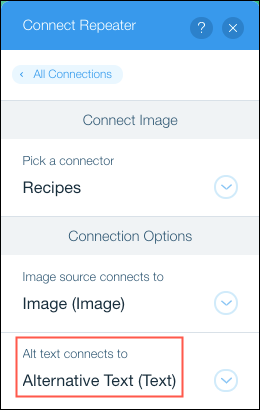
You can [add alt text](https://support.wix.com/en/article/studio-editor-adding-alt-text-to-images) to an image using the editor, but if you are displaying multiple images from a database collection, you can dynamically assign alternate text to your images with code using the [`alt`](https://dev.wix.com/docs/velo/velo-only-apis/$w/image/alt.md) image property, or by connecting to alternative text stored in a database collection using a dataset.
## Dynamic pages and routers
[Dynamic pages](https://support.wix.com/en/article/cms-about-dynamic-pages) and [router pages](https://dev.wix.com/docs/develop-websites-sdk/code-your-site/build-a-custom-backend/routers/about-routers.md) are different than regular pages in that they contain dynamic data. SEO information for a dynamic or router page must be set dynamically, so that it reflects the real content the pages hold when they're viewed.
You can [define SEO information](https://support.wix.com/en/article/working-with-seo-settings-for-dynamic-pages) for your dynamic pages in the editor.
You can dynamically [define the following SEO information](https://dev.wix.com/docs/develop-websites-sdk/code-your-site/build-a-custom-backend/routers/add-seo-to-your-router.md) for your router pages:
* [Meta tags](https://dev.wix.com/docs/develop-websites-sdk/code-your-site/build-a-custom-backend/routers/add-seo-to-your-router.md#step-1--set-meta-tags-for-router-pages): Help search engines learn about your pages.
* [Sitemap](https://dev.wix.com/docs/develop-websites-sdk/code-your-site/build-a-custom-backend/routers/add-seo-to-your-router.md#step-2--create-the-sitemap-for-your-router): Help search engines find your pages.
## Build a great site structure
Site structure refers to how you organize content on your site. For example, how do pages with your main content link to pages with subtopics? How many pages will a site visitor have to navigate to reach the content they want? Is the connection between pages with related content organized or random?
Planning and mapping out an organized site structure will make it easier for search engines to crawl and index your site. Google awards [sitelinks](https://developers.google.com/search/docs/appearance/sitelinks?hl=en&visit_id=638694267737097538-2339297366&rd=1), additional links that appear beneath the main URL in a Google search, to sites with great site structures.
Use [database collections](https://dev.wix.com/docs/develop-websites-sdk/code-your-site/work-with-data/introduction/about-collections.md) and [dynamic pages](https://support.wix.com/en/article/creating-unlimited-site-pages-with-a-dynamic-page) to improve and organize your site structure. Consider the following factors when planning your site:
* **Organized hierarchy:** Make sure the connection between pages on your site isn't random. Your site hierarchy should be organized and fairly shallow (not too many levels).
This is easy to accomplish using dynamic pages, where you can automatically generate multiple pages with similar structure and different content all relating to a main index page.
* **URL structure:** The structure of your URLs should mirror your navigation hierarchy. Each level of your site should be represented by a section of your URL containing an appropriate keyword. For example, if you've got a recipe site divided by cuisine type and then by course, a site visitor who selects Italian cuisine and then appetizer recipes should see a URL that reflects the site hierarchy:

You can automatically generate [structured URLs](https://support.wix.com/en/article/customizing-your-pages-url-structure-in-seo-settings) for your pages using dynamic list and item pages.
* **Internal links:** Search engines use internal links to crawl the pages of your site. In general, the more internal links the better, but minimally every page on your website should have a link to and from another page on your site.
You can create an index page or a dynamic list page to easily link to and from dynamic item pages on your site.
>**Note:**
> [SEO settings](https://support.wix.com/en/article/working-with-seo-settings-for-dynamic-pages) for dynamic pages are different than SEO settings for regular site pages.
## Set SEO data with the SEO API
You can use the [SEO API](https://dev.wix.com/docs/sdk/frontend-modules/seo/introduction.md) to get and set SEO information for your site pages:
* **Title tag:** Gets and sets the clickable heading that appears in search result pages.
* **Link tags:** Gets and sets link relation attributes for multiple URLs that point to your page. For example, `rel canonical` lets search engines know which URL represents the master copy of your page.
* **Meta tags:** Gets and sets metadata, additional information about your page. For example, you could use meta tags to control what content appears when your page is shared on Facebook, or to prevent search engines from indexing your page.
* **Structured data markup:** Gets and sets additional information about your page in a standardized format that can be read by search engines. Search engines use this information to classify your page content and possibly display the search result for your page as [rich results](https://yoast.com/what-are-rich-snippets/) (snippets). For example, you can use structured data to let search engines know your page content is a recipe or contact information for an organization.
>**Note:**
> To ensure the SEO data you set will be read by search engines, make sure to set such data in the [`onReady()`](https://dev.wix.com/docs/velo/velo-only-apis/$w/on-ready.md) event handler.
## Track site events
You can connect a 3rd-party [marketing tool](https://support.wix.com/en/article/about-marketing-integrations) such as Google Analytics or Facebook Pixel to your Wix site and collect valuable information about your visitors' behavior. Wix helps you track specific visitor events such as page views and purchases and report them to your integrated marketing tool. You can then use this information to optimize your site.
If you want to track additional visitor actions not included in the default tracking events available using Wix marketing integrations, you can use the [Track Event API](https://dev.wix.com/docs/sdk/frontend-modules/window/track-event.md). For example, you can [add tracking code](https://dev.wix.com/docs/develop-websites-sdk/code-your-site/build-a-custom-frontend/event-handlers/add-an-event-handler.md) to a download button and report to a 3rd-party tool every time a visitor downloads a document.
## See also
* [Wix SEO Setup Checklist](https://support.wix.com/en/article/improving-your-online-presence-with-the-wix-seo-setup-checklist): A step-by-step plan designed to help you improve your site's SEO.
* [Wix SEO Guide](https://www.wix.com/seo/learn/wix-seo-guide): Everything you need to know to set up your website's SEO and get found online.
* [Google SEO Guidelines](https://developers.google.com/search/docs/guides/get-started): Don't forget to carefully check Google's SEO guidelines. If you are experiencing SEO issues with your site, it's worthwhile to review Google's guidelines again and make sure you aren't inadvertently missing any important details.