> Portal Navigation:
>
> - Append `.md` to any URL under `https://dev.wix.com/docs/` to get its markdown version.
> - Pages are either content pages (article or reference text) or menu pages (a list of links to child pages).
> - To get a menu page, truncate any URL to a parent path and append `.md` (e.g. `https://dev.wix.com/docs/sdk.md`, `https://dev.wix.com/docs/sdk/core-modules.md`).
> - Top-level index of all portals: https://dev.wix.com/docs/llms.txt
> - Full concatenated docs: https://dev.wix.com/docs/llms-full.txt
## Resource: Manage Secrets in the Secrets Manager
## Article: Manage Secrets in the Secrets Manager
## Article Link: https://dev.wix.com/docs/develop-websites-sdk/code-your-site/developer-environments/secrets/manage-secrets-in-the-secrets-manager.md
## Article Content:
# Manage Secrets in the Secrets Manager
The [Secrets Manager](https://dev.wix.com/docs/develop-websites-sdk/code-your-site/developer-environments/secrets/about-the-secrets-manager.md) allows you to access and manage secrets securely, and use them in your site's code.
## Step 1 | Access the Secrets Manager
There are multiple ways to access the [Secrets Manager](https://www.wix.com/my-account/site-selector/?buttonText=Select%20Site&title=Select%20a%20Site&autoSelectOnSingleSite=true&actionUrl=https:%2F%2Fwww.wix.com%2Fdashboard%2F%7B%7BmetaSiteId%7D%7D%2Fdeveloper-tools/secrets-manager), depending on which interface you are using.
::::tabs
:::Wix-Studio-or-Wix-Editor
1. Navigate to **Developer Tools** in the code panel.
1. Click on **Secrets Manager** in the **Security** section.
:::
:::Dashboard
1. Navigate to **Developer Tools** in the dashboard menu.
1. Click on **Secrets Manager**.
:::
::::
## Step 2 | Manage your secrets
Use the Secrets Manager to add, edit, and delete secrets in the Secrets Manager.
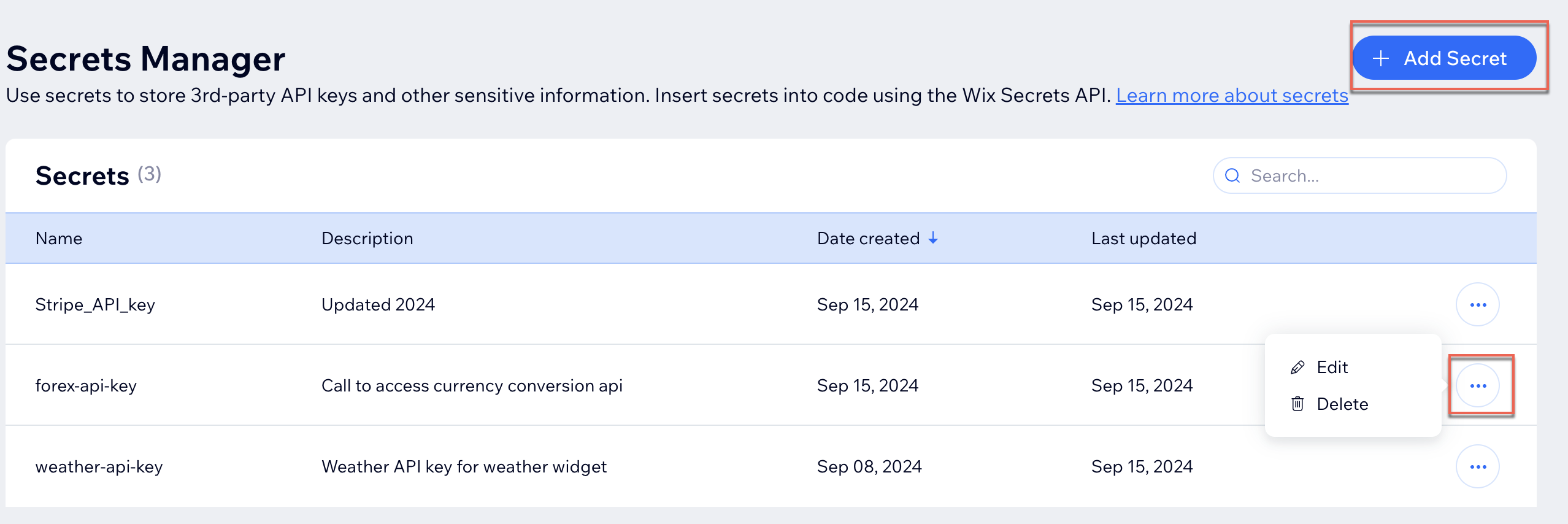
> **Note:** Changes in the Secrets Manager are applied immediately and don't require publishing the site.
Add a secret
To add a secret:
1. At the top right of the Secrets Manager, click **Add Secret**.
2. In the **Add secret** modal, fill in the [fields](https://dev.wix.com/docs/develop-websites-sdk/code-your-site/developer-environments/secrets/about-the-secrets-manager.md#secret-fields).
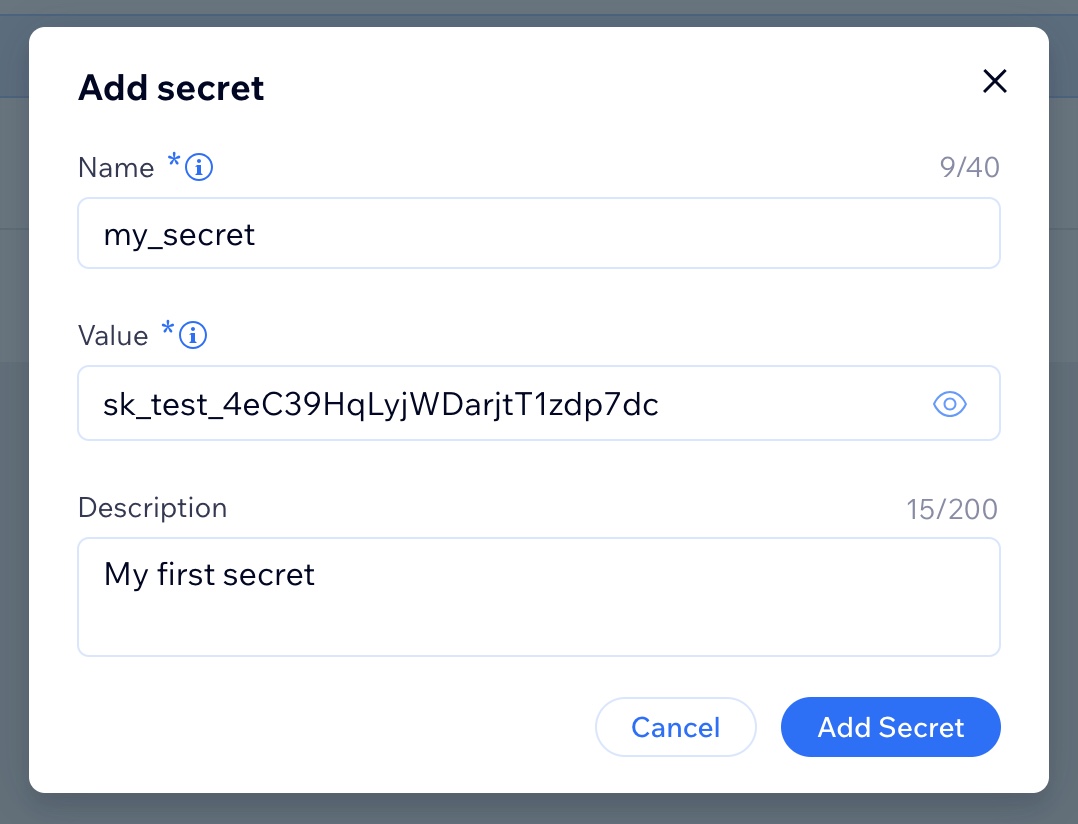
3. Click **Add Secret**.
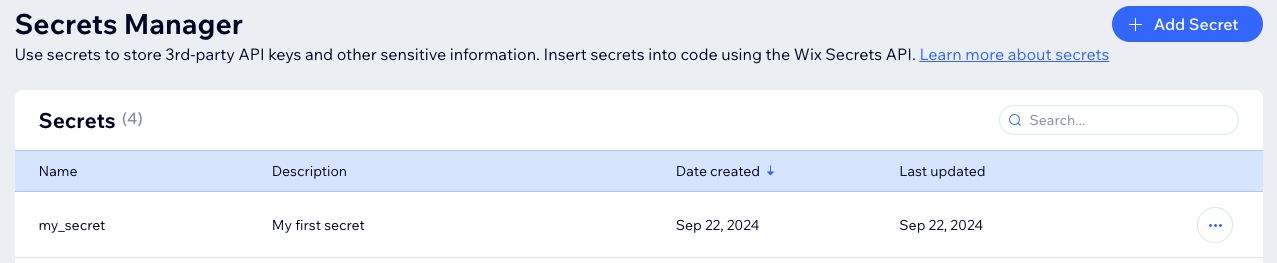
The secret is added and stored in the Secrets Manager. The name and description are displayed, and the secret value is hidden.
Edit a secret
To edit a secret:
Warning: Changing a secret's name or value breaks all code that implements the secret.
1. For the secret you want to edit, select **Edit** in the secret's **More Actions**  menu. The **Edit secret** modal appears.
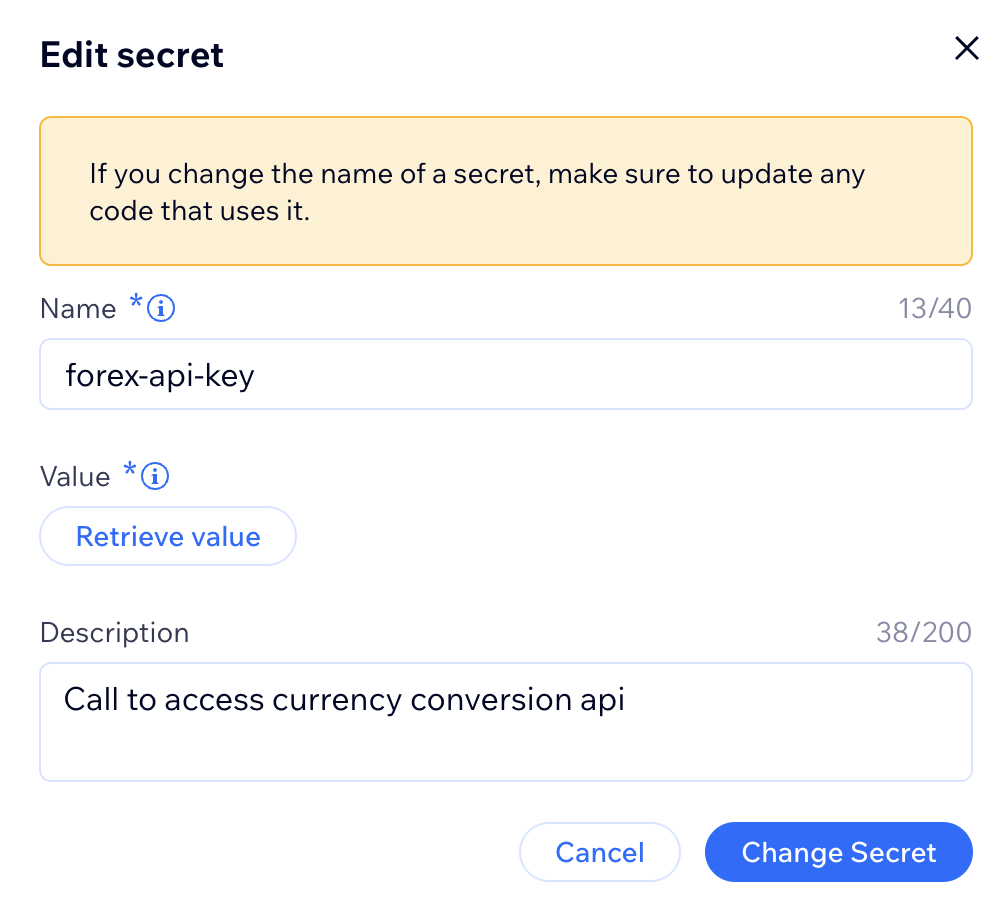
2. - To change the secret's **Name** or **Description**, click the [fields](https://dev.wix.com/docs/develop-websites-sdk/code-your-site/developer-environments/secrets/about-the-secrets-manager.md#secret-fields) to edit the text.
- To change the secret's value, click **Retrieve value**, then click inside the secret's **Value** field that appears.
3. Click **Change Secret**.
Delete a secret
To delete a secret:
Warning:
Deleting a secret breaks all code that implements the secret.
You can't restore a deleted secret.
1. For the secret you want to delete, select **Delete secret** in the secret's **More Actions**  menu. The **Delete secret?** modal appears.
2. Click **Delete Secret** to confirm.
The secret is removed from the Secrets Manager.
## See also
- [About the Secrets Manager](https://dev.wix.com/docs/develop-websites-sdk/code-your-site/developer-environments/secrets/about-the-secrets-manager.md)
- [About the Wix Secrets API](https://dev.wix.com/docs/sdk/backend-modules/secrets/introduction.md)