> Portal Navigation:
>
> - Append `.md` to any URL under `https://dev.wix.com/docs/` to get its markdown version.
> - Pages are either content pages (article or reference text) or menu pages (a list of links to child pages).
> - To get a menu page, truncate any URL to a parent path and append `.md` (e.g. `https://dev.wix.com/docs/sdk.md`, `https://dev.wix.com/docs/sdk/core-modules.md`).
> - Top-level index of all portals: https://dev.wix.com/docs/llms.txt
> - Full concatenated docs: https://dev.wix.com/docs/llms-full.txt
## Resource: Add and Delete External Database Collections
## Article: Add and Delete External Database Collections
## Article Link: https://dev.wix.com/docs/develop-websites-sdk/code-your-site/work-with-data/external-databases/overview/add-and-delete-external-database-collections.md
## Article Content:
# Add and Delete External Database Collections
> **Note:** This feature is only available for sites with certain premium plans. If you need to use this feature, you can [upgrade your site](https://www.wix.com/upgrade/website). Learn more about [premium plans](https://dev.wix.com/docs/develop-websites-sdk/maintain-your-site/scale-your-site/about-premium-plans.md).
Wix lets you [connect your site to an external database](https://dev.wix.com/docs/develop-websites-sdk/code-your-site/work-with-data/external-databases/overview/about-integrating-external-databases-with-your-wix-site.md) and then work with that database's collections in your site just as you would with our built-in collections.
This article explains how to add and delete external database collections for your site.
## Before you begin
Before adding an external database to your Wix site you need to set up or create an [external database adaptor](https://dev.wix.com/docs/develop-websites-sdk/code-your-site/work-with-data/external-databases/overview/about-integrating-external-databases-with-your-wix-site.md#external-database-adaptors).
> **Note:** You can also add external database collections to your site by calling [`createExternalDatabaseCollection()`](https://dev.wix.com/docs/api-reference/business-solutions/cms/external-databases/external-database-connection/create-external-database-connection.md). For detailed instructions, see the [sample flows](https://dev.wix.com/docs/api-reference/business-solutions/cms/external-databases/external-database-connection/sample-flows.md) of the External Database Connections API.
## Add external database collections
1. Select **Databases** from the Code sidebar (Wix Editor) or the Code sidebar (Wix Studio).
2. Click the  icon next to **External Databases** and select **Add external database**.
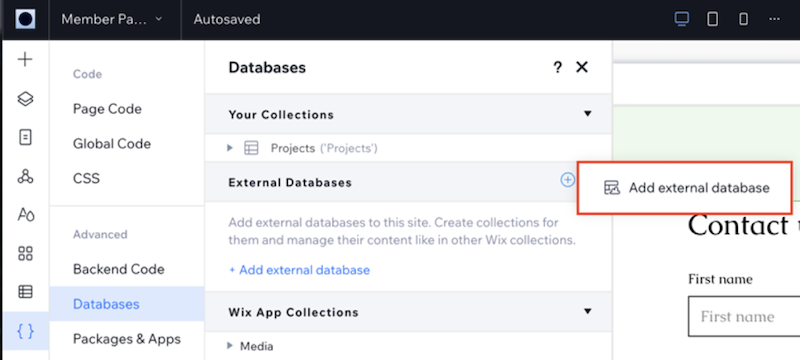
3. Choose the provider of the external database you wish to add and click **Next**.
4. In the Connect External Database screen:
1. Choose a namepace to group the external database's collections under.
2. Enter your endpoint URL for the external database adaptor.
3. Enter the database adaptor's secret key.
Your external database collections are now listed under the namespace you chose, and you can work with them as you would your other collections.
## Delete an external database collection
Delete an external database collection from your site in the same way that you would delete a built-in data collection, using the Show More icon .
> **Note:** This only deletes the collection from your site. It does not delete it from the external database.
