About CMS Data Sources
A CMS Data Source shares a collection's items with the elements on a page or section, so you can display collection data without writing code. Wix creates CMS Data Sources automatically for each collection on a site, including Wix app collections and collections from an external database.
A CMS Data Source is a Data Source, a logical component that shares state and behavior with the elements it's attached to. The Studio Two editor calls this kind of component a Data Source, and its code uses context provider APIs and React Context. For a CMS Data Source, Wix generates the context provider code for each collection, so you don't write or maintain it. You can also build your own Data Sources. Learn more in About Data Sources.
The Data Sources for each collection
Wix creates two Data Sources for each collection:
- The collection Data Source: Named after the collection. It shares a list of the collection's items, for elements such as repeaters, and the current item. It also shares a way to load more items, and whether items are loading. You set its sort order, its filter, and how many items it loads at a time with Manage Source. See Display Collection Items.
- The item page Data Source: Named after the collection with (item page) added, for example Listings (item page). It shares the current item on a dynamic item page.
Each item shares its field values and a link to the item's dynamic page.
When you delete a collection, Wix removes its Data Sources.
Connect elements to a CMS Data Source
You connect elements to a CMS Data Source the same way as to any Data Source, in the Studio Two editor:
-
Attach the Data Source to a page, container, or section. CMS Data Sources are listed under CMS collection in Connect Source. For the panel, see Connect to Source.
-
Connect an element inside it with Connect to Data. Under Source, select the CMS Data Source. For example, to show an item's title, select Single Item, then Fields, then Title.
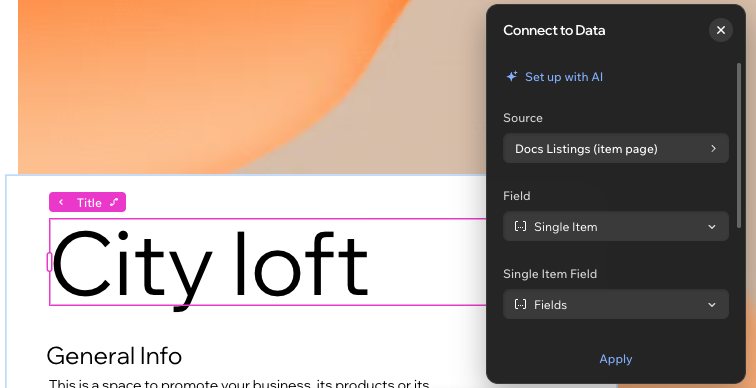
For an element in a repeater, the Source in the Connect to Data panel is the repeater's items. The panel lists them as the collection's name followed by Item List, for example Listings Item List. Under Field, select Fields to show a field's value, then select the field. For the steps, see Display Collection Items. To link to an item's page instead, see Link each item to its item page.
What CMS Data Sources don't do
CMS Data Sources display data. They don't add, update, or remove items, and they don't run custom queries or aggregations. For those tasks, use the Data API in code.
An Editor React Component (ERC) can't read from or control a CMS Data Source in code. It gets the Data Source's values only through editor binding. You connect an ERC's props to values that the Data Source shares, such as the current item's fields. To get collection data in an ERC's code, query it with the Data API. To share query results with several elements, build a custom Data Source.
See also
Last updated: 2 November 2026