Add a Field to a Collection
Add a field to an existing collection on a Studio Two site, so its items can store another kind of value. This article shows how to add a field with a script from the Wix Data view in the Code tab.
You can also add a field in the CMS dashboard. To add one from site code, call Create Data Collection Field in backend code with elevated permissions.
Step 1 | Open an Add Field script
Add Field opens a script that already contains a template field definition for the collection.
To open an Add Field script:
-
In the Studio Two editor, open the Code tab.
-
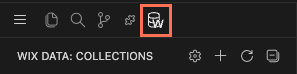
In the row of icons at the top of the sidebar, click the database icon to open the Wix Data view.
-
Right-click the collection and select Add Field. A script opens in a new tab.
The script isn't part of the site's code, and you choose when to run it.
Step 2 | Define the field
The template script looks like this, with the collection's ID already filled in:
To define the field:
- Replace
<choose a key>with the field ID that code uses. - Replace
<choose a display name>with the name that the CMS dashboard shows. - Set
typeto the field type.
This example adds a bathrooms number field to a Listings collection:
Step 3 | Run the script
To run the script, click the play icon, Wix Data: Run Query, at the top right of the script tab. The response opens in a result.json tab and shows the updated collection.
Step 4 | Check the field
To check the field:
- In the Wix Data view, click Refresh Collections.
- Expand the collection. The new field is listed as
<fieldId>: <TYPE> ('<Display name>').
See also
Last updated: 2 November 2026