External URL Extensions
An external URL extension adds a link in the Wix dashboard that points to a destination outside Wix. When a Wix user clicks the link, the destination opens in a new browser tab. The dashboard passes app instance data as a query parameter so the receiving service can identify the calling site.
Like all dashboard extensions, external URL extensions don't appear on the live site. Only Wix users with the required permissions can see them.
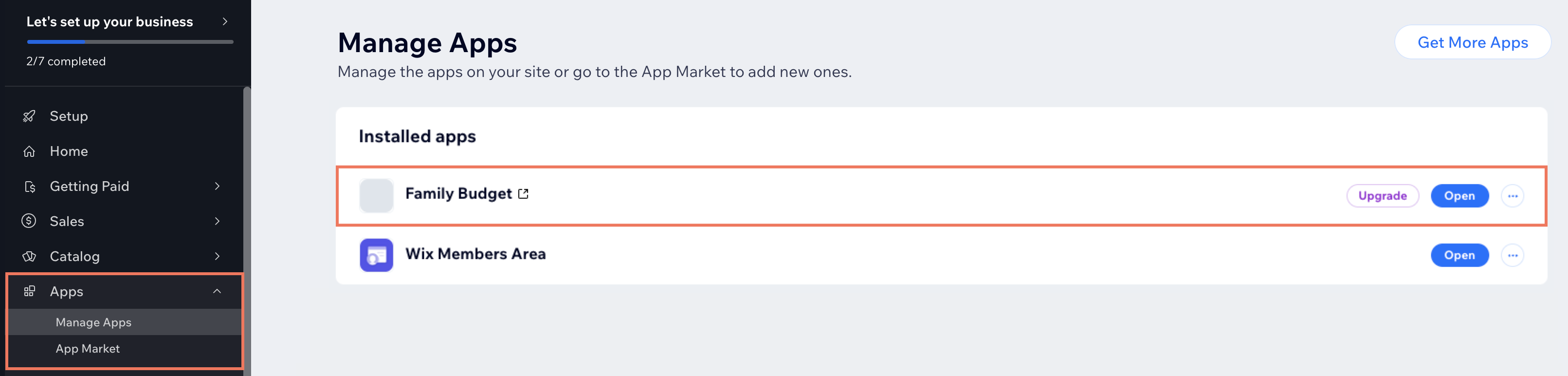
When to use an external URL extension
Use an external URL extension when you want to give Wix users a one-click jump from the dashboard to a destination you host outside Wix. Common cases include:
- Linking to your service's web app when the experience is too extensive to embed in a dashboard page, like a full project management tool with its own navigation.
- Linking to a hosted help center or documentation site, like a "Help" link that opens your knowledge base.
For destinations inside the Wix dashboard, use a dashboard page or dashboard menu plugin instead.
External URL extensions across development paths
The development path determines how you register an external URL extension:
- Sites: Don't add external URL extensions directly. To add one, create a private app that registers the external URL and install that app in your site.
- Wix-managed headless projects: Don't support external URL extensions.
- Self-managed headless projects: Don't support external URL extensions.
- Wix-managed apps: Use the Wix CLI. See Add External URL Extensions with the CLI.
- Self-managed apps: Configure the external URL in the App Dashboard. See Add External URL Extensions in Build Apps.
- Blocks apps: Configure the external URL in the App Dashboard. See Add External URL Extensions in Build Apps.
Last updated: 2 August 2026