Dashboard Plugins
A dashboard plugin is an interactive widget embedded inside a Wix-built dashboard page like Stores Orders, Bookings Calendar, or CRM Contacts. Plugins augment the host page with custom data, actions, or insights.
Plugins render inline on the host page, appearing as part of that page rather than as overlays.
Like all dashboard extensions, dashboard plugins don't appear on the live site. Only Wix users with the required permissions can see them.
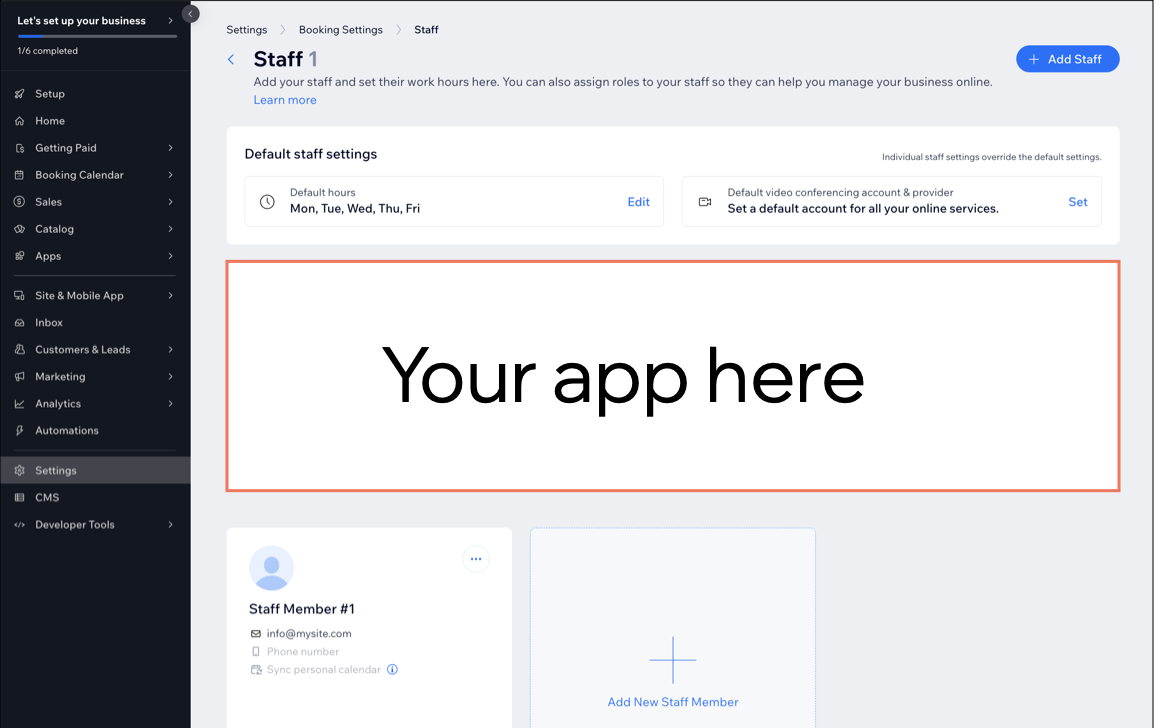
When to use a dashboard plugin
Use a dashboard plugin when your UI belongs alongside existing data from a Wix business solution. Common cases include:
- Showing custom metrics or data alongside records from a Wix business solution, like estimated delivery time on a Stores Orders page.
- Adding a custom action button or workflow shortcut to a Wix-built page, like a "send invoice" button on a Bookings record.
- Augmenting an existing record view with related context or 3rd-party data, like a customer's loyalty status on a CRM contact.
For a standalone destination, use a dashboard page. For a focused pop-up interaction, use a dashboard modal.
Plugin slots
A slot is a UI placeholder that Wix exposes on its own dashboard pages. Each slot has a unique ID and a fixed location on the page. A plugin declares the slot ID it targets, and the platform renders the plugin in that location whenever a site owner opens a host page that includes the slot.
Apps built by Wix such as Wix Bookings and Wix Stores offer a range of slots across their dashboard pages. See About Dashboard Page Slots to explore the available slots and their IDs.
A plugin sits inside a slot at the slot's full width, typically the full width of the host page. The same slot ID can appear on multiple host pages, in which case the plugin renders on all of them. A single slot can also host multiple plugins, which the platform renders together in that location.
Plugin data
Each slot passes contextual data from the host page to the plugin. The most common pattern is an identifier for the record currently in view, like an order ID on the Stores Orders slot or a contact ID on the CRM Contact slot. Some slots also pass the record's fields alongside the ID so the plugin can render without an extra fetch. Plugins reactively re-render as the host page's state changes, so a plugin updates automatically as the site owner navigates between records.
Plugin code
Use the Dashboard SDK at runtime to read host page context, navigate between dashboard locations, and open modals. Call other Wix APIs from inside the dashboard to read and write site data, including the business solution APIs.
When you're writing the UI in React, prefer the Wix Design System and Patterns. They're React component libraries that match the native Wix dashboard look.
Authentication and permissions
Dashboard plugin code runs with the identity of the Wix user viewing the host page, the site owner or a collaborator who's logged into the dashboard.
What the plugin can do is bounded 2 ways:
- The Wix user's role on the site determines which methods they're allowed to invoke.
- When the plugin belongs to an installed app, the app declares the permission scopes the plugin needs in its manifest, and those scopes further constrain what the plugin can call.
For some restricted methods, you can elevate the call from backend code to gain higher authorization than the current user has.
Dashboard plugins across development paths
The development path determines how you build a dashboard plugin:
- Sites: Don't add dashboard plugins directly. Instead, create a private app that registers the extension and install that app in your site.
- Wix-managed headless projects:
- Full Wix integration (Astro): Use the Wix CLI. See Add Dashboard Plugin Extensions with the Wix CLI.
- Other frameworks: Don't support dashboard plugin extensions directly. Follow the same approach as self-managed headless projects.
- Self-managed headless projects: Don't add dashboard extensions directly. Instead, create a private app that registers the extension and install that app in your headless project.
- Wix-managed apps: Use the Wix CLI. See Add Dashboard Plugin Extensions.
- Self-managed apps: Build the plugin on infrastructure you manage. The dashboard embeds it as an iframe whose source URL you provide. See Add Self-hosted Dashboard Plugin Extensions in Build Apps.
- Blocks apps: Don't support dashboard plugins.
Last updated: 2 August 2026