Dashboard Menu Plugins
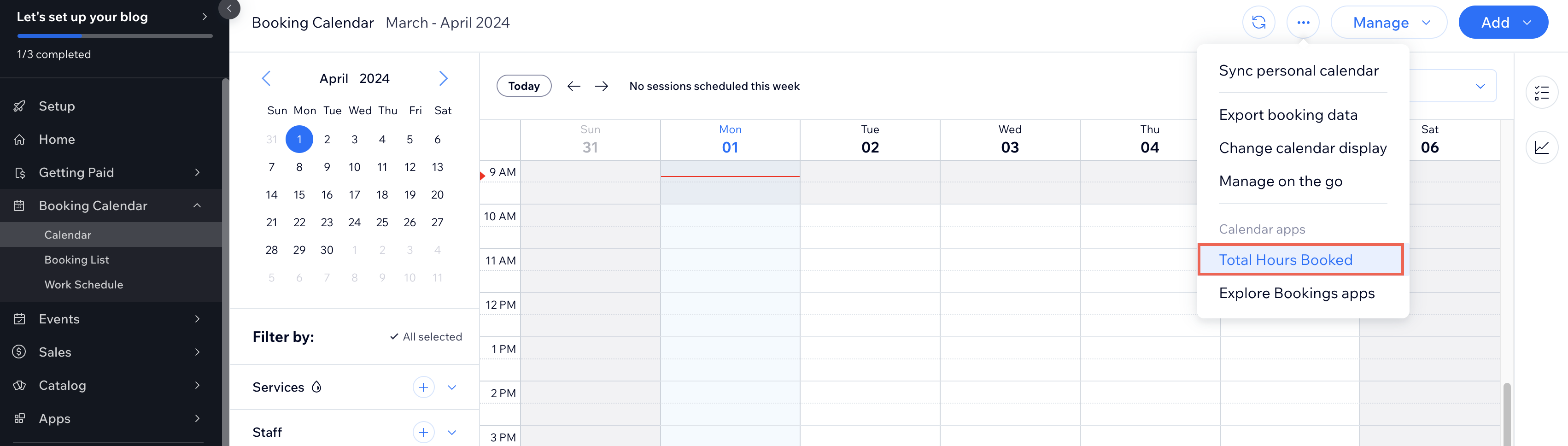
A dashboard menu plugin adds an item to a pre-configured menu slot of a Wix-built dashboard page. When clicked, the item either navigates the Wix user to another dashboard page or opens a dashboard modal. Unlike other dashboard extensions, a menu plugin doesn't render UI of its own. It's a configured trigger that hooks into an existing dashboard menu and points at another destination.
Like all dashboard extensions, dashboard menu plugins don't appear on the live site. Only Wix users with the required permissions can see them.
When to use a dashboard menu plugin
Use a dashboard menu plugin when you want an item in an existing Wix dashboard menu to take the Wix user somewhere or kick off a focused action. Common cases include:
- Navigating to one of your own dashboard pages from a Wix business solution's menu, like adding a "Custom Analytics" item to the Wix Stores More Actions menu.
- Linking out to a different Wix business solution's page, like jumping from a Wix Bookings record to a CRM contact view.
- Opening a dashboard modal for a quick action without navigating away, like a "Quick Edit" modal triggered from a record's actions menu.
Menu slots
A menu slot is a UI placeholder Wix exposes inside a menu on dashboard pages. Each slot has a unique ID and a fixed location in the menu. A menu plugin declares the slot ID it targets, and the platform renders the menu item in that location whenever a Wix user opens a host page that includes the slot.
Apps built by Wix such as Wix Bookings and Wix Stores offer a range of menu slots across their dashboard pages. See About Dashboard Page Slots for the available menu slots.
The same menu slot ID can appear on multiple host pages, in which case the menu item appears on all of them. A single menu slot can also host multiple menu plugins, which the platform renders in the menu together.
Menu plugin definition
Menu plugins are configured rather than coded. The plugin definition tells the platform where the item appears, what label and icon it carries, and what action to perform when clicked.
A menu plugin can pass parameters to its action destination. The mechanics differ depending on whether the action navigates to a page or opens a modal:
- When the action navigates to a page, the configuration can include path and search parameters alongside the page ID. These let the menu plugin deep-link to a specific state in the target page rather than landing on its default route.
- When the action opens a modal, any extra parameters the menu plugin declares are merged with the parameters the host slot passes. If both define a parameter with the same name, the value from the menu plugin overrides the value from the slot.
Dashboard menu plugins across development paths
The development path determines how you configure a dashboard menu plugin:
- Sites: Don't add dashboard menu plugins directly. Instead, create a private app that registers the menu plugin and install that app in your site.
- Wix-managed headless projects:
- Full Wix integration (Astro): Use the Wix CLI. See Add Dashboard Menu Plugin Extensions with the Wix CLI.
- Other frameworks: Don't support dashboard menu plugin extensions directly. Follow the same approach as self-managed headless projects.
- Self-managed headless projects: Don't add dashboard extensions directly. Instead, create a private app that registers the extension and install that app in your headless project.
- Wix-managed apps: Use the Wix CLI. See Add Dashboard Menu Plugin Extensions.
- Self-managed apps: Configure the menu plugin in the App Dashboard. See Add Dashboard Menu Plugin Extensions in Build Apps.
- Blocks apps: Don't support dashboard menu plugins.
Last updated: 2 August 2026