Dashboard Sidebar Categories
A dashboard sidebar category groups an app's dashboard pages under a single entry in the dashboard sidebar. Site owners see the category's title, usually the app's name, with the app's pages listed under it. A sidebar category has no UI or code of its own. It's a label that the app's dashboard pages link to.
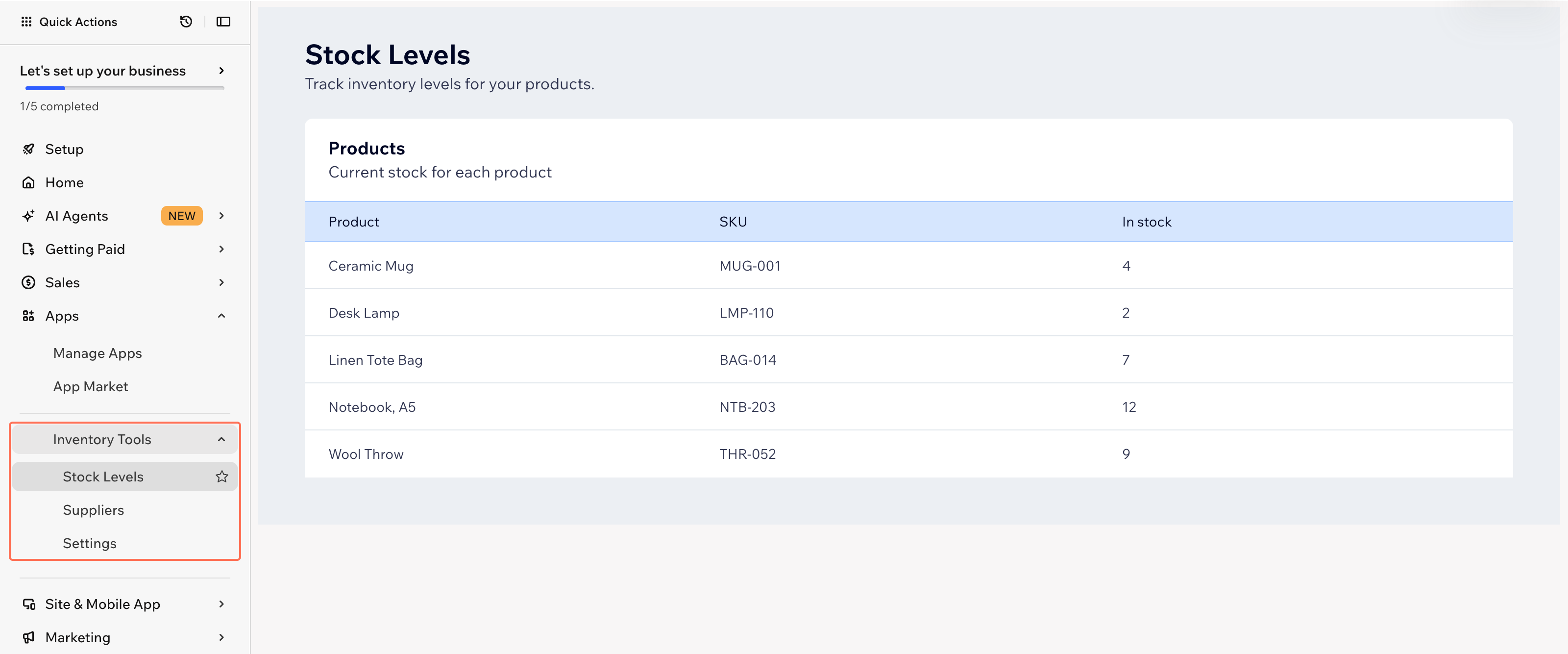
When to use a dashboard sidebar category
Use a dashboard sidebar category when your Wix CLI project has more than one dashboard page. Common cases include:
- Grouping an app's settings, reports, and management pages under the app's name.
- Splitting a large app's dashboard pages into more than one group, like a group for store setup pages and a group for report pages.
Without a sidebar category, each dashboard page of a Wix CLI app appears in the sidebar as its own entry under Apps, as if it were a separate app. The dashboard pages of a Wix-managed headless project appear under Custom Pages.
Wix groups an app's dashboard pages automatically when they're added in the app dashboard or in Wix Blocks, so those apps don't need a sidebar category.
Sidebar placement and order
A sidebar category is an entry in the dashboard sidebar, under Apps, and its pages appear under its title. A page that isn't in a category is its own entry under Apps, at the same level as the app's sidebar categories. In a Wix-managed headless project, a page that isn't in a category appears under Custom Pages instead.
Priority sets the order. Each sidebar category and each page can have a priority. Smaller numbers appear higher, and the default priority is 0.
The sidebar applies priority at two levels:
- Under Apps, it orders an app's sidebar categories together with the app's pages that aren't in a category.
- In a sidebar category, it orders the category's pages.
Example of sidebar order
An app has the following:
- A sidebar category named Reports with a priority of 1.
- A dashboard page named Revenue in the Reports category, with a priority of 1.
- A dashboard page named Traffic in the Reports category, with a priority of 3.
- A dashboard page named Settings with a priority of 2, not in a category.
The sidebar lists them under Apps in the following order:
- Reports
- Revenue
- Traffic
- Settings
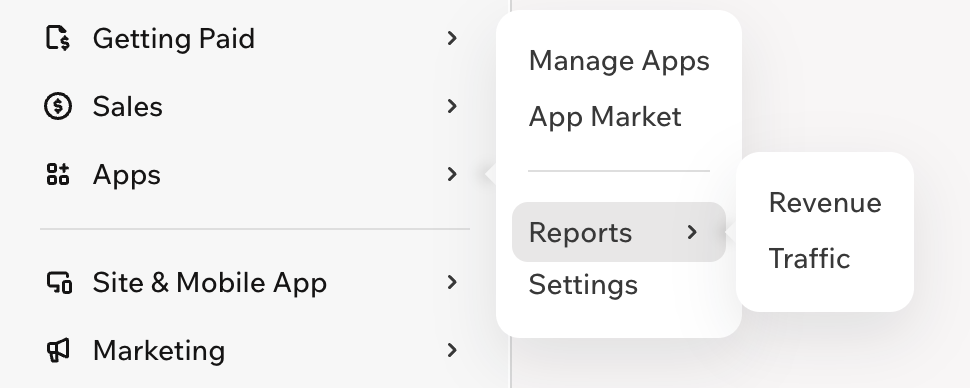
Settings has a smaller number than Traffic, but the sidebar doesn't compare them. It orders Settings together with Reports, and it orders Traffic among the pages in Reports.
Some cases change what the sidebar shows:
- A sidebar category with only one page shows as that page, without the category's title.
- A sidebar category with no pages doesn't appear.
- A page that links to a sidebar category that doesn't exist doesn't appear in the sidebar. In a Wix-managed headless project, it appears under Custom Pages instead.
Sidebar category definition
Sidebar categories are configured rather than coded. In Wix CLI projects, a dashboard sidebar category is a single configuration file that declares the category's ID, its title, and optionally its priority. Each dashboard page links to a sidebar category by setting the page's category ID to the category's ID. For the file and configuration fields, see Dashboard Sidebar Category Extension Files and Code.
Dashboard sidebar categories across development paths
The development path determines how you add a dashboard sidebar category:
- Sites: Create a private app that registers the sidebar category and its dashboard pages, and install that app on the site.
- Wix-managed headless projects:
- Full Wix integration (Astro): Use the Wix CLI. See Add Dashboard Sidebar Category Extensions with the Wix CLI in Go Headless.
- Other frameworks: Don't support dashboard sidebar category extensions directly. Follow the same approach as self-managed headless projects.
- Self-managed headless projects: Create a private app that registers the sidebar category and its dashboard pages, and install that app in your headless project.
- Wix-managed apps: Use the Wix CLI. See Add Dashboard Sidebar Category Extensions with the Wix CLI in Build Apps.
- Self-managed apps: Don't add sidebar categories. When an app has more than one dashboard page in the app dashboard, Wix groups the pages automatically.
- Blocks apps: Don't add sidebar categories. When an app has more than one Blocks dashboard page, Wix groups the pages automatically.
Last updated: 19 November 2026