Define Backend Event Handlers
You can define backend event handlers in the events.js backend file to automatically respond to actions that occur on your site.
Note: Backend events currently require Velo APIs and file naming conventions. While you can use the JavaScript SDK alongside Velo, backend event handlers must be defined using Velo syntax in the events.js backend file. Don't use the event handlers in the JavaScript SDK for backend events when extending Wix sites.
Step 1 | Add an events.js backend file
The way that you add an events.js file to the backend depends on which development environment you're using.
Editor
- Hover over Backend in the Public & Backend section of the code sidebar.
- Click the More Actions icon
 and then click Handle backend events.
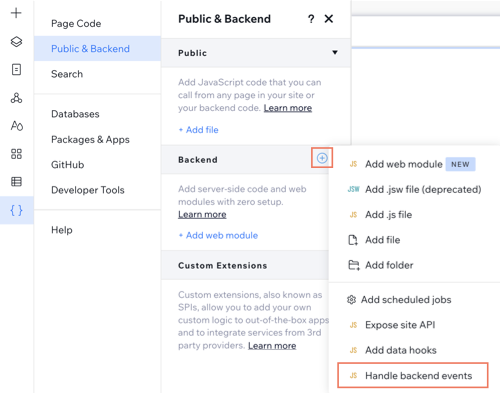
Wix IDE or your local IDE
Add an events.js file to the src/backend folder.
Step 2 | Define a backend event handler
To define an event handler in the events.js file, export a function. The function name should consist of the Wix module and the name of the event, separated by an underscore. Check the Events subcategory in the API documentation to confirm the exact function naming and to see what information is passed to the event handler when it's called.
Here is an example of an event handler that triggers when an invoice is paid:
Using the SDK in backend event handlers
While the event handler function itself must use Velo syntax, you can call SDK functions from in your event handlers:
This hybrid approach allows you to leverage both the event-driven architecture and modern SDK APIs for data manipulation and business logic.
Step 3 | Test and debug your function
There are 2 ways to test your backend event handlers:
- In preview mode, use functional testing to call your event handler function manually.
- Publish your site, then trigger the event that activates your event handler.
See also
Last updated: 22 July 2026