Import Types with JSDoc
Import JSDoc types into your JavaScript code to enable type checking and autocomplete functionality.
Step 1 | Define and export a type
To use a custom type, you first need to define it. If you want to use your defined type in other files, you must export the type.
You can skip this step when using types defined by Wix.
To define and export a type using JSDoc:
-
Use JSDoc tags and definitions to define a type. For example:
Copy -
Choose how to make your type available to other files:
-
Global type: By default, your type is available in any file across the site without importing. This is convenient but can cause naming conflicts if you use the same type name in different files.
-
Restricted type: Add
export {};below your JSDoc definition to keep the type contained within its file. This prevents naming conflicts and requires explicit importing when used elsewhere.
Copy -
Step 2 | Access a JSDoc type
The way that you import a JSDoc type depends on where and how you expose the type
Global types
Use the type directly without importing it. For example:
Restricted types
Import your type using import('<file-path.js>').<type-def-name> directly in the JSDoc tag. For example:
Editor elements
You can use Wix Editor elements directly in JSDoc types without importing them. Define the JSDoc data type using $w. Element. For example:
Backend event handlers
By default, the file for backend event handlers, events.js, doesn't know the type of the parameter you are passing to a method.
To tell your events.js file the parameter's type:
- Check the event's
EventObjectName. You can find it in the method declaration in API reference. - Add the following code above the method declaration:
Copy
Example: onBookingCreated()
To add JSDoc to wix-bookings.v2 event, onBookingCreated():
- Open the API reference for
onBookingCreated(). Find theEventObjectName.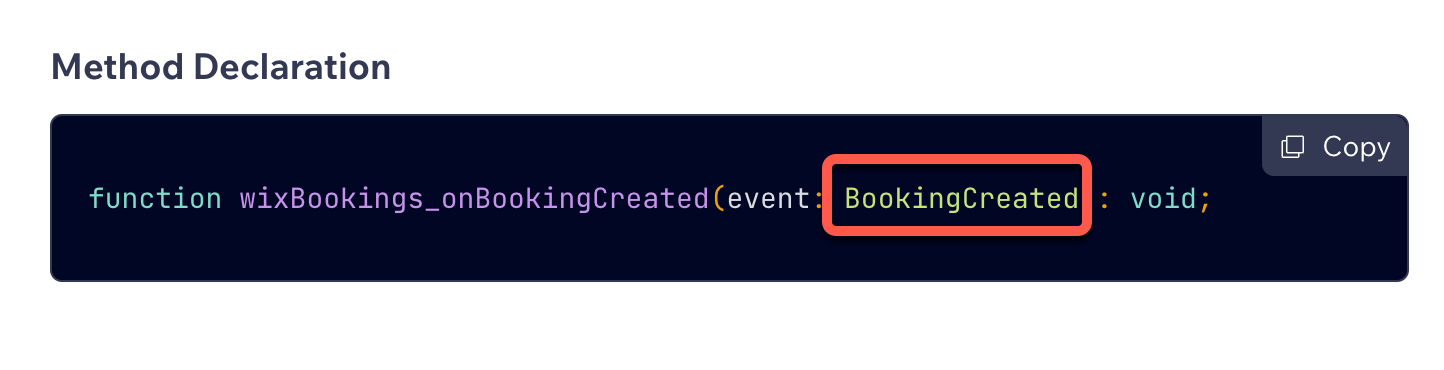
- Add the following JSDoc annotation above the event handler method in the
events.jsfile:/** @param {import('api-module-name').Events. BookingCreated} event */
Routers
By default, the routers.js file doesn't support autocomplete or type checking for WixRouterRequest objects passed to router methods.
To support autocomplete or type-checking in a routers.js file, add the following JSDoc annotation above the router methods: