Test Backend Functions with Functional Testing
The code editor comes with a functional testing tab where you can test your backend functions individually. This reduces the need to manually trigger and test your backend code by calling functions from the frontend, speeding up the development and debugging process.
Test a backend function
To test a single backend function with functional testing:
-
In the code panel, open the backend file that contains the function you want to test.
-
In the code editor, click the play icon button
 located to the left of your function.
This opens the functional testing tab. Your function name appears in the tab header.
-
In the Set Parameters section of the test tab, each parameter appears as a separate property in a JSON. Add sample arguments for each property in the JSON. Click Run to see the output.
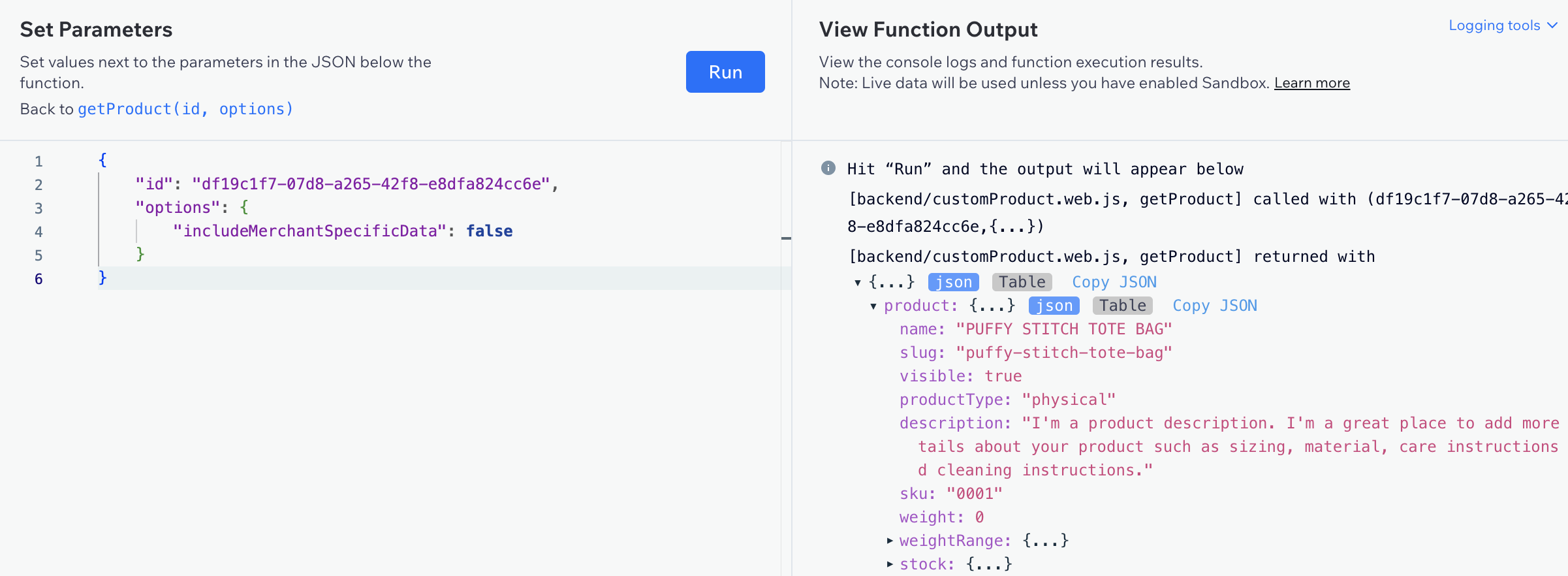
Notes:
- If your function doesn't take any parameters, leave the JSON empty.
- If you close the functional testing tab, the last sample input parameter values and the most recent function output are saved and appear when you reopen the tab unless you refresh the page.
Additional functional testing tab actions
You can also perform the following actions in the functional testing tab:
-
Clear sample parameter values: Hover over your parameter values in the Set Parameters section and click the reset button
 .
. -
Clear test output: Hover over your output in the View Function Output section and click the clear button:
 .
.
See also
Last updated: 11 December 2025