About JSDoc Tags
JSDoc is a popular markup language used to document JavaScript code. You can use JSDoc in a Wix environment in the same way as you would in any JavaScript environment.
Adding JSDoc to your custom code allows you to benefit from type checking and code autocompletion.
Supported IDEs
You can add and benefit from JSDoc using:
- The editor (Wix Studio and Wix Editor).
- The Wix IDE (Wix Studio).
- Your local IDE (Wix Studio and Wix Editor).
You can only import JSDoc in the editor.
JSDoc tags and definitions
Add JSDoc tags to JavaScript files as comments.
Each line of JSDoc defines an item using the following format:
JSDoc tags
| Variable | Description |
|---|---|
jsdoc-tag | JSDoc tag that defines what the item is. For example, use @typedef to define a new type, @property to define the property of an object, and @param to define a parameter. |
type | Data type of the item. For example, object. |
item-name | Name or identifier for the item being documented. |
description | Description of the item. Optional. |
Where to add JSDoc in your code
You can add JSDoc to your code as you would to any JavaScript code, by including the annotations just above the code you are documenting. However, when defining a method parameter type using the @param tag, place the JSDoc definition directly above the method declaration.
JSDoc example
In the following example, we define an employee type that's then applied to a method parameter.
Type checks and autocompletion
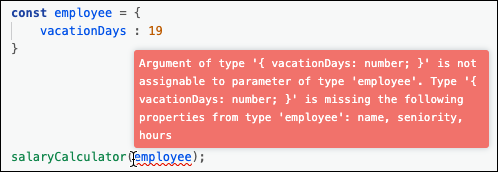
When you apply JSDoc types to parameters, the editor can perform type checking and provide autocomplete suggestions for method arguments.

File types
You can add JSDoc in any JavaScript file, meaning the file's suffix is .js. This includes JavaScript files in custom apps, allowing anyone using the custom app to use type checking and autocomplete.
You can import types defined by Wix in some specific file types.
For example, you can import backend event objects to events.js files.