About the Regular Editor when Connected to GitHub
Note: This article refers to 2 different versions of the editor:
- Regular Editor: The editor that's generally used to build Wix sites.
- Local Editor: A specialized version of the Regular Editor that's used when extending a site in a local IDE.
When you connect a site to GitHub, the Regular Editor undergoes some changes to facilitate code management and version control. The code in the Regular Editor is automatically synced with the default branch of the connected repo.
Because a connected site's code is managed outside of the editor, the code in the Regular Editor is in read-only mode.
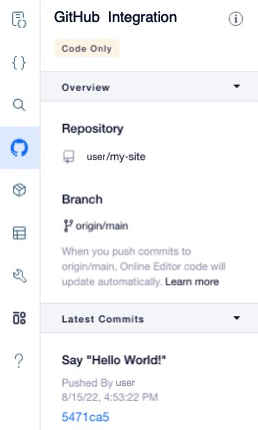
The name of the connected repo as well as the details of commits to the default branch appear in the GitHub Integration panel of the sidebar.
About read-only mode
While a site is connected to GitHub, the Regular Editor is in read-only mode. This involves the following changes:
- Code files are read-only. You can't make any changes to the site's code or add new files. Use the local IDE to add new files and change code.
- You can add dynamic event handlers to elements using code. To see the event handlers supported for each element, check the Velo API Reference.
- Changes to the fields in a collection are immediately reflected on the live site, even before you publish.
- If you duplicate a page on the site, the page's code isn't included in the copy.
See also
Last updated: 22 July 2026
Did this help?