About Legacy Limits
In September 2023, Wix launched new premium plans that include updated limits on data, compute platform, and developer tools features.
The new limits impact existing sites, as follows:
- Existing free sites moved to the new free tier limits.
- Existing sites with earlier premium plans continue receiving legacy plan limits.
Checking a site's plan
If a site has a premium plan, you can check if it has a legacy premium plan or a new premium plan.
To check the plan type, do the following:
- Open the site's dashboard.
- Navigate to Settings > Manage plan.
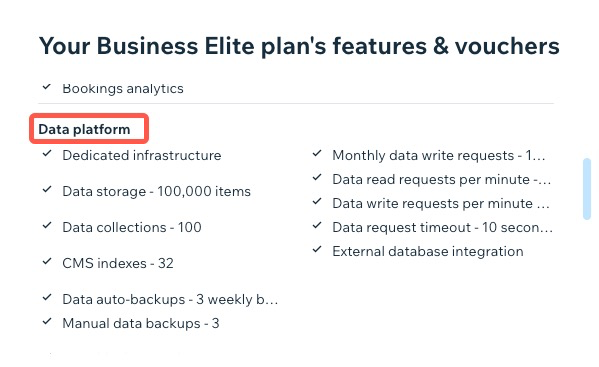
- Click View Plan Features. A modal opens, displaying the site's premium plan features.
- Scroll down to see the site's plan limits.
- If you see dedicated sections for Data platform, Compute platform, and Developer tools, the site has a new premium plan.
- If you don't see these sections, the site has a legacy premium plan.
Changing a site's plan
If a site has a legacy premium plan and you move to a new plan, the plan's limits change. In some cases, the new plan may have lower limits for some features than the site's current usage. Downgrade behavior varies by feature. Learn more about downgrade behavior for data platform, compute platform, and developer tools features.
Legacy plan limits
These tables list the limits for legacy premium plans.
Data platform
| Feature | Limit |
|---|---|
| Data storage | 10 GB |
| Data collections | 1000 |
| Data indexes | - |
| Data requests per minute | Read: 3000/minute Write: 1500/minute |
| Data request timeout | 5 seconds |
| External database integration | Yes |
Compute platform
| Feature | Limit |
|---|---|
| Backend containers | 1 micro container |
| Capacity per container | 1 vCPU 400 MB RAM |
| Backend requests per minute | 7000 |
| Backend request timeout | 14 seconds |
Developer tools
| Feature | Limit |
|---|---|
| Scheduled jobs | Up to 20 1 hour minimum interval |
| Backend event handlers | Yes |
| Service plugins | Yes |
Last updated: 11 December 2025
Did this help?