> Portal Navigation:
> 
> - Append `.md` to any URL under `https://dev.wix.com/docs/` to get its markdown version.
> - Pages are either content pages (article or reference text) or menu pages (a list of links to child pages).
> - To get a menu page, truncate any URL to a parent path and append `.md` (e.g. `https://dev.wix.com/docs/sdk.md`, `https://dev.wix.com/docs/sdk/core-modules.md`).
> - Top-level index of all portals: https://dev.wix.com/docs/llms.txt
> - Full concatenated docs: https://dev.wix.com/docs/llms-full.txt

## Resource: Changes to the Editor When Your Site Is Integrated

## Article: Integrating Your Site With GitHub

## Article Link: https://dev.wix.com/docs/develop-websites/articles/workspace-tools/developer-tools/git-integration-wix-cli-for-sites/changes-to-the-editor-when-your-site-is-integrated.md

## Article Content:

# Changes to the Editor When Your Site Is Integrated

When you connect your site to GitHub, a GitHub repository is created to store your site's code. Once this happens, the code in the editor is synced with the [default branch](https://docs.github.com/en/pull-requests/collaborating-with-pull-requests/proposing-changes-to-your-work-with-pull-requests/about-branches#about-the-default-branch) of this repo.

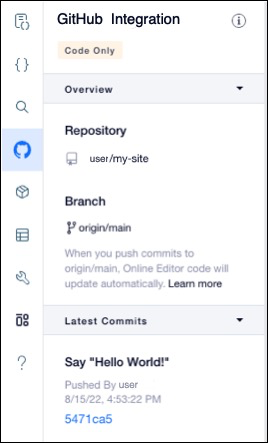
The name of the connected repo as well as the details of commits to the default branch appear in the **GitHub Integration**  ![](https://user-images.githubusercontent.com/89579857/184650610-e5aec718-676b-4dc5-b9b4-cad2b6c1fc64.png) panel of the sidebar. 

 <div style="text-align:center">
 
 <img src="https://user-images.githubusercontent.com/89579857/188308333-b67eeb2a-d422-4070-b38d-2cbee24127ae.png" style="max-width:40vw" />
 
 </div>

## About read-only mode

While your site is connected to GitHub, the editor is in read-only mode. This involves the following changes:

*   Code files are read-only. You can't make any changes to your site's code or add new files. Use your local IDE to [add new files and change code](https://dev.wix.com/docs/develop-websites/articles/workspace-tools/developer-tools/git-integration-wix-cli-for-sites/git-hub-repository-file-structure.md).
*   You can add [dynamic event handlers](https://dev.wix.com/docs/develop-websites/articles/coding-with-velo/frontend-code/about-event-handlers-in-wix.md) to elements using code. To see the event handlers supported for each element, check the [Velo API Reference](https://www.wix.com/velo/reference/$w).
*   Changes to the [fields](https://support.wix.com/en/article/content-manager-about-your-collection-fields) in a collection are immediately reflected on your live site, even before you publish.
*   If you duplicate a page on your site, the page's code isn't included in the copy.

## See also

* [Testing your code with the Local Editor](https://dev.wix.com/docs/develop-websites/articles/workspace-tools/developer-tools/git-integration-wix-cli/test-your-code-in-the-local-editor.md)
* [Publish a Site with Git Integration & Wix CLI for Sites](https://dev.wix.com/docs/develop-websites/articles/workspace-tools/developer-tools/git-integration-wix-cli/publishing-a-site-with-git-integration-wix-cli.md)