Catalog V1 to V3 Migration Guide
This guide aims to assist developers in migrating from the Stores Catalog V1 API to the V3 API. It outlines key changes in the product object structure and provides detailed conversion tables for various components.
This guide does not provide an automatic migration path. Rather, it serves as a reference for understanding structural and naming differences between the two versions. Use this guide when rebuilding or updating your implementation to align with the new V3 API.
To ensure that new and existing sites can install your app, your app must support both Catalog V3 and Catalog V1. You must confirm compatibility in your app's dashboard for Wix users to install your app. The image below shows an example of the compatibility confirmation screen.
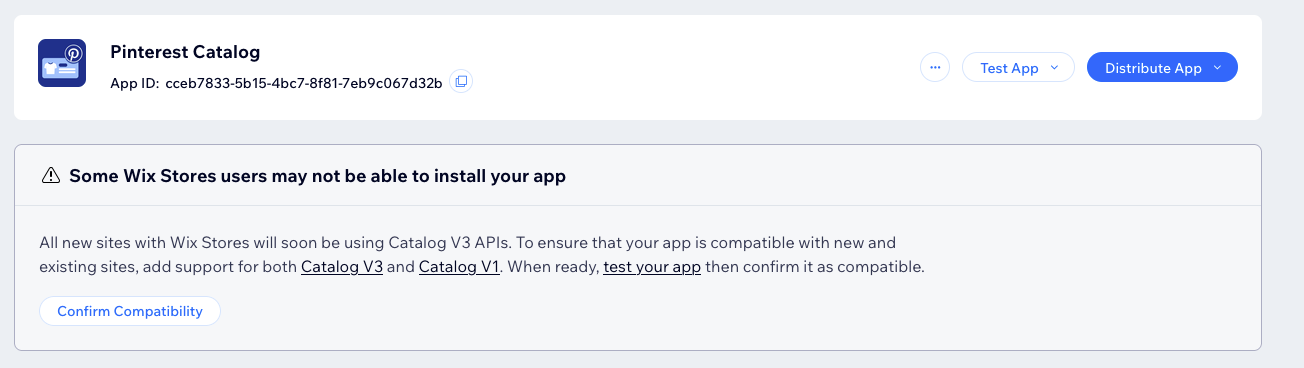
New apps that don't support both versions won't be listed in the app market. Existing apps that don't support both versions won't work on new sites.
Major Changes
- Product to Variant Field Relocation: Several fields have moved from the product level to the variant level, including actual price and compare at price. This change allows for more granular control per variant.
- Universal Variants: Every product now has at least one variant. Products without options are treated as 'single variant products'.
- Variant Management: The
manageVariantsfield has been removed. All products now have variants:- Products without options are considered single variant products
- Products with at least one option (equivalent to
managedVariants: truein V1) may have multiple variants
- Pricing Model Changes:
- Variant-Level Pricing: Pricing is now exclusively managed at the variant level. The
priceDataandconvertedPriceDataobjects have been removed. Instead, the price fields themselves will reflect the converted currency values. Note that read-only Price Ranges likeactualPriceRangeandcompareAtPriceRangeare still available at the product level to reflect the minimum and maximum prices across all variants. - New Discount Model: The
discountobject (including percentage or amount types) is no longer supported. Instead, discounts are represented by the relationship between two price fields:actualPrice: (Required) The final selling price (what the customer pays).compareAtPrice: (Optional) The original price (displayed as strikethrough).
- How to Convert:
- If product has a discount: Map V1
price→ V3compareAtPrice, and V1discountedPrice→ V3actualPrice. - If product has NO discount: Map V1
price→ V3actualPriceand leavecompareAtPriceempty.
- If product has a discount: Map V1
- Variant-Level Pricing: Pricing is now exclusively managed at the variant level. The
- Options and Modifiers: In V3 options will always create variants, equivalent to V1
manageVariants=true. Modifiers behave like V1 options withmanageVariants=false. A major improvement in V3 is the ability to mix options and modifiers on the same product. - Custom Text Fields: These have been moved to the
modifiersfield. Map V1customTextFields&arr; V3modifierswith typeFREE_TEXT. - Variant Data in Query/Search Operations: Query and Search endpoints in Products V3 don't include variants in the response. For variant-centric queries, use the Read-Only Variants API.
Some fields previously accessible via the Catalog V1 Product object are now available through other Catalog V3 APIs. On the other hand, some fields that required separate API calls in V1 are now directly available in the Products V3 API.
Conversion Tables
*Fields marked with an asterisk signify little to no change in semantics or access.
Product Object Conversion
| Product V1 | Product V3 | Notes |
|---|---|---|
id* | id | The $hasSome operator for filtering by product.id is not supported in V3. |
name* | name | |
slug* | slug | |
visible* | visible | |
productType | productType | Enum values in V3 are in UPPER_CASE |
description | description (recommended) OR plainDescription (if integration with RICOS isn't possible) | |
sku | variantsInfo.variants[i].sku | For single variant product only. Each variant in V3 can have its own SKU |
weight | variantsInfo.variants[i].physicalProperties.weight | For single variant product only. Each variant in V3 can have its own weight |
weightRange.minValue | physicalProperties.shippingWeightRange.minValue | |
weightRange.maxValue | physicalProperties.shippingWeightRange.maxValue | |
stock.trackInventory | Available via Inventory Items API | Each variant in V3 can have its own inventory. Search Inventory Items and filter by productId and/or variantId. |
stock.quantity | Available via Inventory Items API | Each variant in V3 can have its own inventory. Search Inventory Items and filter by productId and/or variantId. |
stock.inventoryStatus | inventory.availabilityStatus | |
priceData.currency | currency | Now a requested field |
priceData.price | variantsInfo.variants[i].price.compareAtPrice.amount | See Pricing Model Changes in Major Changes section above |
priceData.discountedPrice | variantsInfo.variants[i].price.actualPrice.amount | See Pricing Model Changes in Major Changes section above |
priceData.formatted.price | variantsInfo.variants[i].price.compareAtPrice.formattedAmount | See Pricing Model Changes in Major Changes section above |
priceData.formatted.discountedPrice | variantsInfo.variants[i].price.actualPrice.formattedAmount | See Pricing Model Changes in Major Changes section above |
priceData.formatted.pricePerUnit | variantsInfo.variants[i].physicalProperties.pricePerUnit.description | See Pricing Model Changes in Major Changes section above |
priceData.pricePerUnit | variantsInfo.variants[i].physicalProperties.pricePerUnit.value | See Pricing Model Changes in Major Changes section above |
convertedPriceData.currency | currency | Now a requested field |
convertedPriceData.price | variantsInfo.variants[i].price.compareAtPrice.amount | For single variant product only. Each variant in V3 can have its own compare at price |
convertedPriceData.discountedPrice | variantsInfo.variants[i].price.actualPrice.amount | For single variant product only. Each variant in V3 can have its own actual price |
convertedPriceData.formatted.price | variantsInfo.variants[i].price.compareAtPrice.formattedAmount | For single variant product only. |
convertedPriceData.formatted.discountedPrice | variantsInfo.variants[i].price.atualPrice.formattedAmount | For single variant product only. |
convertedPriceData.formatted.pricePerUnit | variantsInfo.variants[i].physicalProperties.pricePerUnit.description | For single variant product only. |
convertedPriceData.pricePerUnit | variantsInfo.variants[i].physicalProperties.pricePerUnit.value | For single variant product only. |
priceRange.minValue | compareAtPriceRange.minValue.amount | |
priceRange.maxValue | compareAtPriceRange.maxValue.amount | |
costAndProfitData.itemCost | variantsInfo.variants[i].revenueDetails.cost.amount | For single variant product only. |
costAndProfitData.formattedItemCost | variantsInfo.variants[i].revenueDetails.cost.formattedAmount | For single variant product only. |
costAndProfitData.profit | variantsInfo.variants[i].revenueDetails.profit.amount | For single variant product only. |
costAndProfitData.formattedProfit | variantsInfo.variants[i].revenueDetails.profit.formattedAmount | For single variant product only. |
costAndProfitData.profitMargin | variantsInfo.variants[i].revenueDetails.profitMargin | For single variant product only. |
costRange.minValue | costRange.minValue.amount | |
costRange.maxValue | costRange.maxValue.amount | |
pricePerUnitData.baseQuantity | physicalProperties.pricePerUnit.quantity | |
pricePerUnitData.baseMeasurementUnit | physicalProperties.pricePerUnit.measurementUnit | |
pricePerUnitData.totalQuantity | variantsInfo.variants[i].physicalProperties.pricePerUnit.settings.quantity | V3 moves unit settings to the variant level for greater flexibility. Base settings remain on the product. |
pricePerUnitData.totalMeasurementUnit | variantsInfo.variants[i].physicalProperties.pricePerUnit.settings.measurementUnit | V3 moves unit settings to the variant level for greater flexibility. Base settings remain on the product. |
additionalInfoSections[i].description | infoSections[i].description (recommended) OR infoSections[i].plainDescription (if integration with RICOS isn't possible) | Learn more in the Info Section API |
additionalInfoSections[i].title | infoSections[i].title | Learn more in the Info Section API |
| - | infoSections[i].uniqueName | New in V3. Required unique identifier set by the developer. Learn more in the Info Section API |
media.mainMedia | media.main | See media conversion table |
media.items[i] | media.itemsInfo.items[i] | See media conversion table |
customTextFields[i].title | modifiers[i].freeTextSettings.title | Manage these fields with the Customizations API |
customTextFields[i].maxLength | modifiers[i].freeTextSettings.maxCharCount | Manage these fields with the Customizations API |
customTextFields[i].mandatory | modifiers[i].mandatory | Manage these fields with the Customizations API |
manageVariants | - | See point (3) in Major Changes section above |
productOptions | options | See Options and Modifiers in Major Changes section above |
productOptions[i].optionType and manageVariants = true | options[i].optionRenderType | Writable in V3. drop_down becomes TEXT_CHOICES; color becomes SWATCH_CHOICES. |
productOptions[i].optionType and manageVariants = false | modifiers[i].modifierRenderType | Writable in V3. drop_down becomes TEXT_CHOICES; color becomes SWATCH_CHOICES. |
productOptions[i].name and manageVariants = true | options[i].name | |
productOptions[i].name and manageVariants = false | modifiers[i].name | |
productOptions[i].choices[i].value and manageVariants = true | options[i].choicesSettings.choices[i] | |
productOptions[i].choices[i].value and manageVariants = false | modifiers[i].choicesSettings.choices | |
productOptions[i].choices[i].description and manageVariants = true | options[i].choicesSettings.choices[i].name | |
productOptions[i].choices[i].description and manageVariants = false | modifiers[i].choicesSettings.choices[i].name | |
productOptions[i].choices[i].media and manageVariants = true | options[i].choicesSettings.choices[i].linkedMedia[i] | See media conversion table |
productOptions[i].choices[i].media and manageVariants = false | modifiers[i].choicesSettings.choices[i].linkedMedia[i] | See media conversion table |
productOptions[i].choices[i].inStock | options[i].choicesSettings.choices[i].inStock | |
productOptions[i].choices[i].visible | options[i].choicesSettings.choices[i].visible | |
productPageUrl.base | url.url | Must be a full URL |
productPageUrl.path | url.relativePath | |
numericId | Was used for cursor paging - V3 Query & Search APIs support cursor paging out of the box | |
inventoryItemId | Available via Inventory Items API | Moved to inventory service but it's no longer saved on Product V3. Search Inventory Items and filter by productId and/or variantId. |
discount.type | variantsInfo.variants[i].price.actualPrice.amount | Discounts now saved on each variant |
discount.value | variantsInfo.variants[i].price.actualPrice.amount | Discounts now saved on each variant |
collectionIds[i] | directCategories[i].id | |
variants[i].id | variantsInfo.variants[i].id | |
variants[i].choices[key] | variantsInfo.variants[i].choices[i].optionChoiceNames.optionName | |
variants[i].choices[value] | variantsInfo.variants[i].choices[i].optionChoiceNames.choiceName | |
| - | variantsInfo.variants[i].choices[i].optionChoiceNames.renderType | New in V3. Required. Must match the optionRenderType defined in product.options. |
variants[i].variant.priceData | - | See point (5) in Major Changes section above |
variants[i].variant.convertedPriceData.price | variantsInfo.variants[i].price.compareAtPriceRange.amount | |
variants[i].variant.convertedPriceData.discountedPrice | variantsInfo.variants[i].price.actualPrice.amount | |
variants[i].variant.convertedPriceData.formatted.price | variantsInfo.variants[i].price.compareAtPriceRange.formattedAmount | |
variants[i].variant.convertedPriceData.formatted.discountedPrice | variantsInfo.variants[i].price.actualPrice.formattedAmount | |
variants[i].variant.convertedPriceData.formatted.pricePerUnit | variantsInfo.variants[i].physicalProperties.pricePerUnit.description | |
variants[i].variant.convertedPriceData.pricePerUnit | variantsInfo.variants[i].physicalProperties.pricePerUnit.value | |
variants[i].variant.costAndProfitData.itemCost | variantsInfo.variants[i].revenueDetails.cost.amount | |
variants[i].variant.costAndProfitData.formattedItemCost | variantsInfo.variants[i].revenueDetails.cost.formattedAmount | |
variants[i].variant.costAndProfitData.profit | variantsInfo.variants[i].revenueDetails.profit.amount | |
variants[i].variant.costAndProfitData.formattedProfit | variantsInfo.variants[i].revenueDetails.profit.formattedAmount | |
variants[i].variant.costAndProfitData.profitMargin | variantsInfo.variants[i].revenueDetails.profitMargin | |
variants[i].variant.weight | variantsInfo.variants[i].physicalProperties.weight | |
variants[i].variant.sku | variantsInfo.variants[i].sku | |
variants[i].variant.visible | variantsInfo.variants[i].visible | |
variants[i].stock.trackQuantity | Available via Inventory Items API | |
variants[i].stock.quantity | Available via Inventory Items API | |
variants[i].stock.inStock | variantsInfo.variants[i].inventoryStatus.inStock | |
lastUpdated | updatedDate | |
createdDate | createdDate | |
seoData* | seoData | |
ribbon | ribbon.name | Manage these fields with the Ribbons API |
brand | brand.name | Manage these fields with the Brands API |
taxGroupId | taxGroupId | |
digitalFile.id | variantsInfo.variants[i].digitalProperties.digitalFile.id | Each variant in V3 can have its own digital file |
digitalFile.fileName | variantsInfo.variants[i].digitalProperties.digitalFile.fileName | Each variant in V3 can have its own digital file |
digitalFile.fileType | variantsInfo.variants[i].digitalProperties.digitalFile.fileType | Each variant in V3 can have its own digital file |
*Fields marked with an asterisk signify little to no change in semantics or access.
Media Conversion Table
New in V3: product media can be set directly as part of the Products API via the product.media field.
| Media V1 | Media V3 |
|---|---|
thumbnail.url | - |
thumbnail.width | - |
thumbnail.height | - |
thumbnail.format | - |
thumbnail.altText | - |
mediaType | - |
title and mediaType = IMAGE | image.fileName |
title and mediaType = VIDEO | video.filename |
id and mediaType = IMAGE | image.id |
id and mediaType = VIDEO | video.id |
image.url* | image.url |
image.width* | image.width |
image.height* | image.height |
image.format | - |
image.altText* | image.altText |
video.files[i].url | video.resolutions[i].url |
video.files[i].width | video.resolutions[i].width |
video.files[i].height | video.resolutions[i].height |
video.files[i].format | video.resolutions[i].format |
video.files[i].altText | - |
video.stillFrameMediaId | - |
Inventory Conversion Table
In V3, you can manage inventory using the dedicated Inventory Items API. Alternatively, you can set inventory alongside product variants for easier assignment using Create Product With Inventory or Bulk Update Products With Inventory.
| Inventory V2 | Inventory Items V3 | Notes |
|---|---|---|
id* | id | |
productId* | productId | |
trackQuantity | trackQuantity | Now per-variant and read-only. Derived from inStock or quantity. |
variants[i].variantId | variantId | |
variants[i].inStock | trackingMethod.inStock | |
variants[i].quantity | trackingMethod.quantity | |
variants[i].availableForPreorder | AvailabilityStatus = PREORDER | |
lastUpdated | updatedDate | |
numericId | - | Was used for cursor paging - V3 Query & Search APIs support cursor paging out of the box |
preorderInfo.enabled | preorderInfo.enabled | Now per-variant |
preorderInfo.message | preorderInfo.message | Now per-variant |
preorderInfo.limit | preorderInfo.limit | Now per-variant |
Subscriptions Conversion Table
In V1 Subscriptions has its own APIs, where in V3 we don't have a dedicated API. Subscriptions exists directly in Product entity.
| SubscriptionOption V1 | Product V3 |
|---|---|
id | subscriptionDetails.subscriptions[i].id |
title | subscriptionDetails.subscriptions[i].title |
description | subscriptionDetails.subscriptions[i].description |
subscriptionSettings.frequency | subscriptionDetails.subscriptions[i].frequency |
subscriptionSettings.interval | subscriptionDetails.subscriptions[i].interval |
subscriptionSettings.autoRenewal | subscriptionDetails.subscriptions[i].autoRenewal |
subscriptionSettings.billingCycles | subscriptionDetails.subscriptions[i].billingCycles |
discount.type | subscriptionDetails.subscriptions[i].discount.type |
discount.value | subscriptionDetails.subscriptions[i].discount.amountOff OR subscriptionDetails.subscriptions[i].discount.percentOff |
| SubscriptionOptionInProduct V1 | Product V3 |
|---|---|
id | subscriptionDetails.subscriptions[i].id |
hidden | subscriptionDetails.subscriptions[i].visible |
title | subscriptionDetails.subscriptions[i].title |
description | subscriptionDetails.subscriptions[i].description |
subscriptionSettings.frequency | subscriptionDetails.subscriptions[i].frequency |
subscriptionSettings.interval | subscriptionDetails.subscriptions[i].interval |
subscriptionSettings.autoRenewal | subscriptionDetails.subscriptions[i].autoRenewal |
subscriptionSettings.billingCycles | subscriptionDetails.subscriptions[i].billingCycles |
discount.type | subscriptionDetails.subscriptions[i].discount.type |
discount.value | subscriptionDetails.subscriptions[i].discount.amountOff OR subscriptionDetails.subscriptions[i].discount.percentOff |
Webhook Conversion Table
The following table shows Catalog V1 webhooks and their equivalents in Catalog V3 that are triggered at the same time:
| Catalog V1 | Catalog V3 |
|---|---|
| Product Created | Product Created |
| Product Changed | Product Updated |
| Product Deleted | Product Deleted |
| Variants Changed | Product Updated variantsInfo will be included in modifiedFields |
| Collection Created | Category Created |
| Collection Changed | Category Updated |
| Collection Deleted | Category Deleted |
We've updated the structure of the webhook/event payload.
The product ID is now provided both at the top level as entityId and as product.id within the payload itself.
The table below describes where to find the product ID or product entity in the new webhook payloads:
| Catalog V1 Webhooks | Catalog V3 Webhooks |
|---|---|
productId, collectionId, variants.variantId | All webhook payloads - entityId |
Product Changed - changedFields | modifiedFields |
| Product/Collection Created entity data | createdEvent.entityAsJson |
For more detailed information on specific field changes and how to access data in the new API structure, please refer to our API documentation.
Last updated: 30 December 2025