Flow: Loyalty Program Setup
This article outlines the end-to-end flow for setting up and managing a loyalty program using the Wix Loyalty APIs, from initial program activation through customer account creation and point management.
A loyalty program allows site owners to reward customers with points that can be redeemed for rewards, helping to increase customer retention and engagement. Site owners can customize the program name, point name, and rewards to match their brand.
Note: On Wix sites, the loyalty program is managed through the Wix Loyalty Program app.
Before you begin
It's important to note the following before starting to code:
- A Wix user must create the loyalty program through the dashboard.
- There can only be 1 loyalty program per Wix site.
- Each customer can have only 1 loyalty account.
- Customers must have a contact ID to create a loyalty account.
The following diagram shows the full loyalty program setup flow.
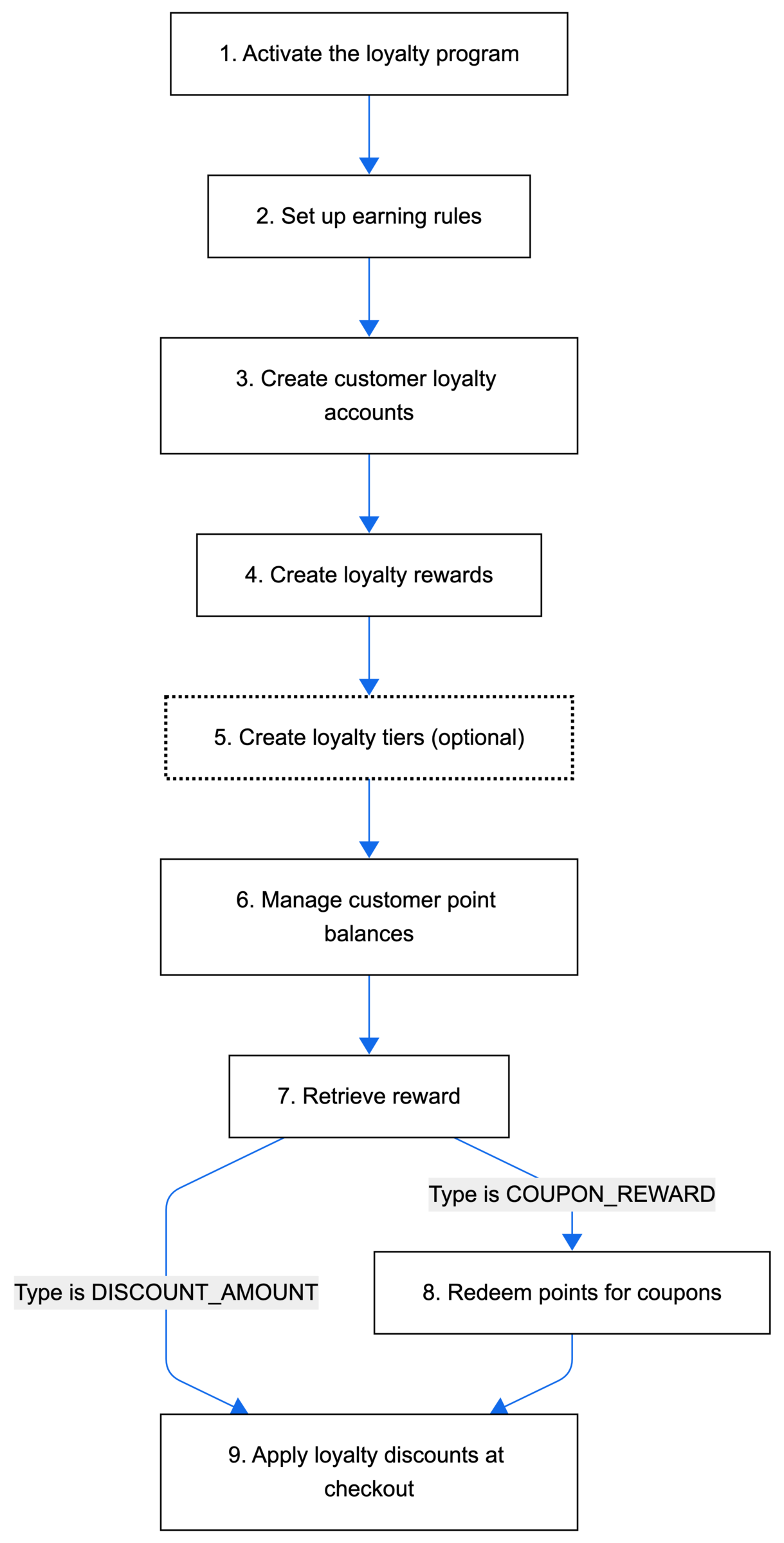
The following steps describe the complete setup flow for configuring a loyalty program from activation through managing customer accounts and points.
Step 1 | Activate the loyalty program
Begin by activating the loyalty program for a site. The program must be created on a site before it can be activated.
Action: Call Activate Program to enable the loyalty program on a site.
Result: Activates the loyalty program, making it available for customer participation.
Step 2 | Set up earning rules
Define how customers can earn points. Earning rules specify the conditions and actions that trigger point awards. For example, you might create a rule that awards 10 points for every $1 spent, or 50 bonus points for writing a product review.
Action: Call the Create Loyalty Earning Rule to create a rule for how customers earn points.
Result: Sets up the conditions under which customers earn loyalty points.
Step 3 | Create customer loyalty accounts
Create loyalty accounts for your customers so they can start earning and redeeming points.
Action: Call Create Account with the customer's contact ID.
Result: Creates a loyalty account for the customer with a starting balance of 0 points.
Step 4 | Create loyalty rewards
Set up rewards that customers can redeem with their points, such as discount coupons.
Action: Call Create Reward to define a reward, including the point cost and reward type (such as a coupon).
Result: Creates a reward that customers can redeem using their loyalty points.
Step 5 | Create loyalty tiers (optional)
Create a levels-based program that assigns loyalty accounts to different tiers based on the amount of points they have earned.
Action: Call Create Tier to create individual tiers, or use Bulk Create Tiers to create multiple tiers at once. Call Update Tiers Program Settings to set the status to ACTIVE and enable the tiers program.
Result: Creates a tiered loyalty program that automatically assigns customers to tiers based on their earned points.
Step 6 | Manage customer point balances
Adjust customer point balances by adding or removing points as needed.
Action: Call Adjust Points to add or subtract points from a customer's account.
Result: Updates the customer's point balance in their loyalty account.
Tip:
- Call Get Account to view a customer's current point balance and transaction history.
- Call Query Loyalty Accounts to retrieve multiple customer accounts at once.
Step 7 | Retrieve reward
Before redeeming points, retrieve the reward details to determine the reward type and appropriate redemption process.
Action: Call Get Reward to see the type of reward that's reddemed.
Possible results:
- The type is
DISCOUNT_AMOUNT. Continue to Step 9. - The type is
COUPON_REWARD. Continue to Step 8.
Step 8 | Redeem points for coupons
If the reward type is COUPON_REWARD, allow customers to exchange their earned points for discount coupons.
Action: Call Redeem Points For Coupon to convert a customer's loyalty points into a usable coupon.
Result: Creates a loyalty coupon that the customer can use during checkout. Continue to Step 9.
Tip:
- Call Query Rewards to display available rewards the customer can redeem with their points.
- Call Get Current Member Coupons to show the customer all their available loyalty coupons.
Step 9 | Apply loyalty discounts at checkout
When customers are ready to use their loyalty coupons, apply the discount to their checkout.
Action: Call Apply Discount To Checkout to apply a reward or loyaltyCoupon discount that is exchanged for loyalty points.
Result: Applies a discount to the customer's order based on their redeemed loyalty points. The flow is complete.
See also
Last updated: 12 January 2026