Flow: Online Store Product Purchase
This article walks you through the complete customer purchase flow, from browsing products and adding items to cart through checkout and order completion with automatic inventory deduction.
For custom integrations, you can choose between 2 approaches: a default location approach using the Checkout API for simpler implementation, or a custom checkout approach. Multi-location inventory management is only available with custom checkout, giving you full control over which location fulfills each order item. Custom checkout is also a good choice for on-location purchases such as point of sale transactions.
Before you begin
- Your catalog must have products with pricing and inventory configured. See Flow: Online Store Catalog Setup.
- For custom integrations, you must handle authentication and session management for cart operations.
Purchase flow
The following diagram shows the standard customer purchase flow as managed by Wix, including automatic inventory validation and deduction.
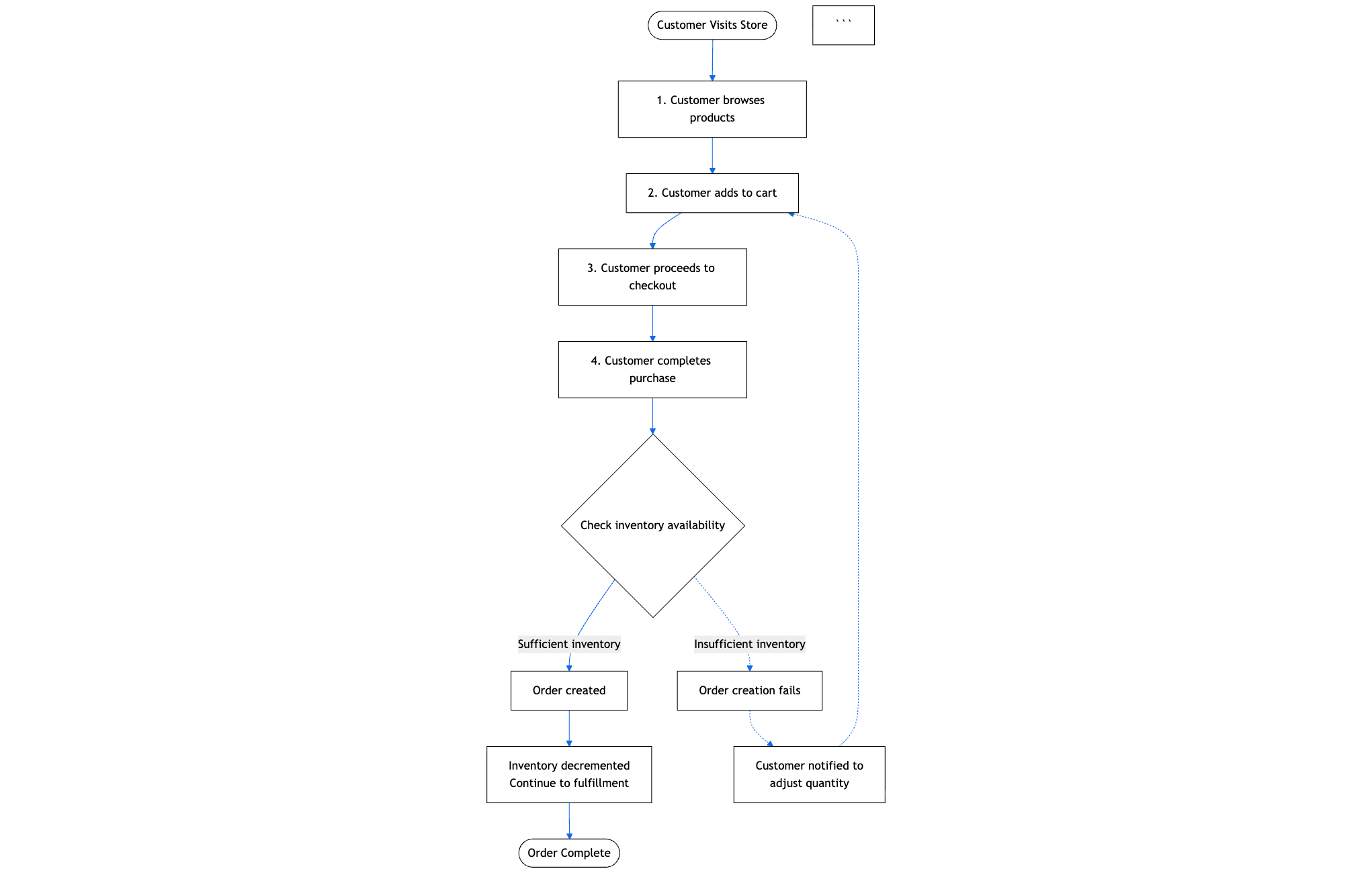
The following steps describe the complete customer purchase flow from product browsing through order completion and inventory deduction, including both the standard Wix checkout approach and custom integration options for multi-location inventory management.
Step 1 | Display products to customers
Retrieve and display products from your catalog with all relevant details, pricing, and variant options.
Actions:
- Call Query Products to filter and paginate through products
- Or call Search Products to search products by keywords
Display product name, description, images, and pricing from the response. Show available variants with their options like size and color. For products with inventory tracking, consider checking availability before displaying.
Result: Products displayed in your custom UI with all relevant information.
Step 2 | Add items to cart
When a customer selects a product variant and quantity, add it to their cart.
Action: Call Add To Current Cart with the catalog item ID and quantity. Include variant ID when the product has variants. The cart is automatically created if it doesn't exist and associated with the current session.
Result: Item added to the customer's cart with the selected configuration.
Step 3 | Choose your checkout approach
When the customer is ready to complete their purchase, determine which checkout approach to use based on your inventory location requirements.
Actions: Choose one of 2 approaches:
- Default location approach: Use Checkout API for simpler implementation where inventory automatically deducts from the default location only. Continue to Step 4.
- Multi-location approach: Use an alternative checkout solution for full control over which location fulfills each order item. Continue to Step 5.
Result: Checkout approach selected based on business requirements.
Step 4 | Default Location Approach with Checkout API
Process the customer's order using the Wix-managed checkout flow for automatic order creation and inventory management.
Actions:
- Call Create Checkout From Current Cart to create a checkout session. The checkout includes pricing calculations, tax, shipping options, and line items.
- Present the checkout details to the customer and collect shipping address, billing information, and payment details.
- Customer completes payment through Wix checkout.
Possible results:
- Sufficient inventory: Wix automatically creates the order upon successful payment. If inventory tracking is enabled, inventory automatically deducts from the default location. If inventory tracking is not enabled, the order is created without inventory deduction.
- Insufficient inventory: If inventory tracking is enabled and available stock is less than requested quantity, the cart automatically adjusts line item quantities to match available inventory. The customer is notified to review and confirm the adjusted quantities before completing payment. If preorder is enabled for the item, customers can purchase up to the preorder limit even when stock is zero.
Step 5 | Multi-Location Approach with Custom Checkout
Implement your own checkout solution to control which location fulfills each order item for multi-location inventory management.
Actions:
- Implement your alternative checkout solution.
- Validate inventory availability at the specified locations before processing payment. Query inventory items to check stock levels.
- Collect shipping address, billing information, and payment details.
- Process payment.
- Call Create Order from the Orders API with all line items and
status: APPROVED. Specifylocationson each line item to control which location fulfills that item. - If inventory tracking is enabled, adjust inventory using one of 2 approaches:
- Order-based: Update the order with
paymentStatus: PAIDandstatus: APPROVEDto trigger automatic inventory deduction from the specified locations. By default, this prevents negative inventory and fails if stock is insufficient. To allow overselling or backorders, setrestrictInventoryValue: falsewhen decrementing inventory. - Manual adjustment: Use Bulk Decrement Inventory Items, Bulk Increment Inventory Items, Bulk Decrement Inventory Items By Variant And Location, or Bulk Increment Inventory Items By Variant And Location for adjustments outside of the order flow, such as returns, corrections, or transfers.
- Order-based: Update the order with
Possible results:
- Sufficient inventory: Order created with custom checkout. If inventory tracking is enabled, inventory adjusts based on your chosen approach. If inventory tracking is not enabled, the order is created without inventory deduction.
- Insufficient inventory: If inventory tracking is enabled and
restrictInventoryValue: true(default), the inventory deduction fails and you must handle the error by notifying the customer and adjusting quantities. If you've setrestrictInventoryValue: false, the order is created and inventory becomes negative, allowing backorders. If preorder is enabled for the item, customers can purchase up to the preorder limit even when stock is zero.
Results
After implementing this flow, customers can browse your product catalog, add items to their cart, and complete purchases with automatic inventory deduction. For custom integrations, you have full control over the checkout experience and can manage multi-location inventory fulfillment based on your business needs.
See also
Last updated: 13 January 2026