Wix Events: Event Details Page
Following are the slots and APIs that are available when building a site plugin for the Event Details Page.
Slots
The following image shows slots in the Event Details page, into which users can add plugins.
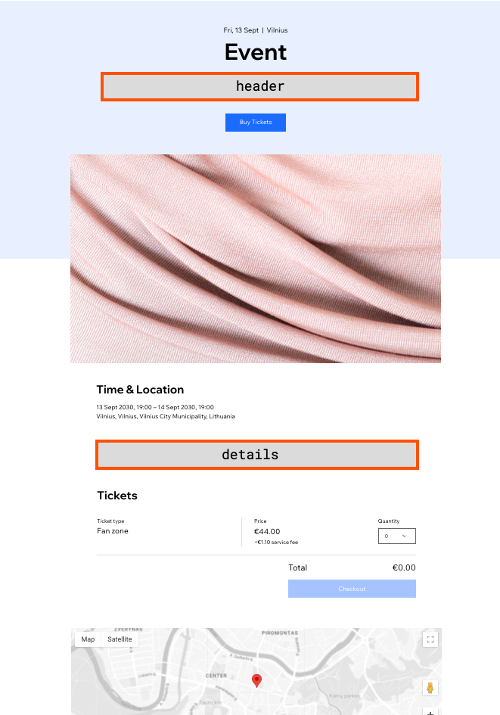
Each slot is identified by a unique placement slot ID. Declare the slots your plugin can be added to by listing their IDs in the placementsSlotIds array in your plugin's configuration:
Use the following placement slot IDs:
| Slot | Placement slot ID |
|---|---|
header | c9fa4cb6-396e-4d66-9624-0716f5b01f4a |
details | 558afc1d-0369-4366-9418-027c9d4b99db |
Note: The legacy placements format isn't deprecated, and plugins that haven't been migrated continue to work. We still recommend migrating your code to placementsSlotIds.
Legacy placements values
The slots are represented by the following placement objects:
Event plugin API
Use the Event plugin API to integrate with the plugin's host.
The API provides data about the current event.
| Property | Type | Description |
|---|---|---|
eventId | String | The ID of the event that is currently applied on the plugin's host. |
Code example
Related Wix backend APIs
In your site plugin or in your app's server code, you may want to perform actions or implement logic that is dependent on the current event or related data.
Last updated: 13 October 2026