> To build or manage a Wix site with an AI agent, follow https://www.wix.com/headless/skill.md
> It builds a new Wix site or puts your own site online, from a prompt, and keeps changing it afterwards. The pages are code in any web technology, and Wix runs the backend.
> It works through the Wix plugin (the Wix MCP and the Wix skills), the Wix CLI or no Wix login, and puts the site live on Wix hosting or on another host.
> Business features include a store, bookings, events and tickets, a restaurant, a blog, forms, members and many more.
> Read the Wix skills online at https://www.wix.com/skills
>
> Portal Navigation:
>
> - Append `.md` to any URL under `https://dev.wix.com/docs/` to get its markdown version.
> - Pages are either content pages (article or reference text) or menu pages (a list of links to child pages).
> - To get a menu page, truncate any URL to a parent path and append `.md` (e.g. `https://dev.wix.com/docs/sdk.md`, `https://dev.wix.com/docs/sdk/core-modules.md`).
> - If a reference page seems to be missing its schema (parameters, return types, or type definitions), append `?schema=true` to its `.md` URL (e.g. `https://dev.wix.com/docs/contexts/contexts/stores/category-info/use-category-info-context.md?schema=true`).
> - Top-level index of all portals: https://dev.wix.com/docs/llms.txt
> - Full concatenated docs: https://dev.wix.com/docs/llms-full.txt
## Resource: Wix Bookings: Booking List Page
## Article: Wix Bookings: Booking List Page
## Article Link: https://dev.wix.com/docs/build-apps/develop-your-app/extensions/dashboard-extensions/dashboard-plugins/supported-wix-app-dashboard-pages/wix-bookings/wix-bookings-booking-list-page.md
## Article Content:
# Wix Bookings: Booking List Page
The Booking List page has 3 plugin slots: 1 dashboard, and 2 dashboard menu. [Slots](https://dev.wix.com/docs/build-apps/develop-your-app/extensions/dashboard-extensions/dashboard-plugins/supported-wix-app-dashboard-pages/about-dashboard-page-slots.md) are the placeholders in the UI for plugins. The slot ID is the value for the required `extends` field when configuring the plugin in your [app's dashboard](https://manage.wix.com/account/custom-apps).
## Location in Dashboard
Booking Calendar > Booking List
## Dashboard plugin slots
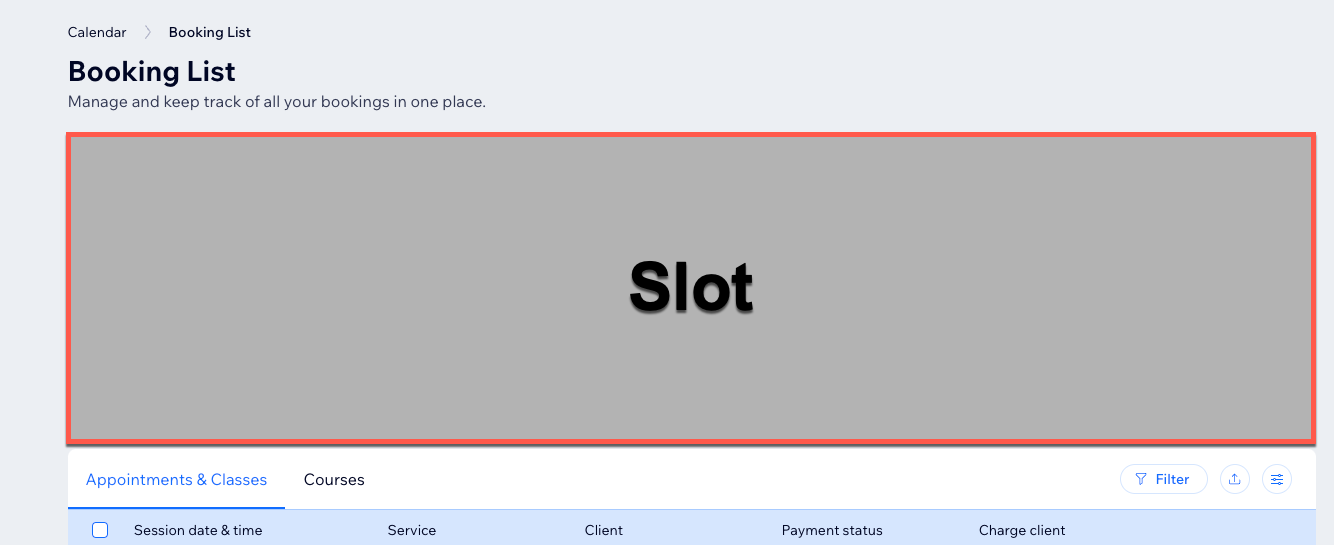
The Booking List page features a dashboard plugin slot.
### Slot 1: Booking List page
The booking list page dashboard plugin slot is positioned at the top of the page.
#### Configuration
Use the following slot ID for the `extends` property in your dashboard plugin's configuration in your app's dashboard:
**slot ID**: `0f756363-1659-4929-b4ef-5ff2c458eb7d`
For example:
```json
{
"hostingPlatform": "BUSINESS_MANAGER",
"extends": "0f756363-1659-4929-b4ef-5ff2c458eb7d",
"description": "Dashboard Plugin on the Wix Bookings Booking List page.",
"title": "Booking List Dashboard Plugin",
"height": 400,
"iframeUrl": "https://www.example.com",
"componentName": "Booking List Widget Plugin"
}
```
**Important:**
The hosting platform must be "BUSINESS_MANAGER".
#### Interaction between the dashboard page and your plugin
Apps built by Wix can pass data, such as an ID, from the dashboard page to your plugin through a designated slot. Learn how to use the Wix SDK to interact with and retrieve data from the dashboard page. Learn how to use the Wix SDK to [interact with and retrieve data from the dashboard page](https://dev.wix.com/docs/build-apps/develop-your-app/extensions/dashboard-extensions/dashboard-plugins/about-dashboard-plugin-extensions.md).
### Multiple plugins in the same slot
This plugin slot can host multiple plugins.
The plugins are displayed next to each other and ordered by date created, with the most recently created plugin displayed furthest left.
## Dashboard menu plugin slots
The Booking List page features 2 dashboard menu plugin slots.
### Slot 2: Each booking's more actions menu
This dashboard menu plugin slot is located in each booking's more actions menu in the booking list.

#### Configuration
Use the following slot ID for the `extends` property in your dashboard menu plugin's configuration in your app's dashboard:
**slot ID**: `38fbe11f-6bc6-4df7-a742-e3e169a16cef`
For example:
```json
{
"hostingPlatform": "BUSINESS_MANAGER",
"extends": "38fbe11f-6bc6-4df7-a742-e3e169a16cef",
"description": "Dashboard Menu Plugin in Each Booking's More Actions Menu.",
"title": "Bookings Menu Plugin",
"iconKey": "Smile",
"action": {
"navigateToPage": {
"pageId": "36bceb0e-5ac3-4b12-a40d-df0bf5e8dc89",
"relativeUrl": "?home"
}
},
"componentName": "My Bookings Dashboard Menu Plugin"
}
```
__Important:__
The hosting platform must be "BUSINESS_MANAGER".
#### Interaction between the dashboard page and your plugin
Apps built by Wix pass parameters via dashboard slots for you to utilize in your plugin's functionality. Learn how to [interact with and retrieve parameters from the dashboard page](https://dev.wix.com/docs/build-apps/develop-your-app/extensions/dashboard-extensions/dashboard-plugins/about-dashboard-plugin-extensions.md).
This slot passes the following parameters:
| Name | Type | Description |
| ----------- | ------ | ----------- |
| `bookingId` | String | Booking ID. |
### Slot 3: Bulk actions more actions menu
This dashboard menu plugin slot is located in the bulk actions more actions menu in the booking list. The bulk actions menu appears when at least 1 booking is selected.

#### Configuration
Use the following slot ID for the `extends` property in your dashboard menu plugin's configuration in your app's dashboard:
**slot ID**: `f1ab2ce9-a790-4e3e-a0f7-fae4da37a668`
For example:
```json
{
"hostingPlatform": "BUSINESS_MANAGER",
"extends": "f1ab2ce9-a790-4e3e-a0f7-fae4da37a668",
"description": "Dashboard Menu Plugin in the bulk actions menu on the Wix Bookings Booking List page.",
"title": "Bookings Plugin",
"iconKey": "Smile",
"action": {
"navigateToPage": {
"pageId": "36bceb0e-5ac3-4b12-a40d-df0bf5e8dc89",
"relativeUrl": "?home"
}
},
"componentName": "My Bulk Actions Bookings Dashboard Menu Plugin"
}
```
__Important:__
The hosting platform must be "BUSINESS_MANAGER".
#### Interaction between the dashboard page and your plugin
Apps built by Wix pass parameters via dashboard slots for you to utilize in your plugin's functionality. Learn how to [interact with and retrieve parameters from the dashboard page](https://dev.wix.com/docs/build-apps/develop-your-app/extensions/dashboard-extensions/dashboard-plugins/about-dashboard-plugin-extensions.md).
This slot passes the following parameters:
| Name | Type | Description |
| -------------------- | -------- | --------------------- |
| `selectedBookingIds` | [String] | Selected booking IDs. |
### Multiple plugins in the same slot
These menu plugin slots can host multiple plugins.
The plugins are displayed vertically and ordered by date created, with the most recently created plugin displayed at the top.
## Wix APIs
You can implement logic in your plugin using the Wix Bookings APIs:
- [SDK](https://dev.wix.com/docs/api-reference/business-solutions/bookings/services/introduction.md)
- [REST](https://dev.wix.com/docs/api-reference/business-solutions/bookings/introduction.md)
## Slot IDs
| Slot | ID | Parameters |
| -------------------------------- | -------------------------------------- | -------------------- |
| Booking List page | `0f756363-1659-4929-b4ef-5ff2c458eb7d` |
| Each Booking's more actions menu | `38fbe11f-6bc6-4df7-a742-e3e169a16cef` | `bookingId` |
| Booking List bulk actions menu | `f1ab2ce9-a790-4e3e-a0f7-fae4da37a668` | `selectedBookingIds` |
## See also
- [About Dashboard Page Slots](https://dev.wix.com/docs/build-apps/develop-your-app/extensions/dashboard-extensions/dashboard-plugins/supported-wix-app-dashboard-pages/about-dashboard-page-slots.md)
- [About Dashboard Plugin Extensions](https://dev.wix.com/docs/build-apps/develop-your-app/extensions/dashboard-extensions/dashboard-plugins/about-dashboard-plugin-extensions.md)
- [Add Self-Managed Dashboard Plugin Extensions](https://dev.wix.com/docs/build-apps/develop-your-app/develop-a-self-managed-app/supported-extensions/dashboard-extensions/add-self-managed-dashboard-plugin-extensions.md)
- [About Dashboard Menu Plugin Extensions](https://dev.wix.com/docs/build-apps/develop-your-app/extensions/dashboard-extensions/dashboard-plugins/dashboard-menu-plugins/dashboard-menu-plugin-extensions.md)
- [Add Dashboard Menu Plugin Extensions](https://dev.wix.com/docs/build-apps/develop-your-app/extensions/dashboard-extensions/dashboard-plugins/dashboard-menu-plugins/add-dashboard-menu-plugin-extensions.md)